Fences 7 Release Feedback

With the Fences 7 release, we are creating this thread so that users can report any observed issues.  

Obtaining the product

Object Desktop members can get the release from within Object Desktop Manager 

Individual purchases (as well as Object Desktop Members) can also be obtained from your account page: https://store.stardock.com/myaccount/products

For guest check-out purchase (no account), from this link: http://www.stardock.com/support/productkeyretrieval

Reporting an issue

Please include the following for anything found:

  • Exact Windows version \ build (winver.exe)

  • Detailed steps to recreate the issue seen

  • Screenshots and videos are very helpful.  Videos can be uploaded to a cloud drive service (GoogleDrive, DropBox, OneDrive, YouTube), with a shared link included in your post.  Images can be copied and pasted directly into a post.

  • If there are specific apps that the app does not work (well) with, please note what apps and their exact versions.  If any app is not common, a link to a trial version would be appreciated.

Thank you for your interest and any time you put into making Fences 7 a better product.

460 views 13 replies | Pinned
Reply #1 Top

Release Date

11/18/2026

Version

UI: 7.0
File Version: 7.0.0.9

Changes

Please see our release announcement.

Privacy 

  • New major feature, Privacy mode – mask icons, titles and other potentially sensitive desktop content until desktop becomes active. 

    • Choose to mask titles, icon images, Fence group titles, or all of the fields. 

    • Reveal with mouse-over gesture, when desktop is active, or neither. 

Look & Feel 

  • Customizable Mica Material 

    • A new blending option for Fence groups to match Windows 11 design language, while giving extra control over personalizing your Fence groups on a per-group basis.  

  • Theme support 

    • Light mode theme that utilizes Micra material to match Windows 11 style 

    • Dark mode theme that utilizes Mica material to match Windows 11 style 

    • Auto mode will dynamically adjust theme and color based on Windows theme. 

  • Corner radius and material strength options 

    • New options to tune corner radius and material strength to best suit your needs. 

  • Hide cloud sync status indicators on desktop icons 

    • Solves a common annoyance for users with OneDrive-synced desktops.  

  • Per-element selection for previous version effects (Tint and Chameleon) 

    • Choose to apply effects from previous versions (Icon Tint and Chameleon) to specific desktop elements, instead of the full desktop. Select between “all icons and groups”, “groups only”, or “ungrouped icons only". 

Desktop power tools 

  • Search in Folder Portals™ 

    • A new search icon in the top right corner of a Folder Portal enables you to turn any Folder Portal into a live search, to find what you need or to provide an always-on live search/filter view. (Requires Windows Search indexing.) 

  • Folder Portal enhancements 

    • New options for Navigate to Root (reset navigation) upon clicking away, “List” menu-style views, ability to hide shortcut / cloud syncing indicators, and other refinements and improvements. 

New interactions 

  • Multi-group moving (layout management) 

    • Lasso to select and move multiple groups simultaneously, to make rearranging your layout faster and easier. 

  • Enhanced “Single Click to Open” 

    • Overcomes the limitations of Windows’ existing built-in “Single Click to Open” setting, by allowing users to turn on for the desktop only, and without the underlining and hand cursor that comes with Windows’ own built-in “Single Click to Open” functionality. 

And more 

  • General 

    • Improvements to underlying customization functionality across various settings to improve consistency and ease of use. 

    • Performance improvements for interaction with Fence groups on the desktop.


Reply #2 Top

Known issues

While we appreciate all feedback, please remember that we offer no official support for beta \ preview \ developer channel versions of Windows. If you report issues while in any of those early release channels, you should not expect them to be addressed unless it still exists in a retail version of Windows.

Reply #3 Top

***Reserved***

Reply #4 Top

Hallo,

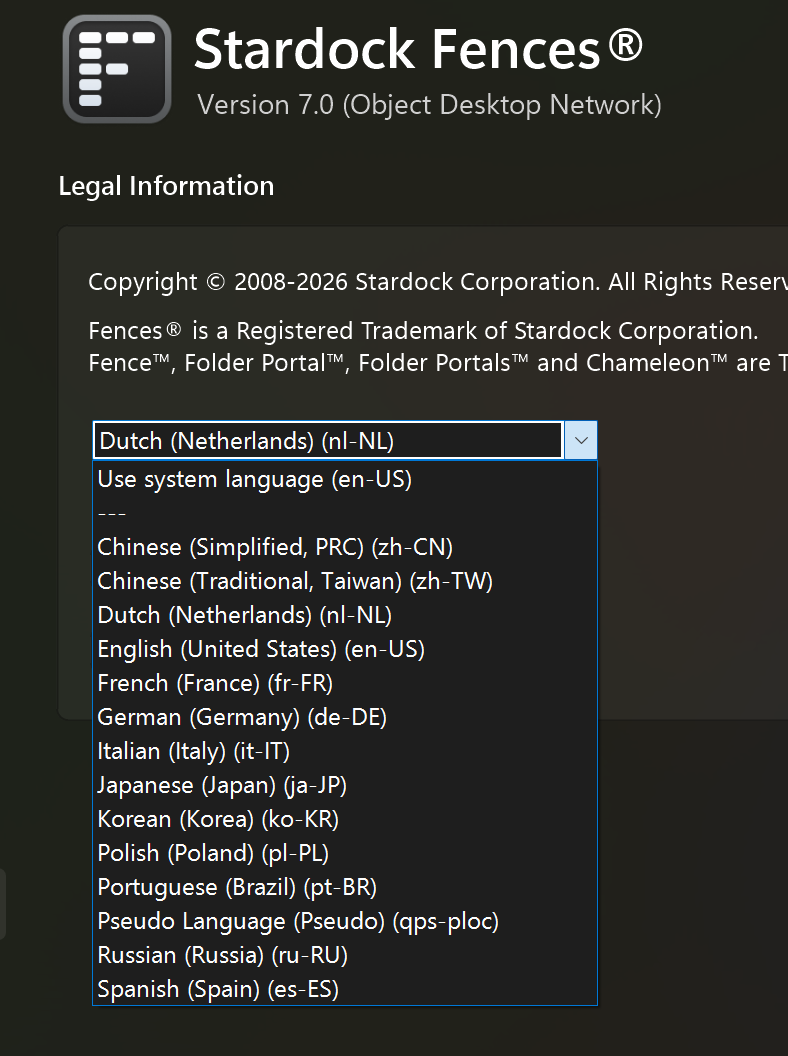
Evenals in BETA 2 van Start11 v3, blijkt dat de Nederlandse vertaling in een enkel geval Engelstalig is in de zojuist gedownloade versie van Fences 7. Ook wordt in een aantal gevallen over iconen of een icoon gesproken, waar in het merendeel van voorkomens dit correct is vertaald in pictogrammen of pictogram.

In tegenstelling tot Start11 v3 waar gebruikt gemaakt wordt van taalbestanden bijv.  nl.lng is dit bij Fences niet het geval.
Op Github zijn wel de .po vertalingen te vinden, maar slechts t/m Fences v5.

Op welke manier is de huidige Nederlandse vertaling tot stand gekomen?

Op het forum van Start11 heb ik verbeter voorstellen gedaan en daarin ontbrekende door mij vertaalde strings aangeboden.

Maar op welke wijze kan een vrijwillige bijdrage voor de Nederlandse vertaling van Fences 7 worden gerealiseerd?

Mvg. J. Kramer

Reply #5 Top
Quoting jkramer, reply 4150564

Dutch Translations

End of jkramer's quote

Appreciate the offer to help, the easiest way would be if create a .txt file with the new transaltion so that it's Current word ->New Word and I can pass this on to the dev team for reveiew.

Reply #6 Top

Allereerst dank voor bovenstaande reactie.

Op Github is een Nederlands taalbestand voor Fences v5 (ca. 3 jaar geleden) te vinden. Daarin ontbreken de
strings die later in de versies 6 en nu 7 zijn gewijzigd of nieuw toegevoegd.

Na installatie van Fences 7 zijn er in de mappenstructuur van het programma geen taalbestanden te vinden, naar ik aanneem
zijn deze in gecompileerde vorm onderdeel van een .exe - of .dll -bestand.

Wat heb ik nodig:

NL-taalbestand Fences v5 aangevuld met de gewijzigde/verwijderde of nieuwe strings van versie 6 en 7,
of het huidige Engelse bron-taalbestand van Fences 7 bewerkbaar bijv. als .txt of .po bestand.

Dit laatste heeft wel als consequentie dat alle Engelstalige string opnieuw moeten worden vertaald en getest,
hetgeen VEEL werk is.

Welk Nederlands taalbestand is gebruikt in Fences 7? Wellicht dat dit bestand beschikbaargesteld kan worden voor aanvullende vertaling,

omdat daarin wellicht nog deels onvertaalde (gewijzigde of nieuwe strings) zijn opgenomen. Met dit bestand als .txt of .po versie zou een complete (Nederlandse) vertaling voor Fences 7 sneller te maken zijn.

Reply #7 Top

Hi J. Kramer,

Thank you for pointing this out.  Our process for updating translations has been revised recently, and work is already being done to update the translations.

While a few areas of the application might appear in English for now, we do expect to have them patched soon.

Best regards,

Adam McGuinness
Stardock Support Specialist

---

Hallo

Bedankt voor de melding. Ons proces voor het bijwerken van vertalingen is onlangs herzien en er wordt al aan gewerkt om de vertalingen te verbeteren.

Hoewel sommige delen van de applicatie momenteel nog in het Engels worden weergegeven, verwachten we dat dit binnenkort verholpen zal zijn.

Met vriendelijke groet.

Reply #8 Top

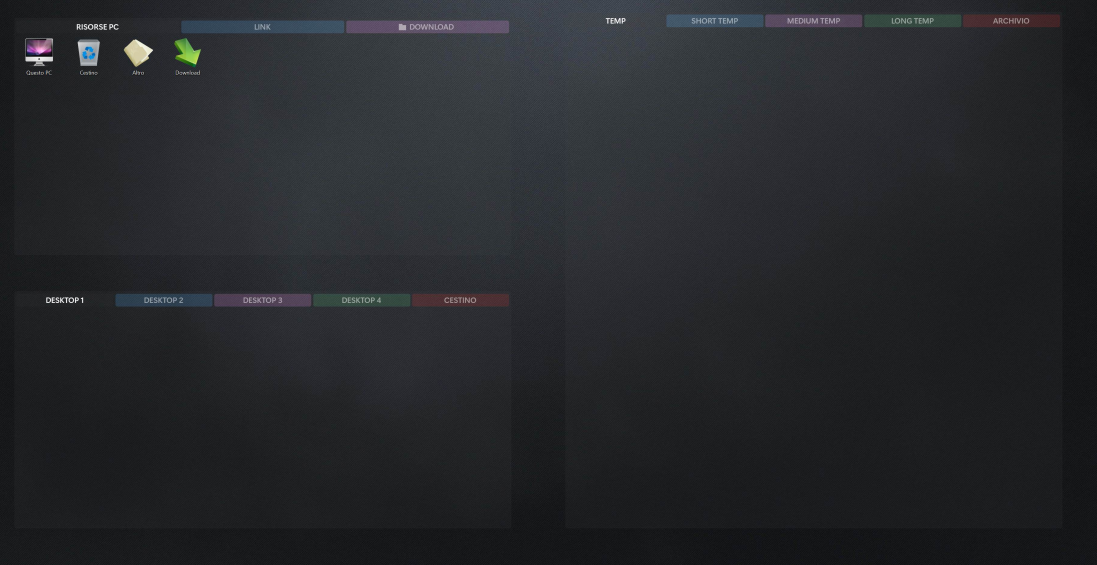
First image from Fence 6

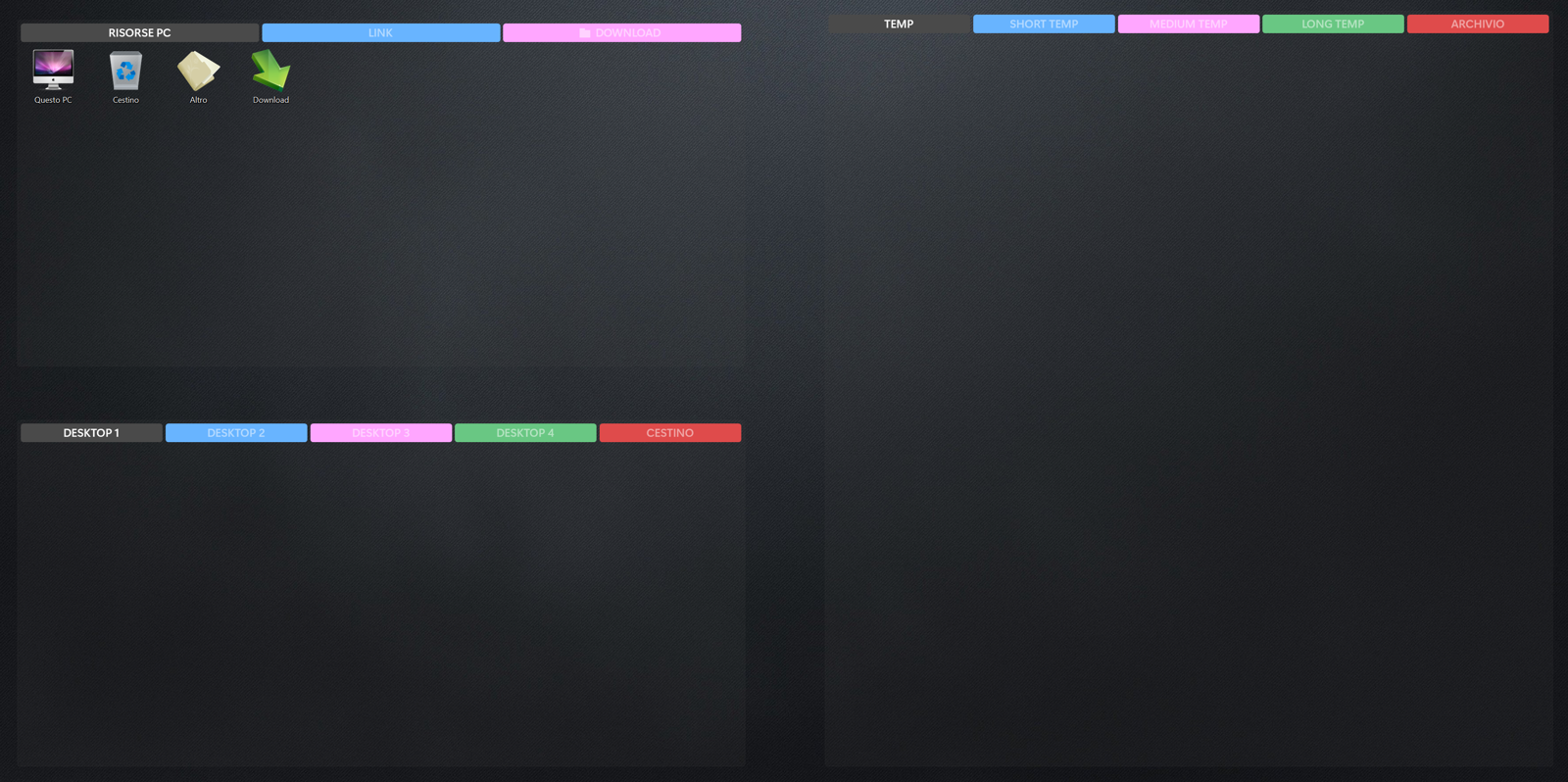
Second image fron Fence 7

I’m having a problem with Fence 7.
I’ve restored the backup from Fence 6, but the colour of the labels is completely different from before.
Can you help me? I’ve disabled the blur effects and the mica effect. The problem only affects labels for tab groups.

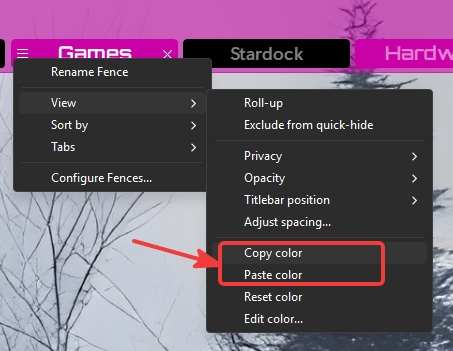
Furthermore, there is no option to copy a fence’s style from one fence to another.

Reply #9 Top
Quoting MarcusXP, reply 4150646

First image from Fence 6

Second image fron Fence 7

I’m having a problem with Fence 7.

I’ve restored the backup from Fence 6, but the colour of the labels is completely different from before.

Can you help me? I’ve disabled the blur effects and the mica effect. The problem only affects labels for tab groups.

Furthermore, there is no option to copy a fence’s style from one fence to another.

End of MarcusXP's quote

Hello,
Sorry to hear you are having issues. There are lots of new option introduced in Fences 7, perhaps, that is causing misalignment with previous  version saved personalization settings. What you can do try out those new setting and try to get back to your old setting manually. As for color there is a copy color and paste color option so you could copy your color over to another Fence.


Thank you,
Basj,
Stardock Community Assistant.

Reply #10 Top

Hi MarcusXP,

Thanks for pointing this out!

Yes, that is definitely misbehaving in that specific usage case of multi-color tabs. It appears to be using the Mica transparency level even when not in Mica. We'll get that fixed up. We're going to do a 7.01 coming up either next week or the start of the following to address any issues we find this week. More soon!

Reply #11 Top

@jkramer, thanks for the note. Dutch is in our list of supported languages with latest phrases, and it should turn on automatically if your system's language is nl-NL. Please let us know if you're having problems and we'd be happy to help. Also if there is problem with poor quality of translations that you're noticing, we're happy to look into it further.

Thanks for the help

Reply #12 Top

Option found. Thank you so much basj !!! ☺️☺️☺️

Regarding update 7.01, thank you so much Dr W - Fences Support!

In the update i suggest to fix a small bug. When restoring a backup, the program recommends backing up the current configuration. However, the message is a mix of Italian, English, and Spanish. I can't send a screenshot because I've marked the message to no longer be displayed, and I don't know how to restore it.

One last question: I purchased a perpetual license for Fence 6 for 5 PCs. I then bought the update to version 7. Before installing version 7, I didn't uninstall Fence 6 or remove the license key. Is this a problem? How can I manage or check which PCs my license is installed on? Thank you very much in advance.

Reply #13 Top

Vreemd hoe de beantwoording op het vertalen door verschillende medewerkers van Stardock wordt beantwoord.

Misschien dat een antwoord op de volgende vraag duidelijkheid biedt:

Op welke wijze worden de vertalingen en dan met name de Nederlandse vertalingen gemaakt en actueel gehouden?

Wordt dit online via een 'lokalisatie website' door vrijwilligers gedaan of zijn er een of meerdere vertalers danwel wordt voor vertalingen

een vertaaltool (Google translate/DeepL o.i.d.) of AI gebruikt?

Belangrijker nog, op welke wijze worden vertalingen in de dialogen (contekst) gecontroleerd en evt. aangepast?

Via ditzelfde forum heb ik t.b.v. Start11 v3 diverse ontbrekende strings aangereikt in de contekst van het programma, maar meer als 'we sturen het naar het supportteam' en er volgt een update krijg ik niet terug.

Op deze wijze steek ik geen tijd meer in mijn hulp, omdat er kennelijk geen behoefte aan bestaat.

Mijn huidige versie van Start11 v3 is mede na correctie van veel strings 100% vertaald.