
Strat11 v2 (2.8) On Restart Custom Start Button Images Is Not Set (have to turn off and on again to make it stick for the session)

I was under the impression the latest version fixed this, but I guess not, or I misread the update notice for 2.8 - but regardless, when you restart or cold boot your PC, upon first login, Start11 itself starts successfully and does everything it is supposed to do - however - the custom start button image I have set doesn't show up.  Its just the default all-blue on that windows comes with.

If I open up Start11 Settings, I hit the slider button to off and then back on, it will update the image and this persists till the next restart.

I have enhanced taskbar turned off - this was not a problem for many editions of both the software and windows, but then I had to turn off enhanced taskbar to make Start11 and Windhawk to play nice together, and then the start button problem started and has stayed since.

For now i will just disable the one Windhawk thing, and turn enhanced taskbar back on and see if that works again.  If I dont come here to edit this part specifically, you can assume turning it back on fixes the issue.  I feel as though a simple start button image change should not require any such enhancement but then, I dont write the software.
322 views 4 replies
Reply #1 Top

You read it right. The 2.8 changelog does carry "Fix for Start button when Enhanced Taskbar is not enabled", so that path was worked on in this release. What you are hitting is a case that survived the fix rather than something nobody looked at.

Worth confirming the build first. 2.8 shipped as UI version 2.8 with file version 2.8.0.2.

On your last point, the start button image is not independent of the taskbar work on Windows 11. Our own compatibility switch treats them as one thing: S11_BLOCKMOSTTASK stops Start11 modifying most taskbar behaviour, and it turns off enhanced taskbar, taskbar colour control and the custom start button together. The image is drawn through the taskbar path either way, so the enhancement setting affecting it is expected rather than odd.

If you do go back to enhanced taskbar on, the more useful test is the other direction: whether the boot-time failure still happens on 2.8.0.2 with enhancement off and the Windhawk mod disabled. That separates the remaining Start11 case from the Windhawk interaction.

Reply #2 Top

Sorry to be even more clear - whatever I was doing many moons ago, a mod from Windhawk that affected task bar grouping didnt play nice with start11 enhanced taskbar on - however, I had stopped using that at some point earlier this summer, so I was already running in a enhanced off and Windhawk off.  Turning enhanced back on makes the image update automatically, turning it back off again means I have to manually switch the it off and back on again in Start11 settings, then it works.


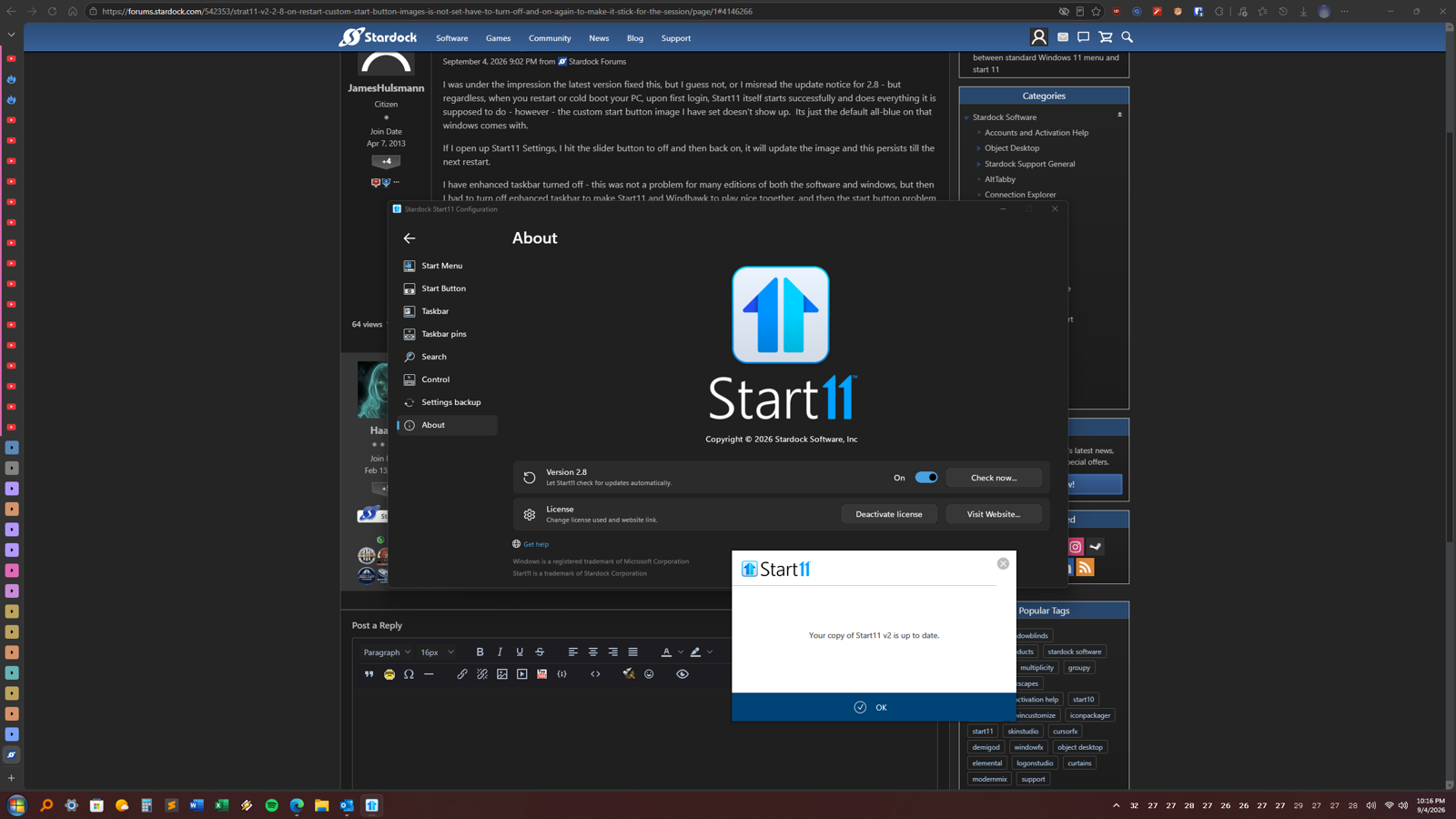
I am using whatever the latest version is (shows 2.8, asking for an update says I need none):

Maybe I need to a fresh install or something - totally purge start11 and then install.  Perhaps something from the previous bugged version is sticking around.

Also, one point - if enhancement is needed or was needed to apply start button images, why does it still work when off so long as I do it myself?  that is - on restart, without enhancement on, it fail to automatically apply the image - but if I quickly go on and turn it off and on (just hit the button on and off) it applies?  I would think if the software could do this from its settings, it can just as easily do it when it starts up.  

Anyway, the update said it would work without enhanced taskbar, but not on my machine - and I am guessing a nuke of Start11v2 will be needed, but perhaps there is something less nuketactic that can be done. 


Reply #3 Top

Your manual toggle working is the useful detail, and it narrows this further than my last reply allowed for. If the image applies correctly with enhancement off once you trigger it, the drawing path is fine and enhancement is not a requirement. What is failing is the apply at startup on that path, which is a smaller and more specific thing.

That also argues against a purge. The image reapplies on demand, so your stored setting is intact, and resetting stored settings is most of what a purge does. You would be spending the reinstall on the part that already works.

Cheaper thing to try first: Start11 has a documented command line, "Start11Config RELOADSETTINGS", added in 2.55 to apply settings changes from a command prompt without restarting Explorer. If it reapplies the button the way the settings toggle does, you could run it from a scheduled task at login and stop clicking. It is documented for registry edits rather than for this case, so treat it as worth ten minutes rather than as a fix.

What you have posted is now a complete reproduction: 2.8.0.2, enhanced taskbar off, the Windhawk mod gone since the summer, fails on every cold boot, reapplies from the settings toggle. That is worth a bug report as it stands.

Reply #4 Top

Firstly - thank you very much for your detailed and ultra timely replies (its Friday night, go home! Or are you in Europe or some place else and its already tomarrow?).

Secondly - For now I will run with enhancement on since clearly it's no longer needs to be off (lol at me for not even realizing that after this past may or June) and that works fine.  

FYI - I am open to beta test any pre-release version that attempts to fix this.


Please, have a happy weekend, also - I will very disappointed in all involved if you respond before Monday 😂