Reply #1 Top

Hello,

Sorry to hear you are having issues. Need to know few things.

  1. Your Windows 11 full version and OS Build number. Please use Winver.exe to get these numbers.
  2. Alt-Tab version number installed.
  3. Is the issue appear on any Steam games or specific one?
  4. Is the games on Fullscreen, Windows Full Screen or Windows mode?

Thank you,

Basj,

Stardock Community  Assistant


Reply #3 Top

I tested this one but, I can't reproduce your issue, Please try, uninstall AltTabby, reboot immediately (important), download latest version available in your account product download page: https://store.stardock.com/myaccount/products. Install it, reboot immediately again. Retest it and report back.

Thank you,

Basj,

Stardock Community  Assistant

Reply #4 Top

Knowing the exact titles would help and also if you are in full screen (windowed) or exclusive fullscreen mode.

Reply #5 Top

OK did that. Same problem.

I am playing EXFIL but it does this on other games.

I am exclusive fullscreen.

I also use Groupy and have Steam in there when I run my game.

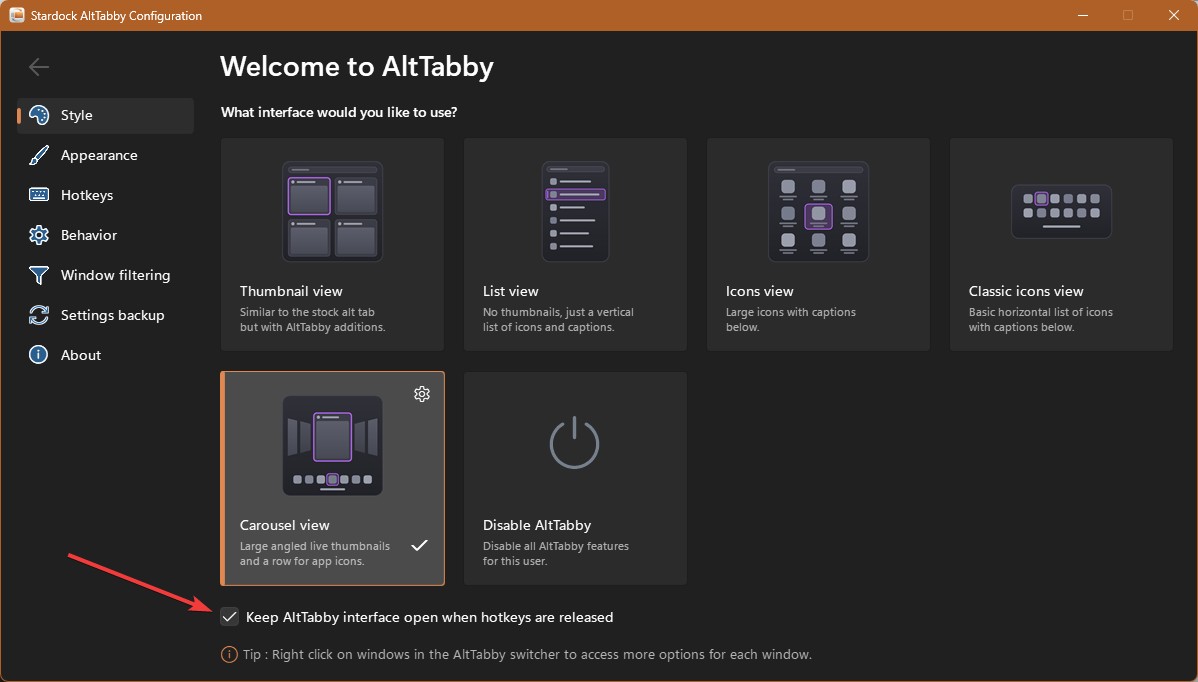
Here is what happens, I have Carousel view active. I ALT/TAB while in game. I don't get the Carousel view, I get some other view. My fingers are still on ALT/TAB. I lift only on TAB finger and hit TAB again, I get Carousel view. I can reproduce this over and over. It is acting just like it did before uninstalling and reinstalling.

Reply #6 Top
Quoting masterblaster73, reply 4146031

My fingers are still on ALT/TAB.

End of masterblaster73's quote

Not sure if you need to do that. Did you turn this option off?

Thank you,

Basj,

Stardock Community  Assistant

Reply #7 Top

I just upgraded to the new update today (ver 8) and changed my settings so I don't need to hold ALT TAB. If I am not in a Steam game, it works as advertised. If I am in a Steam game and I ALT TAB my screen seems to switch to a lower resolution and the ALTTabby screen with my open applications doesn't show at all. If I ALT TAB again, I see the Carousel view of my open applications. So it seems this update didn't help with this nor did the checkbox you recommended. :( 

Reply #8 Top

Hello,

I have forwarded your problem/question to Stardock Support Team for their assistance. Please keep an eye on this thread for any updates. We appreciate your feedback and patience. Thank you.

Basj,

Stardock Community  Assistant

Reply #10 Top

I just updated to Ver ,081.

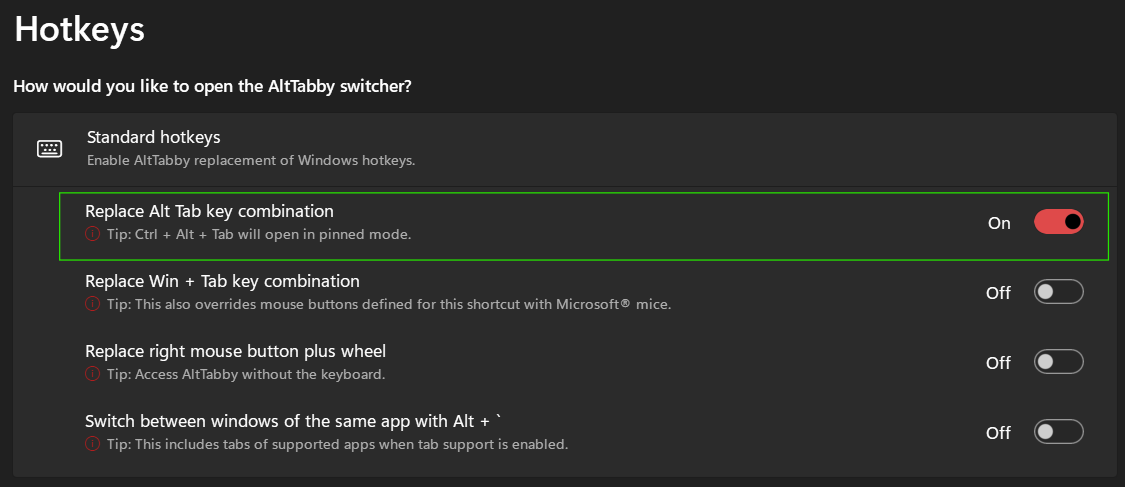
I am using Carousel for appearance. If I have the below highlighted setting enabled, I see the Carousel effect (when not in a game). If I disable this, Carousel does not show (when not in a game). I use ALT/TAB. Is this the correct behavior for this setting?

Reply #11 Top

Yes, that is what that toggle is meant to do. "Replace Alt Tab key combination" is the switch that hands Alt+Tab to AltTabby instead of Windows, so with it off you get the stock Windows switcher and no Carousel, in a game or out of one. Leave it on.

That also lines up with what you are seeing in game. The switcher you get on the first press is the Windows one, so the replacement is not taking hold while the game has focus. Nothing is set wrong on your end.

Your update to 0.81 will not have changed that either. The only item in 0.81 is a fix for multiple pins with different App IDs, the Brave profiles case. The games item, "Fix for AltTabby switcher vanishing when tabbing out of some games", was in 0.8, which is the build you tested on the 3rd.

There is a second report of the same behaviour open at 542293. Another user narrowed it to exclusive fullscreen apps specifically, with windowed ones behaving fine, and Neil said we would investigate. You are exclusive fullscreen on the same Windows build, 26200.9168, so this is likely one fault rather than two.

One thing worth a try in the meantime, from the tip under the setting you highlighted: Ctrl + Alt + Tab opens the switcher in pinned mode. I have not tested whether that gets past the first press problem inside an exclusive fullscreen game, so treat it as an experiment and not a fix.