[IMPORTANT] Software Updates are Stealing Focus

Hello,

just wanted to file a quick bug report about the Stardock software updater or update function in products like Start11 and Fences.

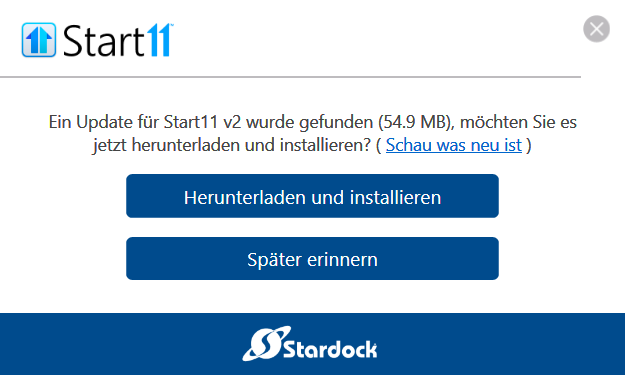
Each time I receive an update notification popup on my desktop, it is stealing the focus and puts it on itself. This goes as far as disruptively minimizing fullscreen applications and games and it even crashed some apps for this reason also.

Please fix this. A notification is fine, but it should never behave this way and only popup in the background and nothing else.

Affected are the latest versions on a Windows 11 Pro 25H2 system:

Start11 = 2.7.4
Fences = 6.5.4

Yet, this issue is standing for some time now and did not occur with the prior installers of older major versions.

Best regards,

Tim

346 views 6 replies
Reply #1 Top

Thanks Tim. A notification pulling itself to the foreground is not how that should behave, and knocking a fullscreen game down with it is a defect rather than something you would fix in settings. The two version numbers and the 25H2 build are the useful part of what you posted.

One thing worth pinning down. There are two separate things that can raise an update prompt for Start11 and Fences: each product's own update check, and Object Desktop Manager if you have that installed. They are not the same code, and a setting in one does not govern the other, so which of them is popping changes where this gets chased. A screenshot of the popup identifies it.

Neil has been treating ODM as a suspect on update-prompt threads this year, including 542233 in August, where a user had updates disabled in Start11 and was still being prompted. If ODM is installed with its betas option on, frequent prompts are expected behaviour rather than a fault.

Both products can have the update check switched off. On the Stardock-direct builds it is a batch file:

Start11: https://cdn.stardock.us/support/uploads/Start11AutoUpdateStop.zip
Fences 3.05 or later: https://cdn.stardock.us/support/uploads/UpgradeCheck.zip

Steam copies do not use those. There the check runs as a scheduled task, so you disable the entries starting with Stardock in Task Scheduler instead.

I would not reach for it in your case. It stops the prompt and it also stops future in-version updates, and you are current on both right now, so you would be trading the popup for missing the fix when it lands.

Reply #2 Top

Hello,

I am at home now, so I can reply and add some details. First, the exact Windows 11 build is: 26200.9278.

I missed to mention that I am using the standalone versions of both the Stadock apps since I strongly dislike subscriptions (best option for me, aside the pricing) – so much, I even forget that Object Desktop is also an option. Yet, they are directly from Stardock, not Steam.

So, they have to be the usual, integrated update functions and the popups I am talking about are the only ones they ever showed (white box with blue buttons; I cannot do a screenshot since there is no new version currently).

I do want notifications and most apps today inform you of updates, but none behave like this aside these two.

A fix would be very appreciated so I do not need to disabled auto-updates and have to check manually.

Reply #3 Top

Just happened again ... -.-

Reply #4 Top

That screenshot settles the open question from earlier in the thread. It is Start11's own update check, not Object Desktop Manager, so the focus grab lives in the product's own updater and ODM can be dropped from the picture.

The prompt you just caught will be today's 2.8 release. Installing it stops the prompting for a while, but it will not change what you reported. The 2.8 changelog is Win11 26H2 taskbar position handling, vertical taskbars on secondary displays, blank Edge icons in Uncombined mode, the start button with Enhanced Taskbar off, and performance work. Nothing in it touches the updater.

The per-product switch off I mentioned before applies cleanly now that we know which component it is, and it only affects Start11. Same trade as before though, you would be checking the About tab yourself for the next build.

Reply #5 Top

As I mentioned before, I never did and never will do use subscriptions (meaning, Object Dock here).

I know about the changes as the updater is showing the changelog at the end of the update process. I am monitoring those for a fix now.

Yet, this should be handled as a serious issue in my opinion. It is pretty poor software design to make popus with focus steal; feels like 1995. This issue exists for several months now already (at least this is the time I am aware of them). Normally, such obvious bugs are fixed immediately so I did wait some time before reporting it in.

Reply #6 Top

The process in question is »SdDisplay« and the path to its executable is:

C:\Program Files (x86)\Stardock\Start11\SdDisplay.exe

This is the program showing these popups. Yet, I think your developers should know this already and be able to differ between a standalone update popup and an Object Desktop one which most likely is something completely different.