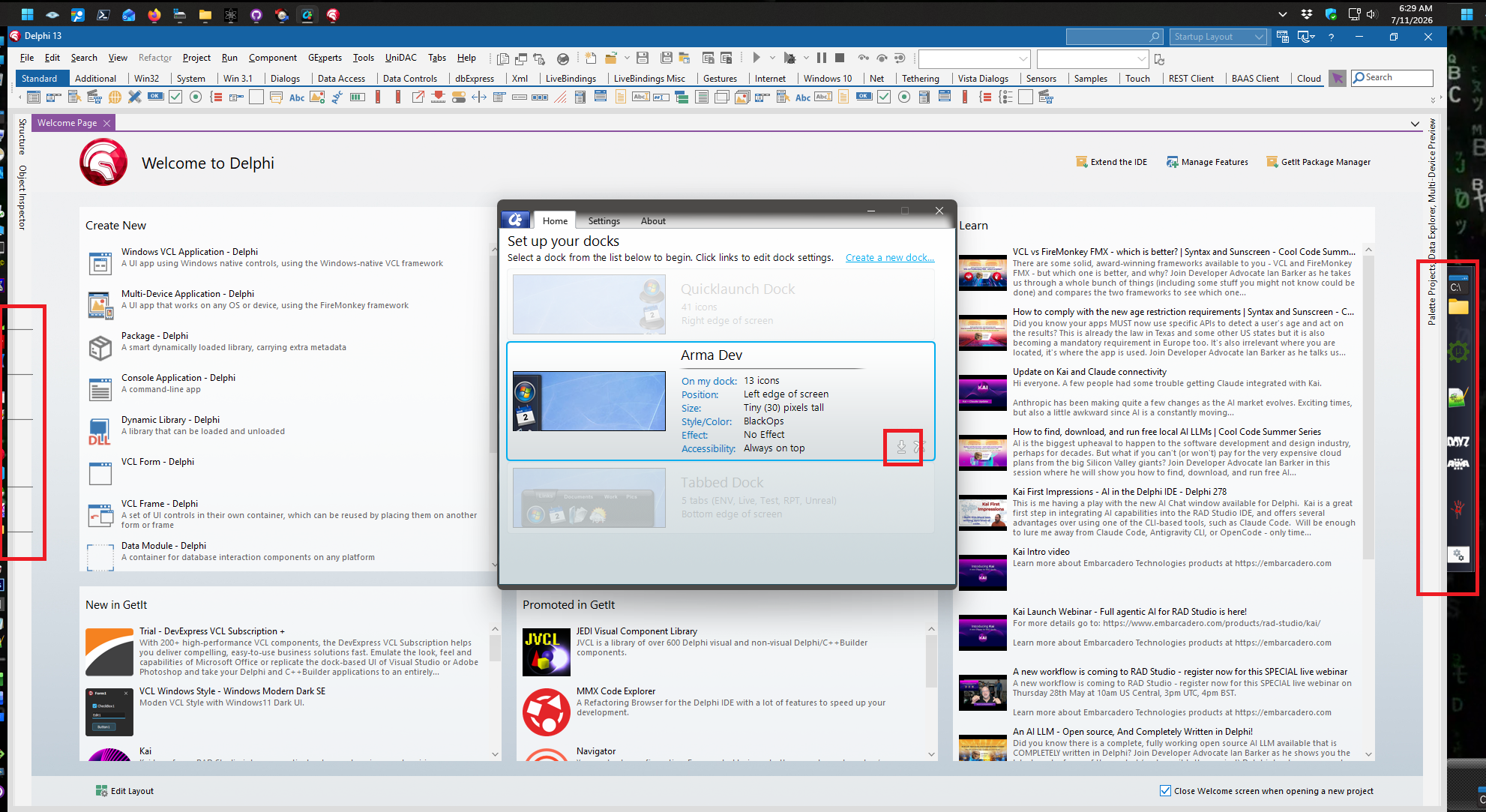
Some one of these docks is a set of icons that are a duplicate of another dock I'm trying to redo at the moment. The duplicated dock (not the tabbed one) is the one showing the artifacts here. Dock 1 (settings 1) is not an issue. Settings 2 is the new dock causing the artifacts, Settings 3 is the dock I'm going to get rid of (copying the shortcuts to Settings 2 and then deleting it)
[Settings]
NumberOfDocks=3
FinishedSaving=1
Version=3

[Settings1]
Title=Quicklaunch Dock
AlternateZoomEffect=0
ZoomEnabled=0
ZoomEnabledOver128=0
ZoomMode=40
enabled=1
sizeNormal=30
sizeZoom=40
IconTransparency=255
ZoomToVisible=1
HideForMaxed=0
DockPosition=3
ZOrder=2
ProportionalStretch=0
UseBlur=0
autohideShowDelay=0
UseMouseActivation=1
colorized=-1
TaskbarPosition=1
TaskbarEnabled=0
SpecialTaskbarEnabled=0
TaskbarMinimizedOnly=0
SystrayEnabled=0
SystrayMode=-1
ForcedEdgeOffset=0
taskbarOffsetLast=0
KeepAboveTaskbar=1
RunningIndicatorOffsetL=0
RunningIndicatorOffsetR=0
RunningIndicatorOffsetT=0
RunningIndicatorOffsetB=0
Autohide=0
ReserveEdge=0
dpiScale=100
LastMonitor=\\.\DISPLAY2
Group1Count=41

[Appearance1]
Background=.\Backgrounds\Tiles\Carbon Disc\config.ini
BackgroundTransparency=0
RunningIndicator=.\Running Indicators\Default.png

[Item(1-1)]
Type=Shortcut
Target=D:\Documents\QuickLaunch\This PC.lnk
RunVisibility=5
UsePopup=0
IconManuallySet=1
TextManuallySet=1
UnpinnedLink=0
Title=This PC
Image=d:\documents\quicklaunch\this pc.lnk

[Item(1-2)]
Type=Shortcut
Target=D:\Documents\QuickLaunch\Network.lnk
RunVisibility=5
UsePopup=0
TextManuallySet=0
UnpinnedLink=0
Title=Network
Image=d:\documents\quicklaunch\network.lnk

[Item(1-3)]
Type=RecycleBin
ImageEmpty=::{645FF040-5081-101B-9F08-00AA002F954E}
ImageFull=::{645FF040-5081-101B-9F08-00AA002F954E}
Title=Trash (Empty)
Image=::{645ff040-5081-101b-9f08-00aa002f954e}

[Item(1-4)]
Type=Separator

[Item(1-5)]
Type=Shortcut
Target=C:\WINDOWS\system32\cmd.exe
StartIn=C:\Users\davalosn
RunVisibility=5
UsePopup=0
IconManuallySet=1
TextManuallySet=1
UnpinnedLink=0
Title=Command Prompt
Image=.\bundled images\applications\command-prompt.png

[Item(1-6)]
Type=Shortcut
Target=%windir%\system32\compmgmt.msc
Args=/s
RunVisibility=5
UsePopup=0
TextManuallySet=1
UnpinnedLink=0
Title=Computer Management
Image=c:\windows\system32\compmgmt.msc

[Item(1-7)]
Type=Shortcut
Target=C:\Windows\system32\taskschd.msc
RunVisibility=5
UsePopup=0
TextManuallySet=1
UnpinnedLink=0
Title=Task Scheduler
Image=c:\windows\system32\taskschd.msc

[Item(1-8)]
Type=Shortcut
Target=C:\Program Files\ProcessExplorer\procexp64.exe
RunVisibility=5
UsePopup=0
TextManuallySet=0
UnpinnedLink=0
Title=Sysinternals Process Explorer
Image=c:\program files\processexplorer\procexp64.exe

[Item(1-9)]
Type=Separator

[Item(1-10)]
Type=Shortcut
Target=C:\WINDOWS\system32\mstsc.exe
RunVisibility=5
UsePopup=0
TextManuallySet=1
UnpinnedLink=0
Title=Remote Desktop
Image=c:\windows\system32\mstsc.exe

[Item(1-11)]
Type=Shortcut
Target=C:\Windows\System32\msra.exe
RunVisibility=5
UsePopup=0
TextManuallySet=0
UnpinnedLink=0
Title=Windows Remote Assistance
Image=c:\windows\system32\msra.exe

[Item(1-12)]
Type=Shortcut
Target=C:\Program Files (x86)\SuperPuTTY\SuperPutty.exe
StartIn=C:\Program Files (x86)\SuperPuTTY\
RunVisibility=5
UsePopup=0
TextManuallySet=0
UnpinnedLink=0
Title=SuperPuTTY
Image=c:\program files (x86)\superputty\superputty.exe

[Item(1-13)]
Type=Shortcut
Target=C:\Program Files\PuTTY\puttygen.exe
RunVisibility=5
UsePopup=0
TextManuallySet=0
UnpinnedLink=0
Title=PuTTY SSH key generation utility
Image=c:\program files\putty\puttygen.exe

[Item(1-14)]
Type=Shortcut
Target=d:\projects\ssh\sshlaunch.exe
RunVisibility=5
UsePopup=0
TextManuallySet=0
UnpinnedLink=0
Title=sshlaunch
Image=d:\projects\ssh\sshlaunch.exe

[Item(1-15)]
Type=Separator

[Item(1-16)]
Type=Shortcut
Target=C:\Program Files (x86)\WinSCP\WinSCP.exe
RunVisibility=5
UsePopup=0
TextManuallySet=0
UnpinnedLink=0
Title=WinSCP: SFTP, FTP, WebDAV, S3 and SCP client
Image=c:\program files (x86)\winscp\winscp.exe

[Item(1-17)]
Type=Shortcut
Target=C:\Program Files\FileZilla FTP Client\filezilla.exe
RunVisibility=5
UsePopup=0
TextManuallySet=0
UnpinnedLink=0
Title=FileZilla FTP Client
Image=c:\program files\filezilla ftp client\filezilla.exe

[Item(1-18)]
Type=Shortcut
Target=C:\Program Files\Wireshark\Wireshark.exe
StartIn=C:\Program Files\Wireshark
RunVisibility=5
UsePopup=0
TextManuallySet=0
UnpinnedLink=0
Title=Wireshark
Image=c:\program files\wireshark\wireshark.exe

[Item(1-19)]
Type=Separator

[Item(1-20)]
Type=Shortcut
Target=C:\Windows\System32\odbcad32.exe
RunVisibility=5
UsePopup=0
TextManuallySet=1
UnpinnedLink=0
Title=ODBC Administrator (64 bit)
Image=c:\windows\system32\odbcad32.exe

[Item(1-21)]
Type=Shortcut
Target=C:\Windows\SysWOW64\odbcad32.exe
RunVisibility=5
UsePopup=0
IconManuallySet=1
TextManuallySet=1
UnpinnedLink=0
Title=ODBC Administrator (32 bit)
Image=c:\windows\syswow64\proquota.exe

[Item(1-22)]
Type=Separator

[Item(1-23)]
Type=Shortcut
Target=C:\Program Files (x86)\Embarcadero\Studio\37.0\bin\bds.exe
StartIn=C:\Program Files (x86)\Embarcadero\Studio\37.0\bin
RunVisibility=5
UsePopup=0
IconManuallySet=1
TextManuallySet=1
UnpinnedLink=0
Title=Delphi 13
Image=c:\program files (x86)\embarcadero\studio\37.0\bin\fdadministrator.exe

[Item(1-24)]
Type=Shortcut
Target=D:\Microsoft VS Code\Code.exe
StartIn="D:\Microsoft VS Code"
RunVisibility=5
UsePopup=0
TextManuallySet=0
UnpinnedLink=0
Title=Visual Studio Code
Image=d:\microsoft vs code\code.exe

[Item(1-25)]
Type=Shortcut
Target=C:\Program Files\HeidiSQL\heidisql.exe
RunVisibility=5
UsePopup=0
TextManuallySet=1
UnpinnedLink=0
Title=HeidiSQL
Image=c:\program files\heidisql\heidisql.exe

[Item(1-26)]
Type=Shortcut
Target=C:\Program Files\winhex\WinHex64.exe
RunVisibility=5
UsePopup=0
TextManuallySet=0
UnpinnedLink=0
Title=WinHex
Image=c:\program files\winhex\winhex64.exe

[Item(1-27)]
Type=Shortcut
Target=D:\Projects
RunVisibility=5
UsePopup=0
TextManuallySet=0
UnpinnedLink=0
Title=Projects
Image=d:\projects

[Item(1-28)]
Type=Separator

[Item(1-29)]
Type=Shortcut
Target=mspaint.exe
RunVisibility=5
UsePopup=0
IconManuallySet=1
TextManuallySet=1
UnpinnedLink=0
Title=MS Paint
Image=c:\users\davalosn\appdata\local\microsoft\windowsapps\mspaint.exe

[Item(1-30)]
Type=Shortcut
Target=C:\Program Files\PhotoshopPortable\PhotoshopCS6Portable.exe
RunVisibility=5
UsePopup=0
TextManuallySet=1
UnpinnedLink=0
Title=Adobe Photoshop CS6
Image=c:\program files\photoshopportable\photoshopcs6portable.exe

[Item(1-31)]
Type=Shortcut
Target=C:\Windows\System32\calc.exe
RunVisibility=5
UsePopup=0
TextManuallySet=0
UnpinnedLink=0
Title=Windows Calculator
Image=c:\windows\system32\calc.exe

[Item(1-32)]
Type=Shortcut
Target=C:\WINDOWS\system32\notepad.exe
RunVisibility=5
UsePopup=0
TextManuallySet=0
UnpinnedLink=0
Title=Notepad
Image=c:\windows\system32\notepad.exe

[Item(1-33)]
Type=Shortcut
Target=C:\Program Files\Notepad++\notepad++.exe
RunVisibility=5
UsePopup=0
TextManuallySet=1
UnpinnedLink=0
Title=Notepad++
Image=c:\program files\notepad++\notepad++.exe

[Item(1-34)]
Type=Separator

[Item(1-35)]
Type=Shortcut
Target=C:\Program Files\Microsoft Office\root\Office16\EXCEL.EXE
RunVisibility=5
UsePopup=0
TextManuallySet=0
UnpinnedLink=0
Title=Excel
Image=c:\program files\microsoft office\root\vfs\windows\installer\{90160000-000f-0000-1000-0000000ff1ce}\xlicons.exe

[Item(1-36)]
Type=Shortcut
Target=C:\Program Files\Microsoft Office\root\Office16\WINWORD.EXE
RunVisibility=5
UsePopup=0
TextManuallySet=0
UnpinnedLink=0
Title=Word
Image=c:\program files\microsoft office\root\vfs\windows\installer\{90160000-000f-0000-1000-0000000ff1ce}\wordicon.exe

[Item(1-37)]
Type=Shortcut
Target=D:\Dropbox
RunVisibility=5
UsePopup=0
TextManuallySet=0
UnpinnedLink=0
Title=Dropbox
Image=d:\dropbox

[Item(1-38)]
Type=Separator

[Item(1-39)]
Type=Shortcut
Target=C:\Program Files\Git\git-cmd.exe
RunVisibility=5
UsePopup=0
IconManuallySet=1
TextManuallySet=1
UnpinnedLink=0
Title=Git CMD
Image=c:\program files\git\git-cmd.exe

[Item(1-40)]
Type=Shortcut
Target=C:\Program Files\Git\git-bash.exe
RunVisibility=5
UsePopup=0
IconManuallySet=1
TextManuallySet=1
UnpinnedLink=0
Title=Git Bash
Image=.\bundled images\misc icons\my computer.png

[Item(1-41)]
Type=Shortcut
Target=C:\Users\Nathan Davalos\AppData\Local\GitHubDesktop\GitHubDesktop.exe
RunVisibility=5
UsePopup=0
TextManuallySet=1
UnpinnedLink=0
Title=GitHub Desktop
Image=c:\users\nathan davalos\appdata\local\githubdesktop\githubdesktop.exe

[Settings2]
Title=Arma Dev
AlternateZoomEffect=0
ZoomEnabled=0
ZoomEnabledOver128=0
ZoomMode=40
enabled=1
sizeNormal=30
sizeZoom=128
IconTransparency=255
ZoomToVisible=1
HideForMaxed=0
DockPosition=2
ZOrder=0
ProportionalStretch=0
UseBlur=0
autohideShowDelay=400
colorized=-1
TaskbarPosition=0
TaskbarEnabled=0
SpecialTaskbarEnabled=0
TaskbarMinimizedOnly=0
SystrayEnabled=0
SystrayMode=-1
ForcedEdgeOffset=0
taskbarOffsetLast=0
KeepAboveTaskbar=1
RunningIndicatorOffsetL=0
RunningIndicatorOffsetR=0
RunningIndicatorOffsetT=0
RunningIndicatorOffsetB=0
Autohide=0
ReserveEdge=0
dpiScale=100
LastMonitor=\\.\DISPLAY3
Group2Count=13

[Appearance2]
Background=.\Backgrounds\Tabs\BlackOps\background-h.ini
BackgroundTransparency=255
RunningIndicator=.\Running Indicators\Default.png

[Item(2-1)]
Type=Shortcut
Target=D:\Projects\DayZ Server Dawn Patrol\a2_dev_environment_launch.bat
StartIn=D:\Projects\DayZ Server Dawn Patrol
RunVisibility=5
UsePopup=0
IconManuallySet=1
TextManuallySet=1
UnpinnedLink=0
Title=Launch Environment
Image=.\bundled images\applications\command-prompt.png

[Item(2-2)]
Type=Shortcut
Target=D:\Projects\DayZ Server Dawn Patrol
StartIn=D:\Projects\DayZ Server Dawn Patrol
RunVisibility=5
UsePopup=0
TextManuallySet=0
UnpinnedLink=0
Title=DayZ Server Dawn Patrol
Image=d:\projects\dayz server dawn patrol

[Item(2-3)]
Type=Separator

[Item(2-4)]
Type=Shortcut
Target=D:\Dropbox\Archives\Programming\Arma\Mikero Tools\DePboTools\bin\Eliteness.exe
StartIn=D:\Projects\DayZ Server Dawn Patrol\Mikero Tools\DePboTools\bin
RunVisibility=5
UsePopup=0
TextManuallySet=0
UnpinnedLink=0
Title=eliteness gui
Image=d:\dropbox\archives\programming\arma\mikero tools\depbotools\bin\eliteness.exe

[Item(2-5)]
Type=Separator

[Item(2-6)]
Type=Shortcut
Target=E:\Steam\steamapps\common\Arma 2 Operation Arrowhead\admin_start.sqf
StartIn=E:\Steam\steamapps\common\Arma 2 Operation Arrowhead
RunVisibility=5
UsePopup=0
IconManuallySet=1
TextManuallySet=1
UnpinnedLink=0
Title=Local Admin Scripts
Image=e:\steam\steamapps\common\arma 2 operation arrowhead\admin_start.sqf

[Item(2-7)]
Type=Separator

[Item(2-8)]
Type=Shortcut
Target=C:\Users\Nathan Davalos\AppData\Local\ArmA 2 OA\ArmA2OA.RPT
StartIn=C:\Users\Nathan Davalos\AppData\Local\ArmA 2 OA
RunVisibility=5
UsePopup=0
IconManuallySet=1
TextManuallySet=1
UnpinnedLink=0
Title=A2 Client RPT
Image=d:\projects\dayz server dawn patrol\origicons\dayz_icon_white.png

[Item(2-9)]
Type=Shortcut
Target=D:\Projects\DayZ Server Dawn Patrol\open_a3_client_rpt.bat
StartIn=D:\Projects\DayZ Server Dawn Patrol
RunVisibility=5
UsePopup=0
IconManuallySet=1
TextManuallySet=1
UnpinnedLink=0
Title=Arma 3 RPT
Image=d:\projects\dayz server dawn patrol\origicons\a3_icon_white.png

[Item(2-10)]
Type=Separator

[Item(2-11)]
Type=Shortcut
Target=D:\DayZServer
StartIn=D:\DayZServer
RunVisibility=5
UsePopup=0
IconManuallySet=1
TextManuallySet=0
UnpinnedLink=0
Title=DayZServer
Image=d:\projects\dayz server dawn patrol\origicons\zombie_hand_icon.png

[Item(2-12)]
Type=Separator

[Item(2-13)]
Type=Shortcut
Target=E:\Steam\steamapps\common\Arma 2 Operation Arrowhead\dayz_launch.bat
StartIn=E:\Steam\steamapps\common\Arma 2 Operation Arrowhead
RunVisibility=5
UsePopup=0
TextManuallySet=0
UnpinnedLink=0
Title=dayz_launch.bat
Image=e:\steam\steamapps\common\arma 2 operation arrowhead\dayz_launch.bat

[Settings3]
Group3TabCount=5
enabled=1
position.x=-50
position.y=908
gridwidth=11
gridheight=1
dockEdge=3
dpiScale=100
webdock=0
tabsOn=1
tabsNamesOn=1
tabsEdge=1
tabsAlign=0
showLabels=0
showLabels2=1
blurEnabled=0
reflectionEnabled=0
reflectionAmount=50
reflectionBaseVisibility=50
draggingLocked=1
positionLocked=0
showStatusBar=0
iconSize=32
tabSizeRatio=100
drawerOpenDelay=500
drawerOpenAnimationSpeed=20
lastSelected=0
reserveEdge=0
ontop=0
ontopTabs=0
ontopStyle=1
ontopStyleTabs=0
activationdelay=150
autoSwitch=0
TabFont=Arial
TabFontSize=12
TabFontBold=1
TabFontItalics=0
LastMonitor=\\.\DISPLAY3
activationSetNew=0000000000000000000000

[Settings3-Tab1]
Group1EntryCount=10
cref=15761536
Name=ENV
Style=c:\program files (x86)\stardock\objectdock\backgrounds\tabs\carbon tabs\background.ini
dontColor=0

[Entry(3-1-1)]
Type=Separator

[Entry(3-1-2)]
Type=Shortcut
Target=D:\Projects\DayZ Server Dawn Patrol\a2_dev_environment_launch.bat
StartIn=D:\Projects\DayZ Server Dawn Patrol
RunVisibility=5
UsePopup=0
IconManuallySet=1
TextManuallySet=1
UnpinnedLink=0
Title=Launch Environment
Image=.\bundled images\applications\command-prompt.png

[Entry(3-1-3)]
Type=Shortcut
Target=D:\Projects\DayZ Server Dawn Patrol
StartIn=D:\Projects\DayZ Server Dawn Patrol
RunVisibility=5
UsePopup=0
TextManuallySet=1
UnpinnedLink=0
Title=Repo
Image=d:\projects\dayz server dawn patrol

[Entry(3-1-4)]
Type=Shortcut
Target=D:\Dropbox\Archives\Programming\Arma\Mikero Tools\DePboTools\bin\Eliteness.exe
StartIn=D:\Projects\DayZ Server Dawn Patrol\Mikero Tools\DePboTools\bin
RunVisibility=5
UsePopup=0
TextManuallySet=1
UnpinnedLink=0
Title=Eliteness GUI
Image=d:\dropbox\archives\programming\arma\mikero tools\depbotools\bin\eliteness.exe

[Entry(3-1-5)]
Type=Shortcut
Target=E:\Steam\steamapps\common\Arma 2 Operation Arrowhead\admin_start.sqf
StartIn=E:\Steam\steamapps\common\Arma 2 Operation Arrowhead
RunVisibility=5
UsePopup=0
IconManuallySet=1
TextManuallySet=1
UnpinnedLink=0
Title=Local Admin Scripts
Image=e:\steam\steamapps\common\arma 2 operation arrowhead\admin_start.sqf

[Entry(3-1-6)]
Type=Shortcut
Target=C:\Users\Nathan Davalos\AppData\Local\ArmA 2 OA\ArmA2OA.RPT
StartIn=C:\Users\Nathan Davalos\AppData\Local\ArmA 2 OA
RunVisibility=5
UsePopup=0
TextManuallySet=1
UnpinnedLink=0
Title=A2 Client RPT
Image=c:\users\nathan davalos\appdata\local\arma 2 oa\arma2oa.rpt

[Entry(3-1-7)]
Type=Shortcut
Target=D:\Projects\DayZ Server Dawn Patrol\open_a3_client_rpt.bat
StartIn=D:\Projects\DayZ Server Dawn Patrol
RunVisibility=5
UsePopup=0
IconManuallySet=1
TextManuallySet=0
UnpinnedLink=0
Title=open_a3_client_rpt.bat
Image=d:\projects\dayz server dawn patrol\open_a3_client_rpt.bat

[Entry(3-1-8)]
Type=Shortcut
Target=D:\DayZServer
StartIn=D:\DayZServer
RunVisibility=5
UsePopup=0
TextManuallySet=1
UnpinnedLink=0
Title=DayZServer Folder
Image=d:\dayzserver

[Entry(3-1-9)]
Type=Shortcut
Target=E:\Steam\steamapps\common\Arma 2 Operation Arrowhead\dayz_launch.bat
StartIn=E:\Steam\steamapps\common\Arma 2 Operation Arrowhead
RunVisibility=5
UsePopup=0
TextManuallySet=1
UnpinnedLink=0
Title=Launch Client
Image=e:\steam\steamapps\common\arma 2 operation arrowhead\dayz_launch.bat

[Entry(3-1-10)]
Type=Shortcut
Target=https://community.bistudio.com/wiki/
RunVisibility=5
UsePopup=0
IconManuallySet=1
TextManuallySet=0
UnpinnedLink=0
Title=https://community.bistudio
Image=.\bundled images\applications\firefox.png

[Settings3-Tab2]
Group2EntryCount=6
cref=14869070
Name=Live
Style=c:\program files (x86)\stardock\objectdock\backgrounds\tabs\carbon tabs\background.ini
dontColor=0

[Entry(3-2-1)]
Type=Shortcut
Target=D:\Projects\DayZ Server Dawn Patrol\Live Chernarus\compile.bat
StartIn=D:\Projects\DayZ Server Dawn Patrol\Live Chernarus
RunVisibility=5
UsePopup=0
TextManuallySet=1
UnpinnedLink=0
Title=Chernarus
Image=d:\projects\dayz server dawn patrol\live chernarus\compile.bat

[Entry(3-2-2)]
Type=Shortcut
Target=D:\Projects\DayZ Server Dawn Patrol\Live Namalsk\compile.bat
StartIn=D:\Projects\DayZ Server Dawn Patrol\Live Namalsk
RunVisibility=5
UsePopup=0
TextManuallySet=1
UnpinnedLink=0
Title=Namalsk
Image=d:\projects\dayz server dawn patrol\live namalsk\compile.bat

[Entry(3-2-3)]
Type=Shortcut
Target=D:\Projects\DayZ Server Dawn Patrol\Live Napf\compile.bat
StartIn=D:\Projects\DayZ Server Dawn Patrol\Live Napf
RunVisibility=5
UsePopup=0
TextManuallySet=1
UnpinnedLink=0
Title=Napf
Image=d:\projects\dayz server dawn patrol\live napf\compile.bat

[Entry(3-2-4)]
Type=Shortcut
Target=D:\Projects\DayZ Server Dawn Patrol\Live Sauerland\compile.bat
StartIn=D:\Projects\DayZ Server Dawn Patrol\Live Sauerland
RunVisibility=5
UsePopup=0
TextManuallySet=1
UnpinnedLink=0
Title=Sauerland
Image=d:\projects\dayz server dawn patrol\live sauerland\compile.bat

[Entry(3-2-5)]
Type=Shortcut
Target=D:\Projects\DayZ Server Dawn Patrol\Live Taviana\compile.bat
StartIn=D:\Projects\DayZ Server Dawn Patrol\Live Taviana
RunVisibility=5
UsePopup=0
TextManuallySet=1
UnpinnedLink=0
Title=Taviana
Image=d:\projects\dayz server dawn patrol\live taviana\compile.bat

[Entry(3-2-6)]
Type=Shortcut
Target=D:\Projects\DayZ Server Dawn Patrol\Live Exile Tanoa\compile.bat
StartIn=D:\Projects\DayZ Server Dawn Patrol\Live Exile Tanoa\
RunVisibility=5
UsePopup=0
TextManuallySet=1
UnpinnedLink=0
Title=Exile Tanoa
Image=d:\projects\dayz server dawn patrol\live exile tanoa\compile.bat

[Settings3-Tab3]
Group3EntryCount=6
cref=11129150
Name=Test
Style=c:\program files (x86)\stardock\objectdock\backgrounds\tabs\carbon tabs\background.ini
dontColor=0

[Entry(3-3-1)]
Type=Shortcut
Target=D:\Projects\DayZ Server Dawn Patrol\Test Server Chernarus\compile.bat
StartIn=D:\Projects\DayZ Server Dawn Patrol\Test Server Chernarus
RunVisibility=5
UsePopup=0
TextManuallySet=1
UnpinnedLink=0
Title=Chernarus
Image=d:\projects\dayz server dawn patrol\test server chernarus\compile.bat

[Entry(3-3-2)]
Type=Shortcut
Target=D:\Projects\DayZ Server Dawn Patrol\Test Server Namalsk\compile.bat
StartIn=D:\Projects\DayZ Server Dawn Patrol\Test Server Namalsk
RunVisibility=5
UsePopup=0
TextManuallySet=1
UnpinnedLink=0
Title=Namalsk
Image=d:\projects\dayz server dawn patrol\test server namalsk\compile.bat

[Entry(3-3-3)]
Type=Shortcut
Target=D:\Projects\DayZ Server Dawn Patrol\Test Server Napf\compile.bat
StartIn=D:\Projects\DayZ Server Dawn Patrol\Test Server Napf
RunVisibility=5
UsePopup=0
TextManuallySet=1
UnpinnedLink=0
Title=Napf
Image=d:\projects\dayz server dawn patrol\test server napf\compile.bat

[Entry(3-3-4)]
Type=Shortcut
Target=D:\Projects\DayZ Server Dawn Patrol\Test Server Sauerland\compile.bat
StartIn=D:\Projects\DayZ Server Dawn Patrol\Test Server Sauerland
RunVisibility=5
UsePopup=0
TextManuallySet=1
UnpinnedLink=0
Title=Sauerland
Image=d:\projects\dayz server dawn patrol\test server sauerland\compile.bat

[Entry(3-3-5)]
Type=Shortcut
Target=D:\Projects\DayZ Server Dawn Patrol\Test Server Taviana\compile.bat
StartIn=D:\Projects\DayZ Server Dawn Patrol\Test Server Taviana
RunVisibility=5
UsePopup=0
TextManuallySet=1
UnpinnedLink=0
Title=Taviana
Image=d:\projects\dayz server dawn patrol\test server taviana\compile.bat

[Entry(3-3-6)]
Type=Shortcut
Target=D:\Projects\DayZ Server Dawn Patrol\Test Server\compile.bat
StartIn=D:\Projects\DayZ Server Dawn Patrol\Test Server
RunVisibility=5
UsePopup=0
TextManuallySet=1
UnpinnedLink=0
Title=Test
Image=d:\projects\dayz server dawn patrol\test server\compile.bat

[Settings3-Tab4]
Group4EntryCount=7
cref=5351167
Name=RPT
Style=c:\program files (x86)\stardock\objectdock\backgrounds\tabs\carbon tabs\background.ini
dontColor=0

[Entry(3-4-1)]
Type=Shortcut
Target=D:\DayZServer\instance_server_chernarus\arma2oaservertest.RPT
StartIn=D:\DayZServer\instance_server_chernarus\
RunVisibility=5
UsePopup=0
TextManuallySet=1
UnpinnedLink=0
Title=Test Chernarus
Image=d:\dayzserver\instance_server_chernarus\arma2oaservertest.rpt

[Entry(3-4-2)]
Type=Shortcut
Target=D:\DayZServer\instance_server_napf\arma2oaservertest.RPT
StartIn=D:\DayZServer\instance_server_napf
RunVisibility=5
UsePopup=0
TextManuallySet=1
UnpinnedLink=0
Title=Test Napf
Image=d:\dayzserver\instance_server_napf\arma2oaservertest.rpt

[Entry(3-4-3)]
Type=Shortcut
Target=D:\DayZServer\instance_server_sauerland\arma2oaservertest.RPT
StartIn=D:\DayZServer\instance_server_sauerland
RunVisibility=5
UsePopup=0
TextManuallySet=1
UnpinnedLink=0
Title=Test Sauerland
Image=d:\dayzserver\instance_server_sauerland\arma2oaservertest.rpt

[Entry(3-4-4)]
Type=Shortcut
Target=D:\DayZServer\instance_server_namalsk\ArmA2OAServertest.RPT
StartIn=D:\DayZServer\instance_server_namalsk
RunVisibility=5
UsePopup=0
TextManuallySet=1
UnpinnedLink=0
Title=Test Namalsk
Image=d:\dayzserver\instance_server_namalsk\arma2oaservertest.rpt

[Entry(3-4-5)]
Type=Shortcut
Target=D:\DayZServer\instance_server_taviana\arma2oaservertest.RPT
StartIn=D:\DayZServer\instance_server_taviana
RunVisibility=5
UsePopup=0
TextManuallySet=1
UnpinnedLink=0
Title=Test Taviana
Image=d:\dayzserver\instance_server_taviana\arma2oaservertest.rpt

[Entry(3-4-6)]
Type=Shortcut
Target=D:\DayZServer\instance_server_test\arma2oaservertest.RPT
StartIn=D:\DayZServer\instance_server_test
RunVisibility=5
UsePopup=0
TextManuallySet=1
UnpinnedLink=0
Title=A2 Test
Image=d:\dayzserver\instance_server_test\arma2oaservertest.rpt

[Entry(3-4-7)]
Type=Shortcut
Target=D:\Projects\DayZ Server Dawn Patrol\open_a3_server_tanoa.bat
StartIn=D:\Projects\DayZ Server Dawn Patrol
RunVisibility=5
UsePopup=0
TextManuallySet=1
UnpinnedLink=0
Title=Test Tanoa
Image=d:\projects\dayz server dawn patrol\open_a3_server_tanoa.bat

[Settings3-Tab5]
Group5EntryCount=3
cref=5351167
Name=Unreal
Style=c:\program files (x86)\stardock\objectdock\backgrounds\tabs\carbon tabs\background.ini
dontColor=0

[Entry(3-5-1)]
Type=Shortcut
Target=E:\Epic Games\UE_5.7\Engine\Binaries\Win64\UnrealEditor.exe
StartIn="E:\Epic Games\UE_5.7"
RunVisibility=5
UsePopup=0
TextManuallySet=1
UnpinnedLink=0
Title=Unreal Engine
Image=e:\epic games\ue_5.7\engine\binaries\win64\unrealeditor.exe

[Entry(3-5-2)]
Type=Shortcut
Target=C:\Program Files\Microsoft Visual Studio\18\Community\Common7\IDE\devenv.exe
StartIn="C:\Program Files\Microsoft Visual Studio\18\Community\Common7\IDE\"
RunVisibility=5
UsePopup=0
TextManuallySet=1
UnpinnedLink=0
Title=Visual Studio
Image=c:\program files\microsoft visual studio\18\community\common7\ide\devenv.exe

[Entry(3-5-3)]
Type=Shortcut
Target=D:\Projects\Unreal
StartIn=D:\Projects\Unreal
RunVisibility=5
UsePopup=0
IconManuallySet=1
TextManuallySet=0
UnpinnedLink=0
Title=Unreal
Image=.\bundled images\applications\explorer.png


 Stardock Forums