Dock Not Staying Where I Put it

I noticed a week ago, one of my ObjectDocks was moved. I assumed that I inadvertently or accidentally dragged it to that spot. I moved it back, and this morning when I booted up it was back in the left top corner. I went to drag it and it would not move. I have no clue why this is happening or how to fix it, and I really don't want to uninstall it and start over. Can someone help? 

1,887 views 16 replies
Reply #1 Top

Hello,

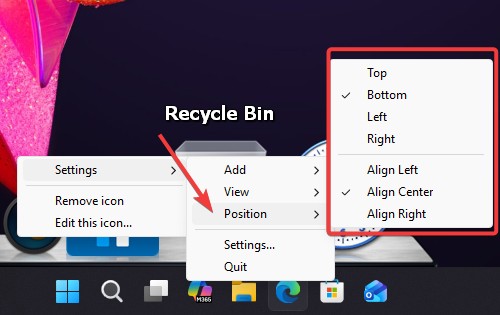
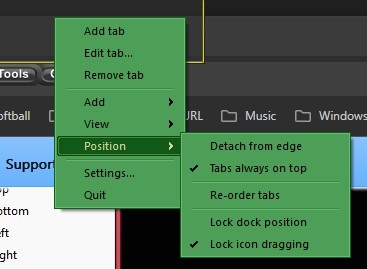
Sorry to hear you are having issues. Have you tried this setting? Right click on any empty area on your dock.


Thank you,

Basj,

Stardock Community  Assistant.

Reply #2 Top

I do not have the pop up menus on my version which says it is 3.01 - says that it is up to date. I did figure out how to get it dragged again, However, locking the dock position does not work. Upon reboot, the dock slides over to the top left. It is quite annoying to have to move it out of my way. Why did this suddenly change as it always stayed where I placed it after reboot until recently. I do not even think I updated the OD app. 

Reply #3 Top

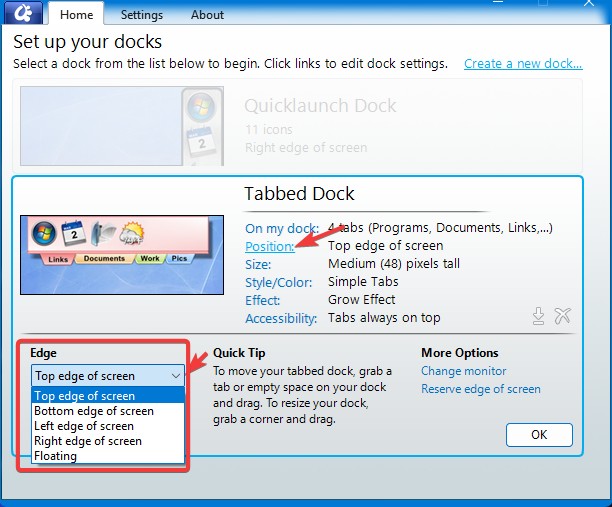
For tabbed Dock the position setting is on the ObjectDock Configuration Windows. Refer my screenshot below.

Also, have you tried "Lock dock position" after you have set your dock position?

Thank you,

Basj,

Stardock Community  Assistant


Reply #4 Top

Yes, I know all of this. It IS set for top edge of screen. And after I position it on the top where I want it, I click the Lock Dock Position.

I reboot and the damn thing is on the top edge but all the way to the left. Every time since this started happening.

Reply #5 Top

Need to know your monitor/s setups. Single or multiple monitors setup? Need to know resolutions and connection type, where these moved dock located, which monitor, if you have more than one monitors etc.

Thank you,

Basj,

Stardock Community  Assistant

Reply #6 Top

Dual monitors: 

Main 1920 x 1080     -    DisplayPort

Second 1680 x 1050   -   DVI

Dock is located on Main Display

Reply #7 Top

Just as a test, disable object dock from auto start on reboot. Reboot your system, and reboot process all done. Start ObjectDock, does the dock still relocate itself to the top left edge?

To disable Object to start on Boot: ->Open up Task manager->Startup apps tab->Look for "Stardock ObjectDock" right click on it, select disable. Reboot.

Try it and report back.

Thank you,

Basj,

Stardock Community  Assistant

Reply #8 Top

Ok, I did what you asked. After reboot I started OD and it was right where I placed it, i.e., no issue with the placement.

I am going to turn the Startup back on, reboot and see what happens next.

Reply #9 Top

FYI, after 2 reboots, the dock has stayed where I put it. So - not sure why - but at this point it appears to be "fixed."

Reply #10 Top

Unfortunately, this morning on reboot, the tabbed dock moved back to the left upper corner again. So NOT fixed...

Reply #11 Top

Would like to suggest adding a delay startup option for ObjectDock. This way, ObjectDock can launch a bit later after Windows finishes loading, which helps avoid conflicts during boot.

First, please disable ObjectDock from starting in Task Manager.

Than, you can set up a delayed start manually using Task Scheduler:

  1. Open Task Scheduler (Win + S → type Task Scheduler).

  2. Create a new task → name it ObjectDock Delayed Startup.

  3. Under Triggers, set it to run At log on and choose Delay task for (e.g., 30 seconds).

  4. Under Actions, set it to Start a program and point to "C:\Program Files (x86)\Stardock\ObjectDock\ObjectDock.exe"

  5. Save the task.

Now ObjectDock will start automatically after the delay you set. Reboot and retest your issue.

Thank you, Basj, Stardock Community Assistant

Reply #12 Top

I used Autorun Organizer and set it for 30 second delay. First boot ok. Want to see how it goes over the next few days.

Reply #13 Top

Nope - still not staying where I put it. Does not make sense.

Reply #14 Top

Hello,

I have forwarded your problem/question to Stardock Support Team for their assistance. Please keep an eye on this thread for any updates. We appreciate your feedback and patience. Thank you.

Basj,

Stardock Community  Assistant

Reply #15 Top

Hi Sunwheel9 and thank you for posting.

Quoting Sunwheel9, reply 3995442

Ok, I did what you asked. After reboot I started OD and it was right where I placed it, i.e., no issue with the placement.

I am going to turn the Startup back on, reboot and see what happens next.

End of Sunwheel9's quote

What is interesting here is that it doesn't happen every time- particularly, it seemed to be resolved when you had it disabled from auto-start.  

Quoting Sunwheel9, reply 3995501

I used Autorun Organizer and set it for 30 second delay. First boot ok. Want to see how it goes over the next few days.

End of Sunwheel9's quote

I wonder if you were to set for a more robust/longer delay.  You might also want to make sure you've disabled it from Task Manager and perhaps try delaying it the way Basj suggested in Reply # 11.   

Please let us know if any configuration of this results in reliable placement for you.  

Best regards,

Adam McGuinness
Stardock Support Specialist

Reply #16 Top

I will keep this in mind if it starts acting up again. Since I posted last reply, it has stayed where I placed it - for the last 3 days. I am leaving well enough alone for now.