Start11 v2 - Wish - Taskbar Pins

Can we get an option to change the folder image when using Taskbar pins

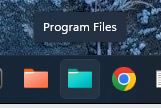
Currently, the image seems to be a standard folder icon, which then causes confusion between the pinned folder(s) and a pinned Explorer


In this image, which are pinned Folders and which is a pinned Explorer?

 

Regards 

Matt
662 views 2 replies
Reply #1 Top

Hello,
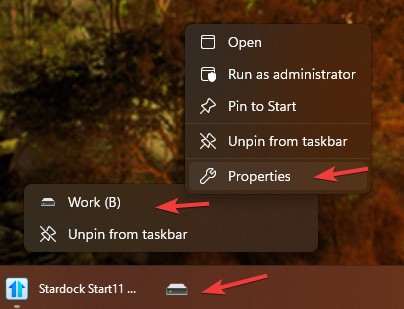
Sorry to hear you are having issues. The newly pinned folder usually is the right most taskbar button. And you can customize that folder icons. to something like my screenshot below.

Here how to do it

  1. Right click on that pin item.
  2. Right click again on that pin item on first menu.
  3. Select Properties from the second menu.
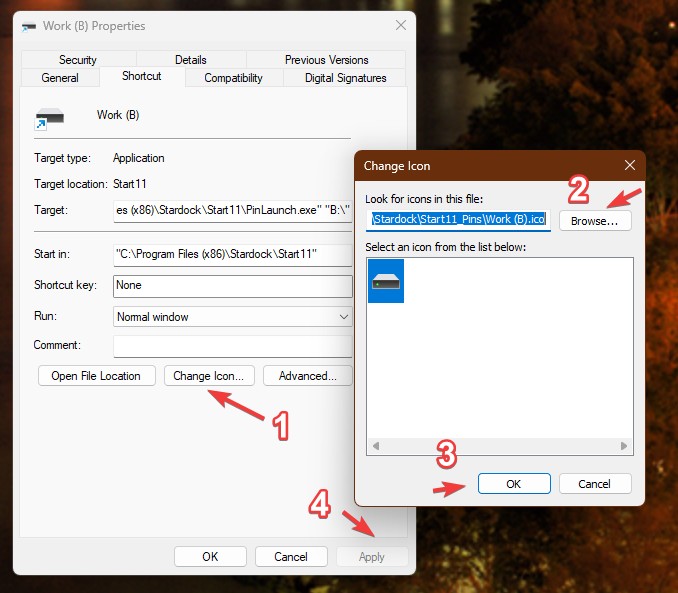
  4. On its properties Windows click on "Change Icon"
  5. Browse than select to any icons you wish to use.
  6. Click ok than click Apply.
  7. Refer screenshot below as guide.

That should do it.

Thank you,
Basj,
Stardock Community Assistant.

Reply #2 Top

Well, there you go — it never occurred to me to right-click the folder and select Properties.

Let’s file this one under “basic user muppetry”.

Consider me told, case closed. Cheers!