Multiplicitity 4.08 Beta Feedback
With the Multiplicity 4.08 beta release today, we are creating this thread so that users can report any observed issues.
Thank you for your interest and any time you put into making Multiplicity 4 a better product.
With the Multiplicity 4.08 beta release today, we are creating this thread so that users can report any observed issues.
Thank you for your interest and any time you put into making Multiplicity 4 a better product.
Known issues
While we appreciate all feedback, please remember that we offer no official support for beta \ preview \ developer channel versions of Windows. If you report issues while in any of those early release channels, you should not expect them to be addressed unless it still exists in a retail version of Windows.
***Reserved***
All, the Multiplicity 4 beta has been updated. For details, please see:
https://forums.stardock.com/540065/get;3985292
As always, thanks for the time, feedback, and support.
Sean Drohan
Product Lifecycle Manager
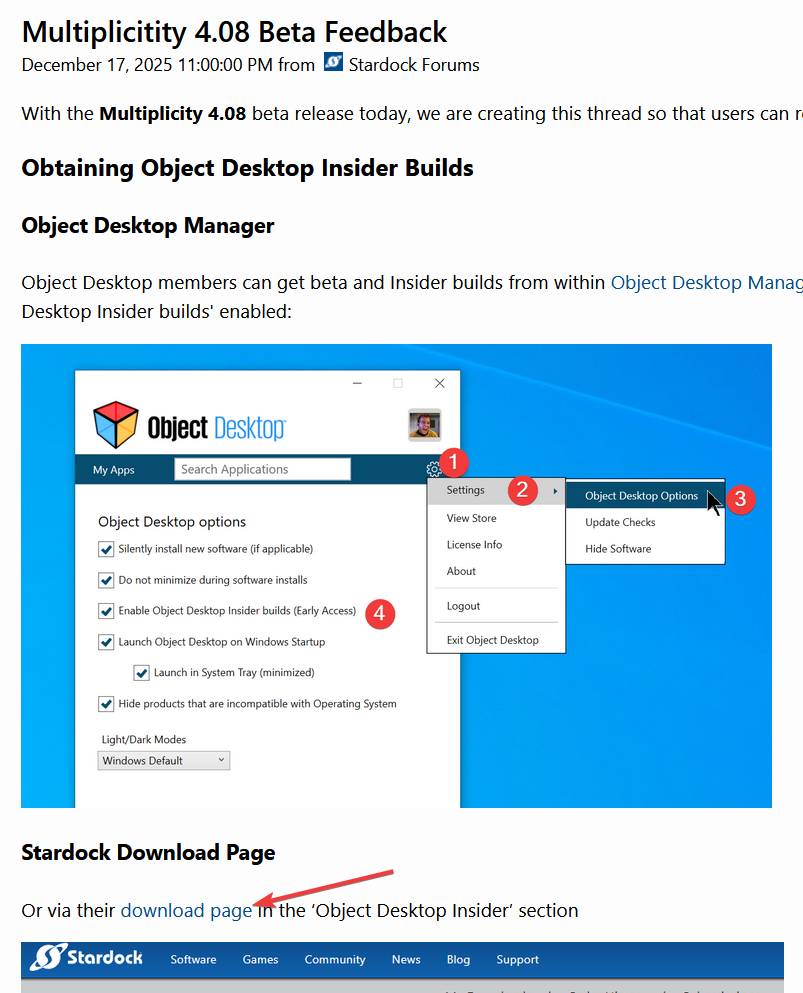
Why not include a link for downloading it?
Also, is another version coming sometime?
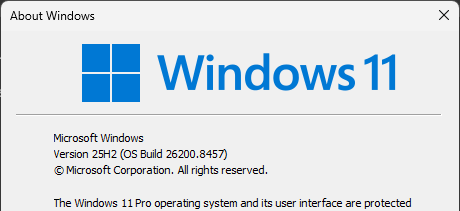
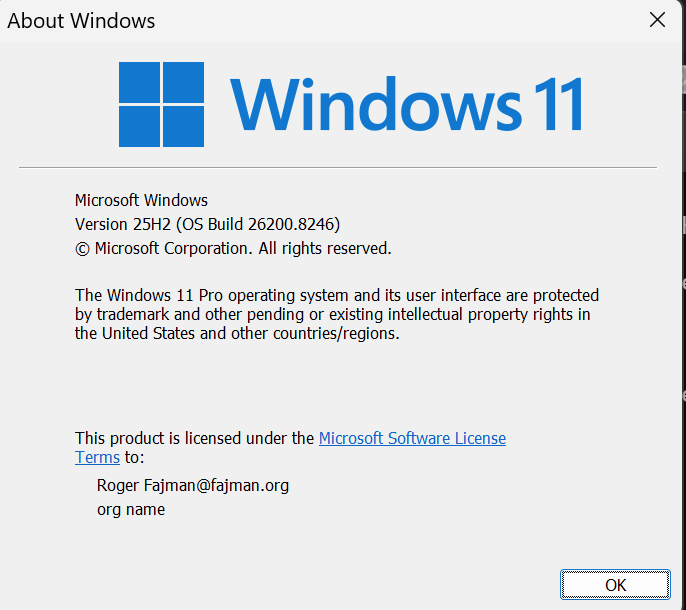
With the previous beta copy/paste of a file from one PC to another in KVM mode didn't work for me, but did work, although a bit strangely, in the earlier released version. Here's my current Windows version:

I've refreshed windows in the meantime. The other PCs are not available now. Sorry about that. I'll understand if you don't want to look at it without more current information. I'll try it again with the latest beta when I get a chance.
By the way, my email address is wrong in the image above.
Moderator: Please do not use your private email as this is a public forum and your security will be compromised. If your email needs correction, please do it via your account.
There is a link to your account product download page up there

If you don't see it in there, perhaps, you have some issue with your account. Please report back here.
Thank you,
Basj,
Stardock Community Assistant
FYI, the date on the 4.0.8.1 Beta Changelog is wrong. Should be 2026 not 2025.
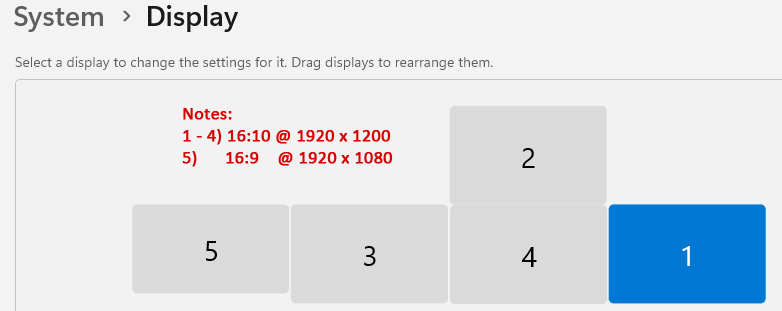
I have run into issues with Show Remote Monitor and Show in Monitor. Note, my primary PC has 5 monitors in 2 rows.
I have 3 monitors on the remote computer and when I use Show Remote Monitor and select Monitor 1 it works fine. Selecting Monitor 2 or Monitor 3 doesn't change what it is shown (still showing Monitor 1). Happens in fullscreen and non-fullscreen.
Show in Monitor rarely ends up on the monitor I selected. For example, selecting Show in Monitor 1 ends up moving it to Monitor 4 (after the move Monitor 4 is checked in the Show in Monitor menu). It does appear to work correctly if the monitor I select is the next in the list (i.e. It is currently on 2 and I select 3 it will go to 3; also works going from 5 (last) to 1, but not reverse order).
When Multiplicity connected this morning, it didn't show up on any monitor (showed on taskbar like normal). I had to turn off a monitor on the primary PC to get it to show (causing windows to refresh what displays are attached). Today this only happened when connecting, but I believe it happened a few times last night when using Show in Monitor.
Last night I was on 4.07 then I upgraded to 4.0.8.1 Beta this morning before trying it.
I have used the Seamless tab as the guide to determine what Monitor number is which physical monitor since those numbers match what actually gets checked in the Show in Monitor menu. It was confusing last night until I realized the numbering in the Seamless tab didn't match the number in Windows settings. It would be helpful if they matched.
FYI, the numbers on the Seamless tab last night when 4.07 was installed were different than today with 4.0.8.1 installed. Monitors 1 & 4 still referred to the same physical monitors, but the other 3 switched.
Primary PC Windows 11 Display Settings:

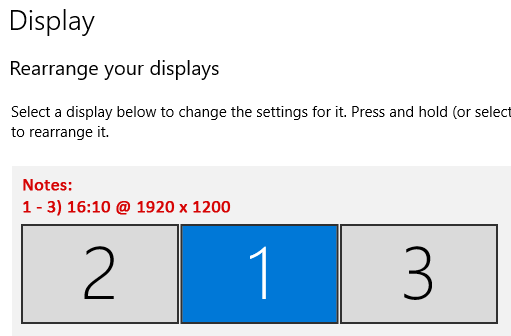
Secondary PC Windows 10 Display Settings:

Monitor 3 above corresponds to Monitor 1 in Multiplicity and is the primary in Windows.
The Secondary PC monitors are the same physical monitors as 1, 3 & 4 on the Primary PC (plugged into different ports). I had hoped Multiplicity wasn't limited to viewing 1 monitor at a time so I could switch the 3 monitors back and forth between the two PCs.
Primary PC Windows Version:

Secondary PC Windows Version:

I have run into issues with Show Remote Monitor and Show in Monitor. Note, my primary PC has 5 monitors in 2 rows.
I have 3 monitors on the remote computer and when I use Show Remote Monitor and select Monitor 1 it works fine. Selecting Monitor 2 or Monitor 3 doesn't change what it is shown (still showing Monitor 1). Happens in fullscreen and non-fullscreen.
Show in Monitor rarely ends up on the monitor I selected. For example, selecting Show in Monitor 1 ends up moving it to Monitor 4 (after the move Monitor 4 is checked in the Show in Monitor menu). It does appear to work correctly if the monitor I select is the next in the list (i.e. It is currently on 2 and I select 3 it will go to 3; also works going from 5 (last) to 1, but not reverse order).
When Multiplicity connected this morning, it didn't show up on any monitor (showed on taskbar like normal). I had to turn off a monitor on the primary PC to get it to show (causing windows to refresh what displays are attached). Today this only happened when connecting, but I believe it happened a few times last night when using Show in Monitor.
Last night I was on 4.07 then I upgraded to 4.0.8.1 Beta this morning before trying it.
I have used the Seamless tab as the guide to determine what Monitor number is which physical monitor since those numbers match what actually gets checked in the Show in Monitor menu. It was confusing last night until I realized the numbering in the Seamless tab didn't match the number in Windows settings. It would be helpful if they matched.
FYI, the numbers on the Seamless tab last night when 4.07 was installed were different than today with 4.0.8.1 installed. Monitors 1 & 4 still referred to the same physical monitors, but the other 3 switched.
Primary PC Windows 11 Display Settings:
Secondary PC Windows 10 Display Settings:
Monitor 3 above corresponds to Monitor 1 in Multiplicity and is the primary in Windows.
The Secondary PC monitors are the same physical monitors as 1, 3 & 4 on the Primary PC (plugged into different ports). I had hoped Multiplicity wasn't limited to viewing 1 monitor at a time so I could switch the 3 monitors back and forth between the two PCs.
Primary PC Windows Version:
Secondary PC Windows Version:
Hello,
Sorry to hear you are having issues. Please create your own new thread for more specific to your own systems issue. We will try to help over there. This thread is more into general feedback thread.
Thank you,
Basj,
Stardock Community Assistant.
I've been testing Multiplicity 4.08 Beta in a broadcast environment, and I'm still seeing what appears to be a reproducible resource leak in KVM mode.
Test environment
Reproduction
Repeatedly disconnect and reconnect the KVM session.
Observed behaviour
MultiPLV64.exe exits.Example from 4.08:
The leaked resources are only released when MultiPLV64.exe is closed or the machine is rebooted.
After enough reconnects, I also begin seeing system-wide degradation:
The 4.08 beta changelog mentions fixing a memory leak in long-running KVM sessions, but from my testing, the reconnect path still appears to leak resources.
I've been testing Multiplicity 4.08 Beta in a broadcast environment, and I'm still seeing what appears to be a reproducible resource leak in KVM mode.
Test environment
Multiplicity 4.08 Beta
KVM mode
Windows 10 22H2
NVIDIA GPU
Long-running LAN-only sessions (8–10 hours typical)
2 Test Machines (Dell Latitude 3930)
Reproduction
Repeatedly disconnect and reconnect the KVM session.
Observed behaviour
Handles continue to increase after each reconnect and are not released until MultiPLV64.exe exits.
Commit size also continues to grow after each reconnect. There is an initial spike (~300 MB) during connection, but it settles 40–50 MB higher than before each reconnect.
Thread count gradually increases from a baseline of ~27–30 to ~50+ after repeated reconnects.
GDI object count remains stable.
Example from 4.08:
Initial:
Handles: 534
Threads: 27
Commit: 481 MB
After 20 disconnect/reconnects:
Handles: 2,561
Threads: 50
Commit: 1,328 MB
The leaked resources are only released when MultiPLV64.exe is closed or the machine is rebooted.
After enough reconnects, I also begin seeing system-wide degradation:
TightVNC temporarily disconnects.
SMB/network drive mapping fails.
Applications take much longer to start up.
In production, we've also experienced eventual black-screen hangs requiring a reboot.
The 4.08 beta changelog mentions fixing a memory leak in long-running KVM sessions, but from my testing, the reconnect path still appears to leak resources.
Hello,
Sorry to hear you are having issues. I have forwarded your problem/question to Stardock Support Team for their assistance. Please keep an eye on this thread for any updates. We appreciate your feedback and patience. Thank you.
Basj,
Stardock Community Assistant
Hi G-Park,
Thank you for posting. Can you check the exact file version of your MultiplicityConfig.exe file on all (primary and secondary) PCs? Just want to confirm you have the exact latest beta version released on each.
Should be in:
MultiplicityConfig.exe -> Properties -> Details -> File version should be 4.0.8.1
Best regards,
Adam McGuinness
Stardock Support Specialist
Hi Adam,
Correct - we are using 4.0.8.1.
Thanks,
Jordan
Hi Jordan,
Thank you for checking that, and for your repro data. I will have this logged.
Internal reference: ODNT-12488
Thanks again,
Adam McGuinness
Stardock Support Specialist
Welcome Guest! Please take the time to register with us.