

Windows 7 Menu

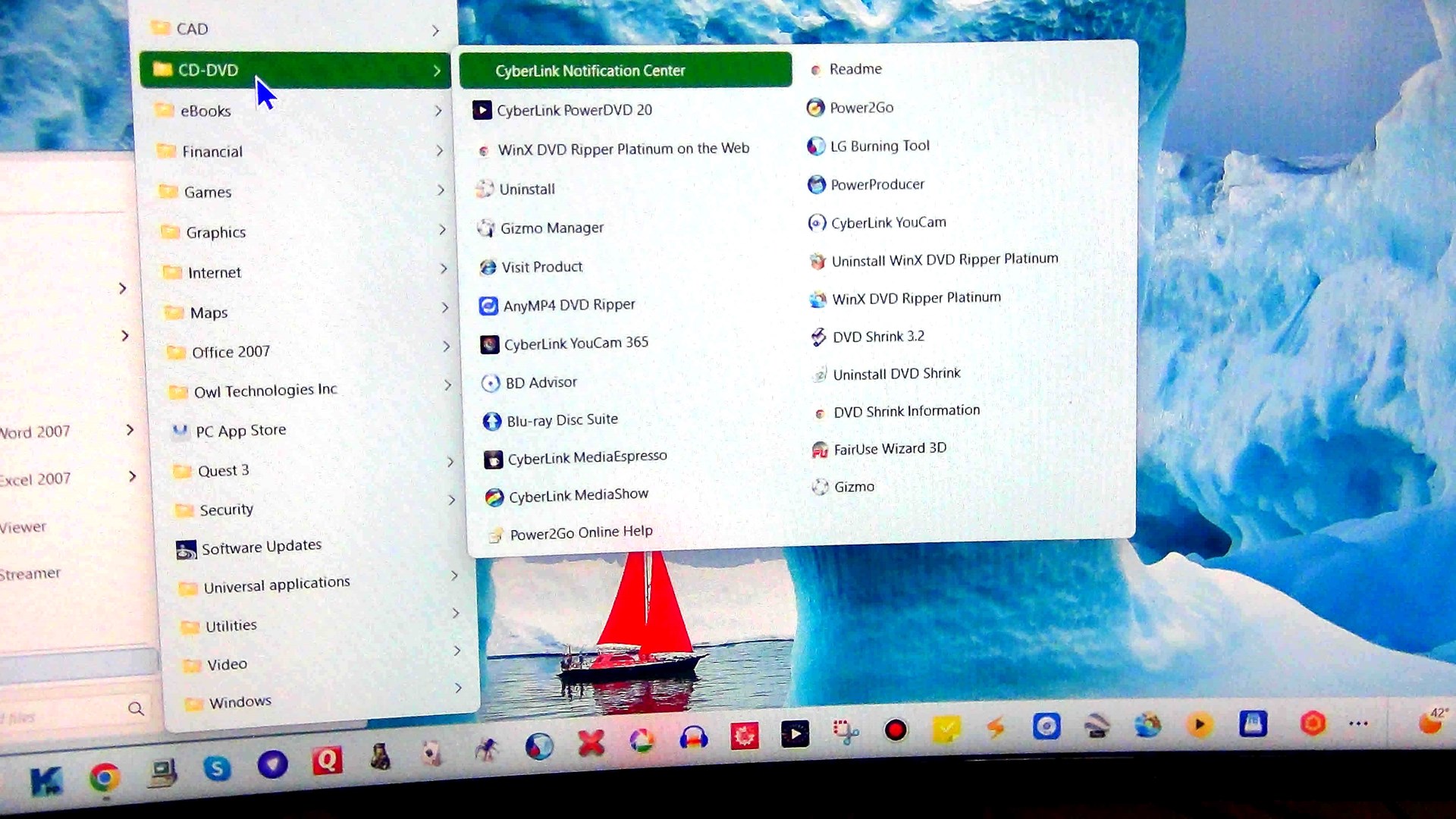
With Start 10, I use the Windows 7 menu system. In Start11, I tried to setup the Windows 7 menu the same. For example, I have a folder CD-DVD in this I had subfolders for WinX DVD Ripper and Cybelink DVD Suite  again with subfolders for each application. In Start 11 when I select the CD-DVD folder, I get a listing of all the programs, they are not separated into applicaiton folders and it makes it confusing which program is associated with which application. How do I create subfolders for each application which contain only programs associated with that application? 
817 views 5 replies
Reply #1 Top

Have you enabled the newer Win10 style all programs list or an all programs popup menu?

Those don't use the same folder system, but the out of the box settings should be identical to Start10.

Are you able to post a screenshot of what you are seeing?

Reply #2 Top

Thanks for you responce. It is appreciated.

Here is the screen shot. Trying to create a folder to separate all programs associated with an application together. As you can see, one program is listed as Uninstall, but without starting it, I don't know what I'm uninstalling. I am looking for a hierarchy/ grouping so don't have to read through all 25 programs and they are not listed alphabetically.

Reply #3 Top

Quoting wayneal, reply 2

Thanks for you responce. It is appreciated.

Here is the screen shot. Trying to create a folder to separate all programs associated with an application together. As you can see, one program is listed as Uninstall, but without starting it, I don't know what I'm uninstalling. I am looking for a hierarchy/ grouping so don't have to read through all 25 programs and they are not listed alphabetically.


End of wayneal's quote

This is why it differs from start10.

The popup menu uses the newer way the OS exposes these things rather than the direct folder view that the scrolling list does.

You just need to set it back to not use a popup menu (right click on the all programs button should do this) and it should show things just like Start10 did.

Reply #4 Top

Thanks again for your effort, but when I right click on the "All Programs" button, I get 3 options Open, Open All Users, Open As A Menu". If I right click on "Open All Users" it opens Windows Explorer Programs. 

With the old Start10, when I left clicked on "All Programs" it would popup a menu with the Folders list similair to Windows Explorer and then when I click on the Folder it would have both Programs and Folders in a new popup. that is what I am trying to do.


Reply #5 Top

Quoting wayneal, reply 4

Thanks again for your effort, but when I right click on the "All Programs" button, I get 3 options Open, Open All Users, Open As A Menu". If I right click on "Open All Users" it opens Windows Explorer Programs. 

With the old Start10, when I left clicked on "All Programs" it would popup a menu with the Folders list similair to Windows Explorer and then when I click on the Folder it would have both Programs and Folders in a new popup. that is what I am trying to do.

 
End of wayneal's quote

If you left click you should get the usual list as you did before with Start10.

If you use right click open as a menu (something Start10 did not have) then you get the alternative view of the files hence one level of folders only.