sdRohan sdRohan

Multiplicity 4 Public Beta 3 Feedback Thread

Multiplicity 4 Public Beta 3 Feedback Thread

With the Multiplicity 4 Beta 3 release, we are creating this thread so that users can report any observed issues.  

Obtaining the product

Object Desktop members can get the release from within Object Desktop Manager 

Individual purchases (as well as Object Desktop Members) can also be obtained from your account page: https://store.stardock.com/myaccount/products

For guest check-out purchase (no account), from this link: http://www.stardock.com/support/productkeyretrieval

Reporting an issue

Please include the following for anything found:

  • Exact Windows version \ build (winver.exe)

  • Detailed steps to recreate the issue seen

  • Screenshots and videos are very helpful.  Videos can be uploaded to a cloud drive service (GoogleDrive, DropBox, OneDrive, YouTube), with a shared link included in your post.  Images can be copied and pasted directly into a post.

  • If there are specific apps that the app does not work (well) with, please note what apps and their exact versions.  If any app is not common, a link to a trial version would be appreciated.

Thank you for your interest and any time you put into making Multiplicity 4 a better product.

Sean Drohan
Stardock Support Manager

22,790 views 54 replies
Reply #26 Top

Hi. :)

I saw an add that stated something like you could RUN OBS on the 2nd computer ect. And that would be insanely cool.

So I wanted to try the new seamless display but the generig driver that installs is set to 120mhz with no possibility to change it to 60 hz

Running win 11 on main PC

Tried restarting both computers.
Cant pick an other driver to install since everything is automatic when i enable it.


I tried changing my main screen to 60hz, and it does nothing.

Reply #27 Top

Quoting Anileania, reply 26

I saw an add that stated something like you could RUN OBS on the 2nd computer ect. And that would be insanely cool.
End of Anileania's quote

Yes, you certainly could but you seem to be confusing "Seamless Display" with "Seamless" connections.

Seamless Display allows you to connect remote monitors to the Primary PC as if they were its own.  In terms of capturing with OBS, it would have to be running on that Primary PC, not the Secondary, to capture its images.

Seamless connections allow you to traverse your mouse to a 'Secondary' PC 'Seamlessly'.  If you needed that Secondary's output captured, that's what you would use, a Seamless connection not Seamless Diplay.

Sean Drohan
Stardock Product Lifecycle Manager

Reply #29 Top

Quoting Anileania, reply 28

Cool, thanks for the correction, but what about my problem. It still only show 120 Hz :)
End of Anileania's quote

While I will inquire about it, Multiplicity does not affect how Windows sees the monitors new Seamless Displays or what options are available for it. 

Sean Drohan
Stardock Product Lifecycle Manager

Reply #30 Top

Maybe I miss wrote. 

The PC screen cannot support 120 hz, and it only goes to 120 Hz when I try to use it as an extra monitor.

It's running fine when not trying to use with Multiplicity. 

Reply #31 Top

Quoting Anileania, reply 30

Reply #30 November 5, 2024 12:44:33 PM from Stardock Forums
Maybe I miss wrote. 

The PC screen cannot support 120 hz, and it only goes to 120 Hz when I try to use it as an extra monitor.

It's running fine when not trying to use with Multiplicity. 
End of Anileania's quote

Heard back from the lead developer.

"Thats the virtual end that has that (120) rate.  The physical monitor end will be running at whatever rate the screen is set to on the Secondary"

Thus, while the Primary may show it at 120, the actual monitor attached to the Secondary will be set to whatever it is on that PC. 

Sean Drohan
Stardock Product Lifecycle Manager

Reply #32 Top

Hi and thank  you for the response, how ever I have to write that it makes no sense.
None of my screens are set to 120. 

Screen 1: Primary


Screen 2: 2nd


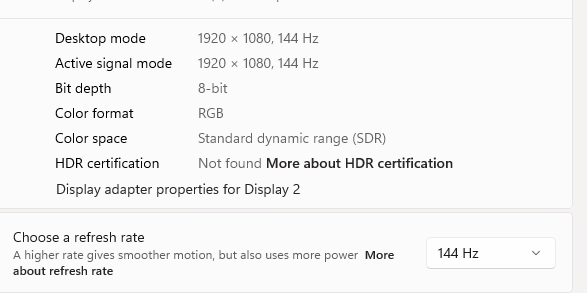
Screen 3: The 2nd computer screen thats not working when activating seemless display.


This is the 2nd computer when its NOT connected to seamless display.


It does not matter if i change the 144 hz to 60.
Still does not work.

Reply #33 Top

Quoting Anileania, reply 32

Hi and thank  you for the response, how ever I have to write that it makes no sense.
None of my screens are set to 120. 
End of Anileania's quote

That it is reporting 120 on the Primary does not necessarily mean that is why it 'Still does not work.'  You have not yet stated what exactly it is you are trying to do that is not working.  Can you detail what that is (what you are doing) and what the result is?

Sean Drohan
Stardock Product Lifecycle Manager

Reply #34 Top

Its not really a concern for me. It still works as a seamless screen.

To add to Anileania's Post  Multiplicity is doubling the secondary screens refresh rate. So if I set is to 60hz it shows as 120 hz and if I set it to 144hz it will show 288hz.


Reply #35 Top

Quoting DARKONE33, reply 34

To add to Anileania's Post  Multiplicity is doubling the secondary screens refresh rate. So if I set is to 60hz it shows as 120 hz and if I set it to 144hz it will show 288hz.
End of DARKONE33's quote

In its current form, Multiplicity cannot actually affect what the Secondary display refresh rate actually is.  If the actual monitors connected to the Secondary are set to 60hz, regardless of what the Primary reads when connected to them, that is what it actually renders as. 

What I need someone to confirm (because we have never seen an issue with this) is why that's a problem (other than looking odd, perhaps misleading) - that in X case, reporting the refresh rate as higher than it actually may be set to is causing problems.  If so, what are those problems and what are the best ways to reproduce them?

Thanks.

Sean Drohan
Stardock Product Lifecycle Manager

Reply #36 Top

Quoting sdrohan, reply 35

What I need someone to confirm (because we have never seen an issue with this) is why that's a problem (other than looking odd, perhaps misleading) - that in X case, reporting the refresh rate as higher than it actually may be set to is causing problems.  If so, what are those problems and what are the best ways to reproduce them?
End of sdrohan's quote

I didn't notice it until it was brought up and I have no issue with it but just looks odd.

I'm not sure if this will cause any issues with long-term use, If I do find any I will open a new thread. 

Reply #37 Top

Quoting DARKONE33, reply 36

I didn't notice it until it was brought up and I have no issue with it but just looks odd.

I'm not sure if this will cause any issues with long-term use, If I do find any I will open a new thread. 
End of DARKONE33's quote

Thank you.

Sean Drohan
Stardock Product Lifecycle Manager

Reply #38 Top

The issue is the screen is black and wont display anything. 

It's like you are experiencing everyone to have a screen that's capable of running 120 hz.

There should be an option to change it.

Reply #39 Top

Quoting Anileania, reply 38

The issue is the screen is black and wont display anything. 

It's like you are experiencing everyone to have a screen that's capable of running 120 hz.

There should be an option to change it.
End of Anileania's quote

Please ignore the refresh rate exposed to the OS, it is like this for a reason and has no impact on what rate your physical monitor supports.

If the screen is black there is another cause.

Things to check are what resolution the screens are set to, do the screens remain black or eventually disconnect?

Also does display properties on the primary show the screens enabled and is Windows set to extended view for monitors vs clone or single monitor only.

Reply #40 Top

Screen runs same resolution as when it's not running seamless. 1900*1024. I've also tried setting it down. No luck.

If I don't do anything it will eventually disconnect.

The primary computer is showing the screen as screen nr 3. And it's extended.

Reply #41 Top

Quoting Anileania, reply 40

Screen runs same resolution as when it's not running seamless. 1900*1024. I've also tried setting it down. No luck.

If I don't do anything it will eventually disconnect.

The primary computer is showing the screen as screen nr 3. And it's extended.
End of Anileania's quote

Just to be clear, this is when you try to initiate a "Seamless Display" connection, you are able to get it to connect but its a black screen,  and eventually fails.

If all is true, we would like to get some logs from you.  To create them, you will need 'DebugView'

https://learn.microsoft.com/en-us/sysinternals/downloads/debugview

You will as need to create a new Registry key here:

HKEY_LOCAL_MACHINE\SOFTWARE\WOW6432Node\Stardock\Multiplicity2\MP\MP\

the key name, type, and value

Name: EnableDebug
type: REG_SZ ('String')
value = 1

Example when done


If you are not comfortable working in the registry, you can use this batch file to create it

https://cdn.stardock.us/support/uploads/Mp4_DebugSwitch.zip

Running it will create it with the correct value.  Running it again will turn it off - something you are going to want to do after you have done the collection. 

Once complete...

  • Close any open applications
  • Open the Multiplicity config
  • Open Debugview64.exe
  • Initiate a Seamless Display connection and allow it to eventually fail (as you said it eventually does with no interaction from you).
  • Stop DebugView from collecting


  • Save the log out with 'Primary' somewhere in the name.
  • The same process should be done on the Secondary but the regkey creation should not be needed as it already outputs debug messages that DebugView can collect. 
  • Save the logs, zip them together, and upload the zip to a shared drive of your choice (GoogleDrive, DropBox, etc) and post a shared link in a reply

This is a video of the capture process

https://cdn.stardock.us/support/uploads/2024-11-07_13-23-48amcguinness.mp4

Thanks for the help.

Sean Drohan
Stardock Product Lifecycle Manager


Reply #42 Top

Hi.

I need to correct my selv, it must have been something I did to make it fail.

Now when I activate seamless display, it actually says connected, windows shows 3 screens AND i can actually move my mouse to screen 3.

I cant however do anything, Theres no background and i cant right click or get a a start meny or system tray there. 

Its like its there but not.

I tried dragging a window over on the 3 screen, and it just dissaperes on the screen.


Reply #43 Top

Quoting Anileania, reply 42

Hi.

I need to correct my selv, it must have been something I did to make it fail.

Now when I activate seamless display, it actually says connected, windows shows 3 screens AND i can actually move my mouse to screen 3.

I cant however do anything, Theres no background and i cant right click or get a a start meny or system tray there. 

Its like its there but not.

I tried dragging a window over on the 3 screen, and it just dissaperes on the screen.

 
End of Anileania's quote

Can you see the mouse on the extra screen moving?

Could you please do the debug steps Sean suggested as they may give us a clue as to why the video end isn't showing up.

The other thing to look for is network traffic.  If you open up taskmanager and move to the page for the graphs you should see noticeable network traffic if you grab a window and 'move' it over to the second screen and just wave it around with your mouse still held down.

Reply #44 Top

Hey there, looking for some advice.


I had Multiplicity v3 running for some years, and I upgraded to version4, however now I cannot get the audio sharing to work. Everything is entered exactly the same as it was for v3, i tried changing the name, clearing all the stored information, the seamless displays works perfectly but it will just not share audio.


I tried multiple restarts of both machines, every other function works perfectly but it just will not share the audio. I do have the option for "show audio in the system tray when sending audio" enabled but it is not showing in the system tray at any point.


Thanks in advance

Reply #45 Top

Quoting Kibeth2252, reply 44

Hey there, looking for some advice. 

I had Multiplicity v3 running for some years, and I upgraded to version4, however now I cannot get the audio sharing to work. Everything is entered exactly the same as it was for v3, i tried changing the name, clearing all the stored information, the seamless displays works perfectly but it will just not share audio. 

I tried multiple restarts of both machines, every other function works perfectly but it just will not share the audio. I do have the option for "show audio in the system tray when sending audio" enabled but it is not showing in the system tray at any point. 

Thanks in advance
End of Kibeth2252's quote

While for MP3, the support still applies, please see:

https://support.stardock.com/space/SHC/1287749690/Multiplicity+Audio+Troublshooting

If all else fails, please run the purge on each PC and install MP4 again on each:

https://support.stardock.com/space/SHC/1347158073/Multiplicity+purging+and+re-installing

Sean Drohan
Stardock Product Lifecycle Manager

Reply #46 Top

Thank you, I did try each step of the MP3 trouble shooting and restarted both computers between checking each step, trying to be thorough!


I also ran a full purge and reinstall of MP4 on both machines. The system icon for Multiplicity Audio never appears in the taskbar, so I am unable to determine if the "-Allow the sender to be unmuted to make sure that it is indeed sending audio:" option is checked.


I think I will probably just revert to MP3 for the time being unless there is other screenshots / info you would want to try further troubleshooting, such as possibly port forwarding at the router level?


Both machines running windows10, up to date on windows updates etc.


Reply #47 Top

Quoting Kibeth2252, reply 46

The system icon for Multiplicity Audio never appears in the taskbar, so I am unable to determine if the "-Allow the sender to be unmuted to make sure that it is indeed sending audio:" option is checked.
End of Kibeth2252's quote

Note, only the sender will ever have that icon show:

https://cdn.stardock.us/support/uploads/2024-11-11_16-43-57sdrohan.mp4

Ensure its not hidden

Or when its the sender, hidden in Windows

Sean Drohan
Stardock Product Lifecycle Manager


Reply #49 Top

Quoting mattaragon, reply 48

Is there a upgrade option/trail for adopters of Multip3 users I'd like to see/try the new improvements.
End of mattaragon's quote

There is a trial, yes:

https://www.stardock.com/products/multiplicity/

Sean Drohan
Stardock Product Lifecycle Manager

Reply #50 Top

Downloaded the trial for MP4. Purchased the 'Pro' version a little while back. Currently using 7 machines on Multiplicity 4 Beta 3 Pro.

Beta 2 worked pretty well. I then upgraded all machines to Beta 3 and now the 'Press CTRL three times will enable keyboard input being sent to all computers' no longer functions, at all. I have tried uninstalling and reinstalling, to no avail. This is an important feature for me. 

  • 6/7 machines running Windows 11 v.23H2 (OS Build 22631.4460)
    • The 7th machine is running Windows 10, but is just a test machine and summarily unneeded so I can eliminate or upgrade that machine if that turns out to be the issue.
  • This issue began when I updated to MP4 Beta 3.

I looked at the retail tiers and, it appears, I am attempting to use more than the 5 allowed KVM computers. Okay, so I removed two of the computers from my seamless setup. No joy. 😒

Any ideas how to fix?