I found the bug!!!!!!!
If the secondary monitor to the right of my primary monitor has a scaling value greater than 100%, the issue occurs. My primary monitor is always set to 100% and my secondary monitors are always set to 125%. This is very strange because the issue only happens when scaling is applied to the secondary monitor located to the right of my primary monitor. It does not happen when scaling is applied to the secondary monitor located to the left of my primary monitor.
Here are the various scenarios (primary always set to 100%):
- If both secondary monitors have a scaling value of 125%, the issue occurs.
- If the left secondary monitor has a scaling value of 100%, and the right secondary monitor has a scaling value of 125%, the issue occurs.
- If the left secondary monitor has a scaling value of 125%, and the right secondary monitor has a scaling value of 100%, the issue does not occur.
- If the left secondary monitor and the right secondary monitor have scaling values of 100%, the issue does not occur.
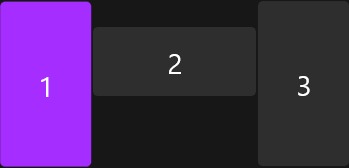
Here is a screenshot of my layout (the monitor to the right is the one that causes the issue):
It is important to note that this issue only occurs when using Start11. When Start11 is uninstalled, the issue does not occur when the right secondary monitor has a scaling value greater than 100%.
Below is the info that you requested:
Primary Monitor (middle): LG 38GN950-B 3840 x 1600 100% scaling
Left Secondary Monitor: ASUS VP28UQG 2160 x 3840 125% scaling portrait
Right Secondary Monitor: ASUS VP28UQG 2160 x 3840 125% scaling portrait flipped
Enhanced Taskbar: Occurs when on and off (on by default)
Taskbar Location: Occurs when placed at the top or bottom (top by default)
Autohide: Occurs when off and on (off by default)
Thanks


 Stardock Forums
