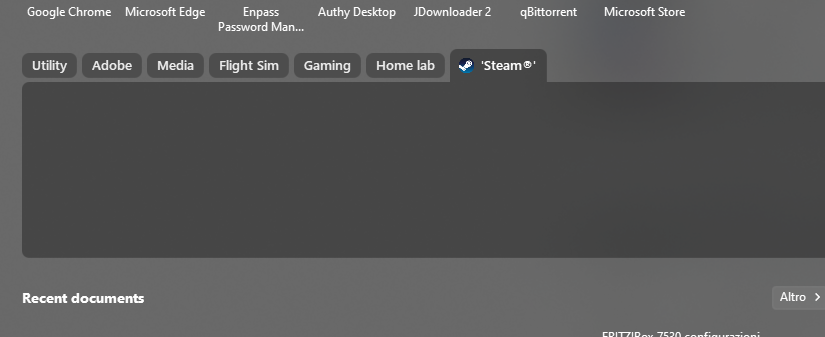
Steam tab/group is empty, how to populate them?

Hello, how the tiles says. My Steam tab or group look completely empty even if I have some games installed. Is there a configuration procedure I'm missing? Thanks for your support!

2,565 views 7 replies
Reply #1 Top

Hello,
Sorry to hear you are having issues. Need to know more on your system and issue.

  1. Windows 10 or 11? Need its full version and OS Build number. Use Winver.exe.
  2. Start11 version number.
  3. Which Start11 style you're using?
  4. How did you add the Steam Group?

Thank you.
Basj,
Stardock Community Assistant.

Reply #2 Top

Thanks for the prompt reply.

1. I'm on Windows 11 Pro 23H2 (build 22631.3737).

2. I'm on Start 11 v2 version 2.08.

3. I'm using App Windows Style.

4. I tried adding the Steam group both as a Tab and as a Group, without success. Here's what I see as a Tab visualization:

I have multiple Steam games installed and running on my PC. It is worth noting that on another install of Start 11 on my laptop, Steam games are perfectly recognized. I recovered a backup from that install.

Reply #3 Top

Hello,
I have forwarded your problem/question to Stardock Support Team for their assistance. Please keep an eye on this thread for any updates. We appreciate your feedback and patience.

Basj,
Stardock Community Assistant

Reply #4 Top

Quoting frart, reply 2

I have multiple Steam games installed and running on my PC. It is worth noting that on another install of Start 11 on my laptop, Steam games are perfectly recognized. I recovered a backup from that install.
End of frart's quote

That is very likely the issue  - that the Steam library on your doner (the one you exported from) is not the same as it is on the receiving PC.

Perhaps the most practical way to resolve this, and because it's so easy, is to remove that group and re-add it

Sean Drohan
Stardock Product Lifecycle Manager


Reply #5 Top

Thanks for your reply. I've already tried removing and readding the tab I had on my older backup. I've also tried creating a Steam group, which I didn't have on my backup, without success.

Reply #6 Top
Quoting frart, reply 5

Thanks for your reply. I've already tried removing and readding the tab I had on my older backup. I've also tried creating a Steam group, which I didn't have on my backup, without success.

End of frart's quote

Forget any backup for a moment and reset all Start11 settings

Are you able to use this to add the Steam library that is located on the new PC?

If not, is your Steam library for that PC located in some odd place (a network drive for example)?

Sean Drohan
Stardock Product Lifecycle Manager

Reply #7 Top

Hello. I tried resetting all Start 11 settings and clearing informations, and then adding a Steam folder on my fresh, empty Start menu, but Steam folder still looks empty.


My Steam library at the moment has two main libraries, both installed on two separate drives.

One is located on C:\Program Files (x86)\Steam\steamapps (same drive where OS, Steam and Start v11 are installed) - this one's empty as I am using this drive only for applications and OS. I can't remove it.

Second one is located on F:\Steam\steamapps\common - it's another nVME drive (not network one) and contains all my games. It's set as default (star icon inside Steam).


I've also tried downloading a new game to see if it would have showed up, again without success.