question on excluding items from Start 11 start menu

I have Start11 version 2.07 on Windows 11.  I am using the Windows 10 format start menu.

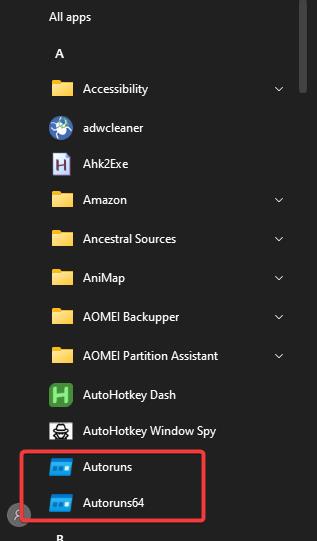
My question has to do with what is included in the start menu.  I am getting entries for a bunch of portable programs which reside in my Downloads folder.  I would like to exclude my entire Downloads folder from the Start Menu.

I went to the Start11 settings to Start Menu > Configure Menu > Manage custom filtered folders.

I created a filter for \My Documents\Downloads and defined an exclusion regex rule as "exe".

I restarted my computer.

All of the portable programs are still showing on the start menu.  What am I doing wrong?  How can I exclude the Downloads folder from the start menu.  These programs did not show in the native Win 10 start menu or the native Win 11 start menu.

Thanks,

Bill

2,000 views 9 replies
Reply #1 Top

Are you talking about the tiles section or the All Apps list?

Reply #4 Top

Hello,
Sorry to hear you are having issues. Need to know your full Windows 11 build number. Please use Winver.exe.


Thank you.
Basj,
Stardock Community Assistant.

Reply #6 Top

I assume you're currently on the latest, Start11v2.07, yes?

I can not reproduce your issue on my system. However, I have forwarded your problem/question to Stardock Support Team for their assistance. Please keep an eye on this thread for any updates. We appreciate your feedback and patience.

Basj,
Stardock Community Assistant

Reply #7 Top

Which part are you unable to reproduce.

1.  The fact that portable programs are added to the all apps section of the start menu.

2.  The fact that the exclusion on the Downloads folder doesn't work.

I'm on Start11 v2.07.

Thanks,

Bill

Reply #8 Top

Quoting BillH99999, reply 7

The fact that portable programs are added to the all apps section of the start menu.
End of BillH99999's quote

This, I don't see portable apps in my download folder appear on my All program list. I have few in there too.

Quoting BillH99999, reply 7

The fact that the exclusion on the Downloads folder doesn't work.
End of BillH99999's quote

I believe, the "Manage custom filtered folders" is not for All program list. It is for the tile area (Groups or tabs)

Thank you,

Basj,
Stardock Community Assistant


Reply #9 Top

Quoting basj, reply 8


Quoting BillH99999,

The fact that portable programs are added to the all apps section of the start menu.


This, I don't see portable apps in my download folder appear on my All program list. I have few in there too.


Quoting BillH99999,

The fact that the exclusion on the Downloads folder doesn't work.


I believe, the "Manage custom filtered folders" is not for All program list. It is for the tile area (Groups or tabs)


Thank you,

Basj,
Stardock Community Assistant


End of basj's quote


I had assumed that the portable programs were being added to All Apps automatically by Start11 scanning the hard drive looking for programs.  This must not be true.  This made me look at it a little closer.

I went to one of the portable programs in All Apps, right clicked it, selected more, and selected Open file location.  This took me to C:\ProgramData\Microsoft\Windows\Start Menu\Programs.  There I saw shortcuts to all my portable programs.  I deleted those shortcuts and the programs disappeared from All Apps. 

The only thing I can think of is that before installing Start11, I did pin these programs to the right side of the start menu (the tiles side).  That did not add them to the All Apps section of the native Win 11 start menu.

Then I installed Start11 and at this point they appeared in the All Apps section of the Start11 start menu, but not the native Win 11 start menu.

In any case, now I have it the way I want it with the portable program icons added to the right side of the start menu and the programs not added to the All Apps list.

I misunderstood what the "Manage custom filtered folders" list would do.  Interestingly, adding the exclusion for the Downloads folder did not remove the tiles from the right side of the start menu either.  Maybe a bug?? Or I coded it wrong??  In any case, I don't want them excluded from the right side of the start menu, so I'll delete the exclusion.

Thanks,
Bill