taskbar
from  Stardock Forums
Stardock Forums
Are you thinking of adding a function to put the bar on the left of the screen?
THANKS
 Stardock Forums
Are you thinking of adding a function to put the bar on the left of the screen?
THANKSHello,
What is the issue?
Thank you.
Basj,
Stardock Community Assistant.
I don't think Microsoft will ever add this capability. Their implementation of Copilot and other new features will prevent the left/right options from functioning properly. Third party apps which provide this capability will most likely cease to function in the near future, as they rely on old code which still remains in Windows 11. Microsoft is planning to remove this old code in the near future of Windows.
I believe Stardocks hands are tied on this one since their software does not rely on the old code which still remains in Windows 11. This is important, as it future proofs their software.
Consider reverting back to Windows 10, which will be supported thru October of 2025. However, now that they are implementing Copilot in Windows 10, I'm not sure how much longer it will allow left/right taskbars.
The days of left/right taskabars are numbered!

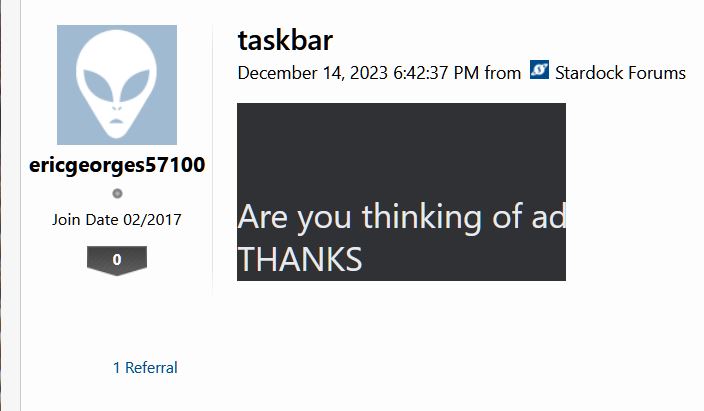
Strangely this is what I see from the OP main post. Why do one need to use strange font and format?
Thank you,
Basj,
Stardock Community Assistant
Evidently the carriage returns are not being respected by your browser. What browser are you using?
The question was "Are you thinking adding a function to put the bar on the left of the screen?"
I don't have Firefox installed, so I can't test it. I did test Chrome, and Edge. They both show the entire text. My main driver is Vivaldi.
FYI, this abbreviated post is what I see using Safari on my iPhone. It would be interesting to find out what’s going on here.
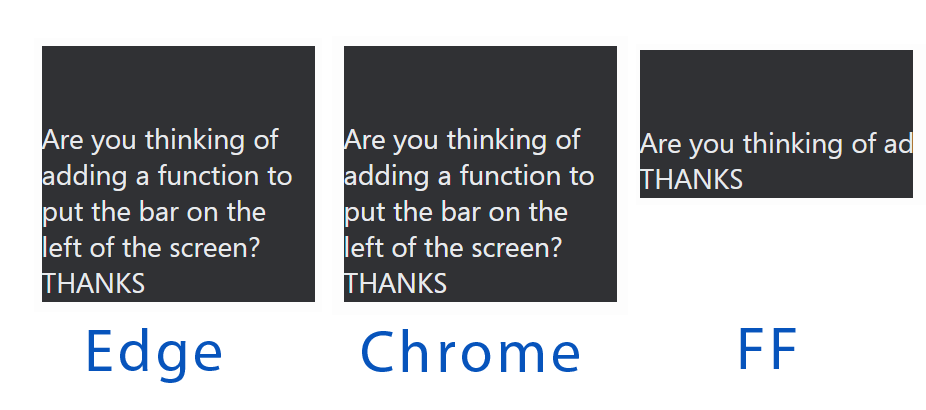
No surprise that Edge & Chrome show the same, so it seems that chrome based browsers know how to insert a break in the black area, and others not. I cannot edit the OP in any way with the limited editing tools we have for that in the forum, so my guess is that it was written in another text editor and pasted here. All I can do with the black background, is delete it - and obviously the text is deleted too. If I first copy the text, delete everything and then paste back the original text, it looks like the forum default text - size and colour.
I have seen and edited this kind of posts a couple of times from one of the games forums some time ago to make them readable, but unfortunately I cannot remember which one. Maybe the OP started to write there, and discovered he was in the wrong place, and pasted it here. So... It seems to be a formatting thing for text size & colour and background colour not visible, but readable for browser (tried to paste it into various text editors and hex-editor, but nothing to see. I have no clue if and how that's possible with javascript or something similar, or if that code is running in the background on all Stardock sites.
Welcome Guest! Please take the time to register with us.
Select a reason for giving karma:
You're about to visit an external site:
Sign up here to get the latest news, updates, and special offers delivered directly to your inbox.