
Seamless Mode Stuck on Secondary

Good Morning All,


Currently I have a user who has a 6-Monitor setup utilizing seamless mode to switch between two machines. One machine connected to 4 monitors and the other machine connected to the additional 2 monitors. Over the last few months he has be continuously plagued with an issue of the mouse getting stuck on the second screen, generally to resolve this issue we will need to restart the “Multiplicity Service”, this issue occurs about 2 to 3 times a week and the time it happens varies from the morning to the afternoon.


I wanted to inquire whether your team has seen this issue prior and has a fix or at the very least if your team can point me to the location of any log files I might be able to dig through in order to pinpoint the root cause of this issue.


Both machines running version 3.6, and we have done a clean install a number of times and ran the Purge file from your site. The machine also has plenty of RAM Primary machine at 128GB and secondary machine is at 96GB.


Any insight would be greatly appreciated as this has been quite a disruptive issue for this user for almost a month now.

7,339 views 10 replies
Reply #1 Top

Hello,
I have forwarded your problem/question to Stardock Support Team for their assistance. Please keep an eye on this thread for any updates. We appreciate your feedback and patience.

Basj,
Stardock Community Assistant

+1 Loading…
Reply #3 Top

Hello,
I have forward your problem/question again to Stardock Support Team for their assistance. Please keep an eye on this thread for any updates. We appreciate your feedback and patience.

Basj,
Stardock Community Assistant

Reply #4 Top

Hello,

Sorry to hear you are having trouble.

Can you help me reconcile these two statements:

be continuously plagued with an issue of the mouse getting stuck on the second screen
End of quote

this issue occurs about 2 to 3 times a week and the time it happens varies from the morning to the afternoon.
End of quote

So it's not happening 'continuously' (generally meant to covey all day, every day, and reproducible), rather, it can be counted on to happen 2 to 3 times a week, yes? 

Is the user able to readily reproduce it... or no, its entirely random?

mouse getting stuck on the second screen
End of quote

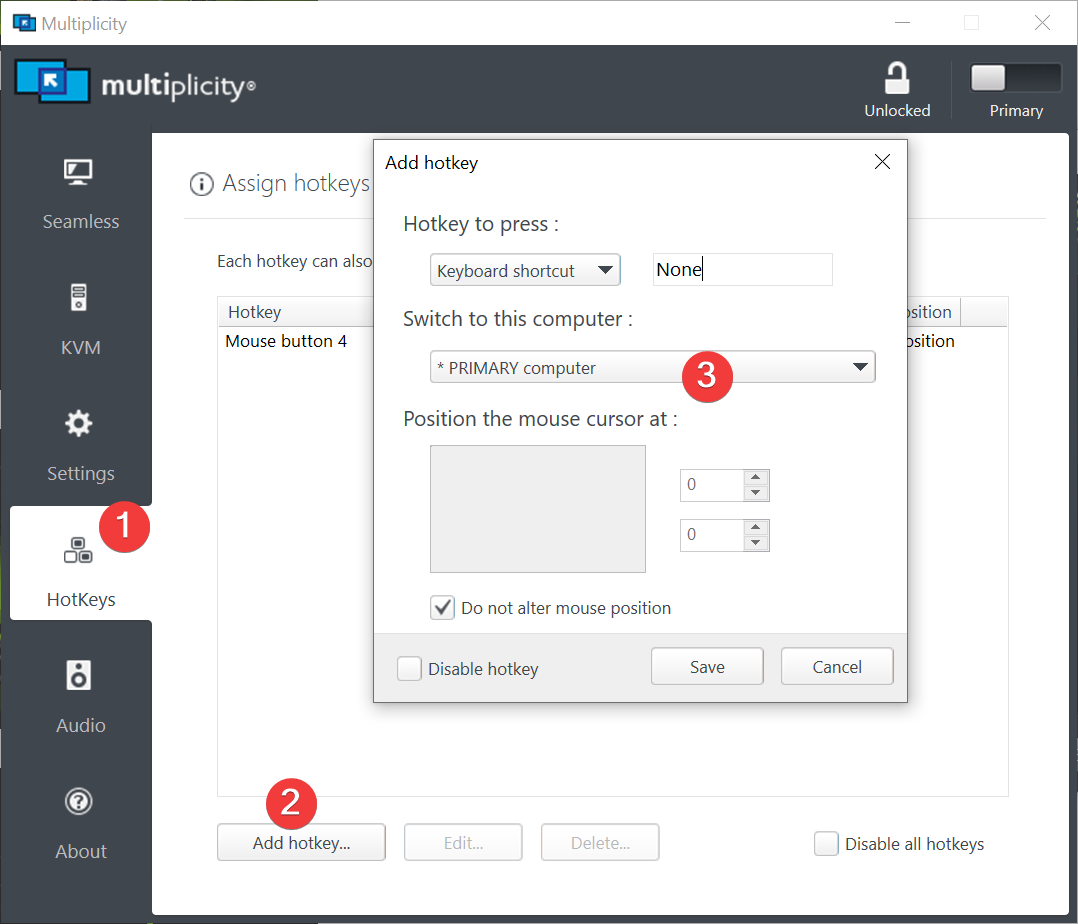
I suspect you mean 'stuck on a monitor of the 2nd PC', yes? If you set a hotkey to have the cursor return to the Primary:

Does that restore normal use?

Sean Drohan
Stardock Product Lifecycle Manager


Reply #5 Top

Morning Sean,


Thanks for the reply here:


1. So it's not happening 'continuously' (generally meant to covey all day, every day, and reproducible), rather, it can be counted on to happen 2 to 3 times a week, yes? 

Correct I would say it happens 2 to 3 times a week.

2. Is the user able to readily reproduce it... or no, its entirely random?

Confirming it seems to be random. In order to resolve I have been restarting the Multiplicity Service.

3. I suspect you mean 'stuck on a monitor of the 2nd PC', yes?

Apologies confirming mouse seems to get stuck on the secondary pc.


I can test out the Hot-Key solution, but in the instances that I have seen there is no input to the machine keyboard or mouse I end up having to remotely connect to his services and restart the service to regain the ability to input on the machine. Additionally, are there any logs on the local machine that I would be able to see if there is any errors with Multiplicity?


My suspicion is the below being the culprit but need to find some conclusive evidence:

https://support.stardock.com/space/SHC/1287389230/Mouse+is+stuck+on+the+Secondary


Reply #6 Top

Quoting ggalati, reply 5

My suspicion is the below being the culprit but need to find some conclusive evidence:
End of ggalati's quote

Do you suspect 'heavy load' on either PC, then?

Sean Drohan
Stardock Product Lifecycle Manager

Reply #7 Top

The user is certainly a power-user, however, we did input 128GB of RAM in the primary machine as well as 96GB in the secondary machine. Additionally we are not seeing the Memory pegged at 100% nor the CPU, no other application seems to be locking up either. 

are there any logs on the local machine that I would be able to see if there is any errors with Multiplicity?

Reply #8 Top

Quoting ggalati, reply 7

are there any logs on the local machine that I would be able to see if there is any errors with Multiplicity?
End of ggalati's quote

There are not but its not likely and 'error' with MP; what is more likely is proper communication is lost.

Quoting ggalati, reply 5

I can test out the Hot-Key solution, but in the instances that I have seen there is no input to the machine keyboard or mouse
End of ggalati's quote

Do mean that you can see the mouse cursor on the Secondary but it does not move at all when moving the Primary mouse... or... it does move but one cannot interact with what is on the Secondary PC (clicks and such do nothing)?

Sean Drohan
Stardock Product Lifecycle Manager

Reply #9 Top

Also, while I am not a fan of band-aids for unknown causes, this may be of help if its as infrequent as you say.

A batch file that will restart the service:

https://cdn.stardock.us/support/uploads/mpRestart.zip

Sean Drohan
Stardock Product Lifecycle Manager

Reply #10 Top

Quoting sdRohan, reply 8

Do mean that you can see the mouse cursor on the Secondary but it does not move at all when moving the Primary mouse... or... it does move but one cannot interact with what is on the Secondary PC (clicks and such do nothing)?
End of sdRohan's quote

Does not move at all.