Combine Taskbar Icons

Since Start11 v1.47, icons aren't combined anymore

I have always found it great advantage for my workflow and productivity to be able to have combined icons on the taskbar. If I have six Word documents open at the same time, which I often do, it's really important that they don't clutter up the taskbar. Suddenly, after installing the latest update to Start 11, version 1.4 7, there is an icon for every document open. Is this because of the date? Is anyone else having this problem?

3,077 views 7 replies
Reply #1 Top

It sounds like you may have accidentally set Start11 to not combine taskbar buttons.  You can set this on the Taskbar page in Start11 settings.

Reply #2 Top

It would be great if it were that simple, but I have been through every possible setting inside Start 11, and I can't find any reference to combining or grouping icons whatsoever. I would really appreciated if you took me through Click by click to get me to the setting you're talking about.

Reply #3 Top

Hello,
Sorry to hear you are having issues. Assuming you on Windows 11. Please refer here:

Thanks
Basj,
Stardock Community Assistant.

Reply #4 Top

O.MY.GOODNESS! How on earth did I miss that?? Thankyou Neil and basj. I wish I'd asked 3 days ago!

I'm therefore a bit anxious about asking another question...

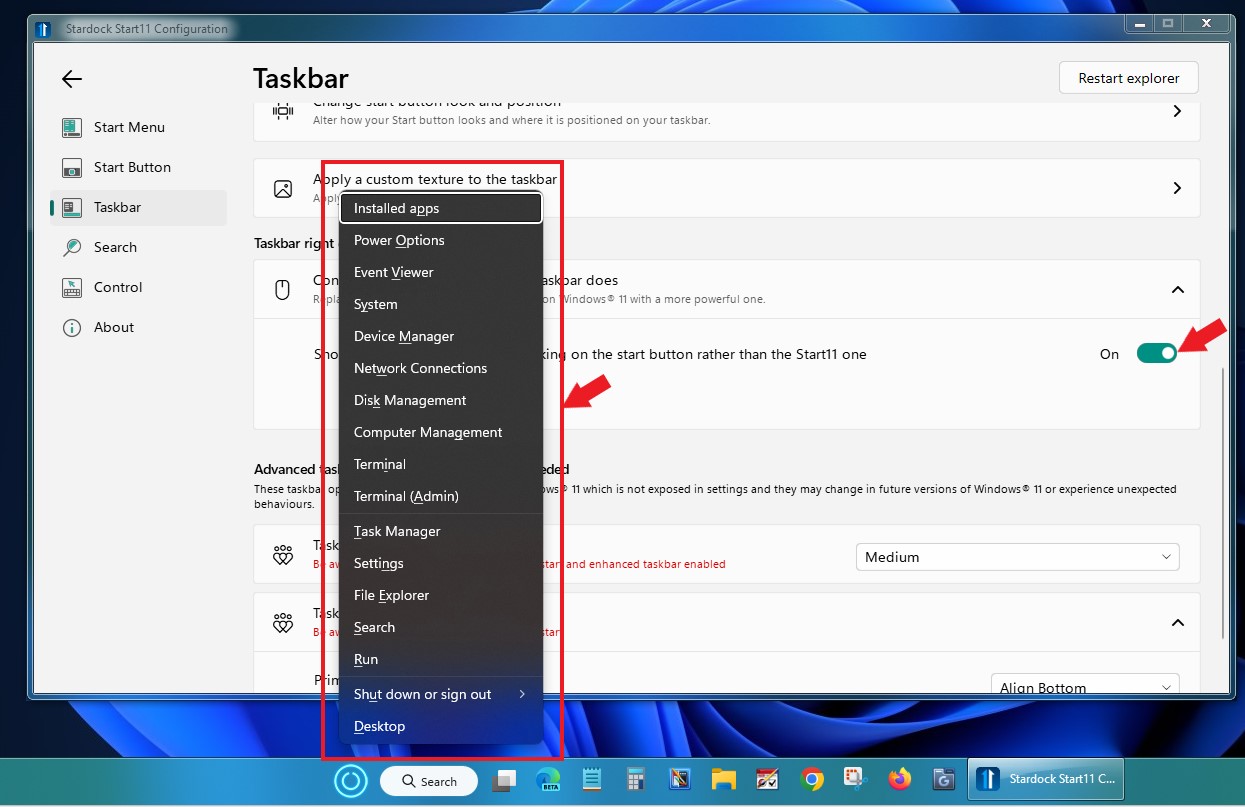
the option "Control what right clicking on the Taskbar does"

if this means the actual Taskbar, I'm not seeing any change; if it means the Start Button on the taskbar, I get more with the Win+X  menu (button on) than with the Start11 one (button off). Again, maybe I'm missing something obvious.


Reply #5 Top

That configuration specifically if you right click on the "Start Button" Turn that "Off", and you will only get this.

Turn "On"

Thank you,

Basj,
Stardock Community Assistant

Reply #7 Top

Glad to help.

Thank you,

Basj,
Stardock Community Assistant