
Default View - Folder Portals

Hi!

I've seen questions/feature suggestions about this as early as 2016 about this, but I haven't found more information.

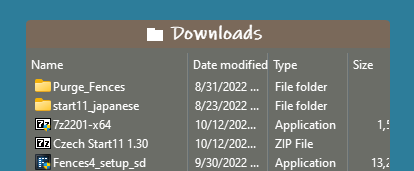
Is it possible to define a default view in folder portals? I'm sure that icons are great for content creators that want to see a thumbnail, but it's a pain for everyone that has multiple revisions of files. Has anyone found a way to lock detailed view (or apply to subfolders)?

Thanks!
5,473 views 3 replies
Reply #1 Top

Hello,
Yes, I remember seeing this same request multiple times. I have forward your request to the Stardock Support Team for their review and recommendations. Please keep an eye on this thread for any updates. We really do appreciate your feedback, Thanks

Basj,
Stardock Community Assistant.

Reply #2 Top


Hi!

I've seen questions/feature suggestions about this as early as 2016 about this, but I haven't found more information.

Is it possible to define a default view in folder portals? I'm sure that icons are great for content creators that want to see a thumbnail, but it's a pain for everyone that has multiple revisions of files. Has anyone found a way to lock detailed view (or apply to subfolders)?

Thanks!
End of quote

Hi pdoyon,

What version of Fences are you using? After you change the view on a folder portal it should stay that way.

Paul Scroggins
Associate Technical Support Analyst

Reply #3 Top

Using latest version 4.0.7.2

Setting the view only applies to the current folder within the portal, and not the portal itself.

For example, navigating to Purge_Fences (as per your example) would show thumbnails as default view. Once you set it as detailed, it will stay. However, every new folder will get thumbnail as default instead of being able to apply view to portal (current folder and every sub-folder).

I currently create a folder for every project (about 20 a week), and it is very frustrating to have to change the view manually.

At this point, I've just deactivated the navigation and use file explorer. Rendering Fences 4.0 as glorified desktop shortcut, which defeats its purpose. Luckily, my template folder doesn't change much and I get to navigate in it...