
Audio issues when secondary in battery mode

Multiplicity audio works very well with my Surface Go 3 as a secondary as long as it is being powered by AC charger. As soon as I unplug the charger the audio will eventually randomly cut off. Sometimes it returns and is then often out of sync. Toggling sending audio on the secondary can sometimes get the sound back for a while, but it's only then a matter of time until it cuts out again.

The Surface Go 3 is on Windows 11 and has this behavior both on wifi and ethernet connection. I've tried setting all multiplicity processes to priority high but it makes no difference. Power mode in Windows 11 can be toggled to recommended, better performance and best performance, all of which have the same issue with audio. Battery saver is turned off, while battery saver on increases mouse latency it has no really relevant impact that I can tell regarding how fast or often the audio will cut out.

It seems like battery mode, at least in Windows 11, doesn't play well at all with Multiplicity audio. Any idea why and what can be done to remedy this? Thanks!
5,436 views 6 replies
Reply #1 Top

Hello,
I have forward your problem/question to Stardock Support Team for their assistance. Please keep an eye on this thread for any updates. We appreciate your feedback and patience.

Basj,
Stardock Community Assistant

Reply #2 Top

Hello,

Sorry to hear you are having trouble.

I gather that the 'Secondary' \ Surface Go 3 in this is the Receiver, not the Sender, yes?

If you unmute the Sender:

so that Audio can be heard from it, does it still happen?

Sean Drohan
Stardock Product Lifecycle Manager

Reply #3 Top

Hi Sean,

No, in this case the Secondary is actually the Sender, sending audio to the Receiver Primary which is a stationary desktop computer.

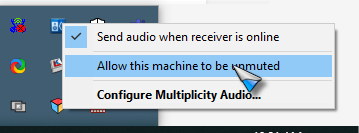
I just tried to set "Allow this machine to be unmuted" on the Sender (Surface Go 3) and thus far that seemed to have resolved the issue when Surface is on battery. I can also mute the audio on the Sender and it still hasn't cut out yet.

I will try it some more to make sure it doesn't cut out. Thanks!

Reply #4 Top

Quoting khaom, reply 3

Hi Sean,

No, in this case the Secondary is actually the Sender, sending audio to the Receiver Primary which is a stationary desktop computer.

I just tried to set "Allow this machine to be unmuted" on the Sender (Surface Go 3) and thus far that seemed to have resolved the issue when Surface is on battery. I can also mute the audio on the Sender and it still hasn't cut out yet.

I will try it some more to make sure it doesn't cut out. Thanks!
End of khaom's quote

The reason for unmuting the sender is to make Window believe it's actually using the hardware it's (normally not) sending to - a power-saving 'feature'.

Sean Drohan
Stardock Product Lifecycle Manager

Reply #5 Top

Quoting sdRohan, reply 4

The reason for unmuting the sender is to make Window believe it's actually using the hardware it's (normally not) sending to - a power-saving 'feature'.
End of sdRohan's quote

Hi Sean,

Ah, that does make sense.

Thank you for the help, I haven't had a single issue with random disconnects since!

 
Reply #6 Top
Quoting khaom, reply 5
Quoting sdRohan,

The reason for unmuting the sender is to make Window believe it's actually using the hardware it's (normally not) sending to - a power-saving 'feature'.

Hi Sean,

Ah, that does make sense.


Thank you for the help, I haven't had a single issue with random disconnects since!

End of khaom's quote

Pleased to hear it and thanks for the update.

Sean Drohan
Stardock Product Lifecycle Manager