
Bug report: Background display of fences is a complete mess

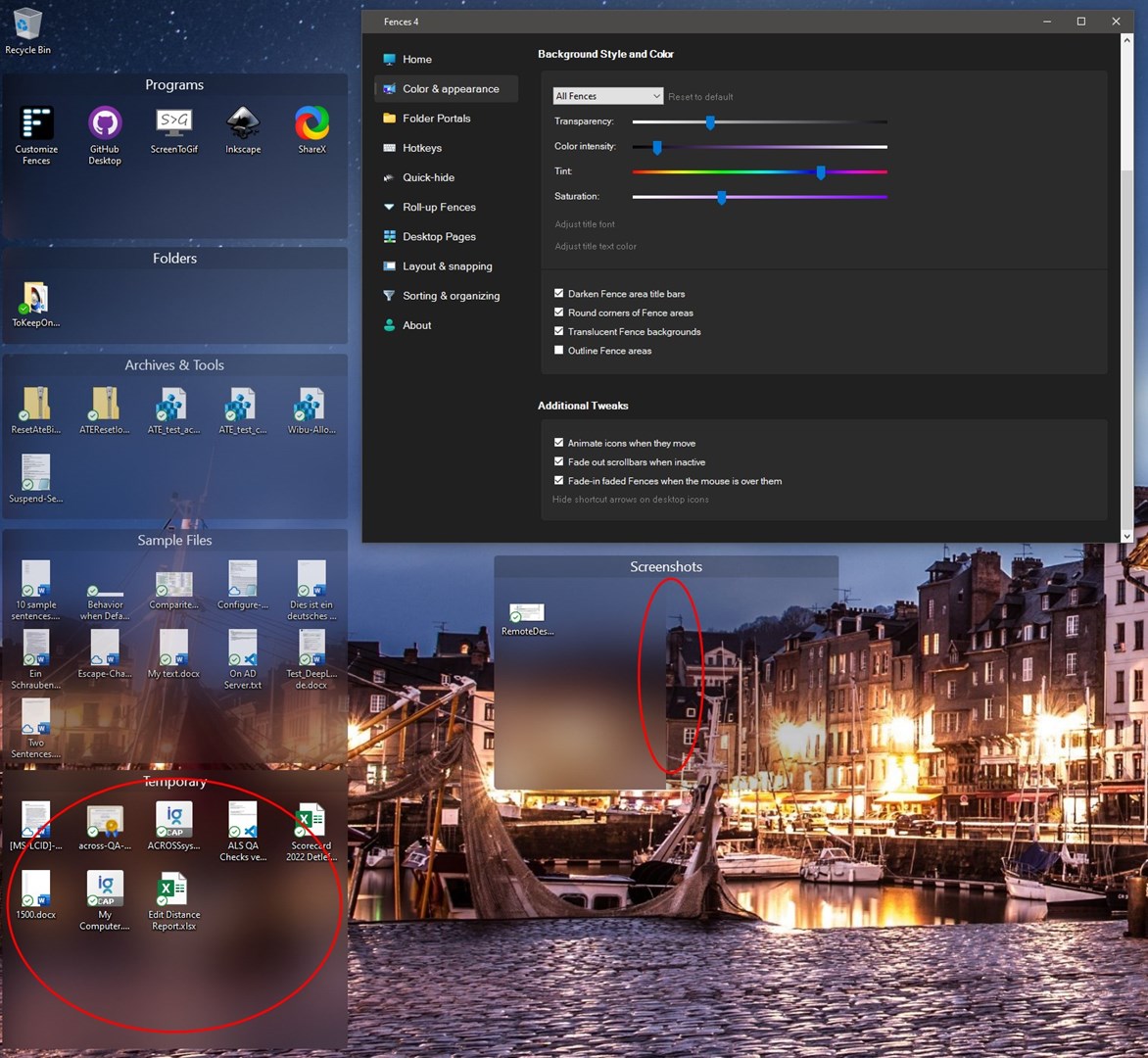
The Fence's on my desktop have different backgrounds, even thoughI  only have configured a global setting for all of them.

Some backgrounds are blurred, some are not. In one Fence even half of it is blurred, the other half is not

I'm running Fences 4.0.0.3 on Windows 11 with two-monitors connected. The monitor, fences are on, is set to use HDR.

Is there a way to repair this?

If not, it should be fixed in the software
6,305 views 6 replies
Reply #1 Top

Hello,
Sorry to hear you are having issues. Have you try Fences V 4.0.5.21? If not please do and report back. Also include more information on your system.

  1. Windows full version numbers.
  2. Monitors resolution and scaling etc.

Thanks
Basj,
Stardock Community Assistant.

Reply #2 Top

Hi Basj,

I updated to Fences 4.0.5.21, but the result is still the same.

Windows version (I'm actually on Windows 10 on this PC, I mixed PCs): 21H2 10.0.19044.1826

Screen 1 (no Fences on it): 2560 x 1600 at 150% (no HDR)

Screen 2 (with Fences on it): 3440 x 1440 at 100% (HDR enabled)

Reply #3 Top

Please try purge and reinstall steps as mention here : [Link]. Just make sure to redownload the latest version from your account page. Reboot after the purge. Reinstall and reboot again after the installation. Retest and report back here.

Thank you,
Basj,
Stardock Community Assistant.

Reply #4 Top

I did the re-install as described, and re-created the fences, I had in original screenshot.

Situation is better now, but still not correct.

The fences on the left column are now all looking good (all blurred)

The fence on the right column (named "Screenshot") still is half blurred, half transparent. The "border" between blurred and transparent is fixed on the screen, not on the fence. If I move the fence, the border remains at the same location relative to the screen.

If I move one of the other fences to the same horizontal location as "Screenshots" it also becomes half blurred and half transparent

Reply #6 Top

Hi Basj,

I'm sorry, but I'm not going to follow these steps. It's just too much efforts for me, creating additional account, fiddling around with Windows Services, etc. That's something that should happen in a software developer's test lab...

I prefer to live with it as it is now, or may try out some of the alternative tools...

You may consider this topic as closed.