Start11 v1.16

Hello

When I install Start11 version 1.16 and turn on 'Let Start11 enchance the taskbar' my taskbar icons disappear (the ones next to my start button).  What do I need to turn on to have these icons reappear?

I am running windows 11 Pro build 22572 release 22034-1536 and I have Fences v4.0.0.3 also installed on my PC.

Thanks Kevin

19,176 views 24 replies
Reply #1 Top

Hello,
Sorry to hear you are having issues. Need more information on that missing icons. What icons? Elaborate please. Or post a video on this issue will help us understand it better.

Thanks
Basj,
Stardock Community Assistant.

Reply #2 Top

Pre turning on 'Let Start11 enchance the taskbar' 

Post turning on 'Let Start11 enchance the taskbar' 


Reply #3 Top

Please try purge and reinstall steps as mentioned here: [link]. Just make sure to redownload the latest version from your account. Reboot after the purged. Reinstall, and Reboot again after the installation. Retest it. Report back here.

Thank you,

Basj,
Stardock Community Assistant

Reply #4 Top

Hi

I ran the Purge_StartALL.bat file, rebooted.

I ran the Start11_1.16-j140-Setup.exe file as admin, rebooted.

It then asked if I wanted advance taskbar features, I said yes, rebooted.

Same issue, icons disappear, taskbar goes from grey colour to dark black colour (as can be seen in the above screen shots).

Kevin

Reply #5 Top

It might because you're running Insider preview Build. Anyway, I have forward your problem/question to Stardock Support Team for their assistance. Please keep an eye on this thread for any updates. We appreciate your feedback and patience.

Basj,
Stardock Community Assistant

Reply #7 Top

Quoting basj, reply 3

Please try purge and reinstall steps as mentioned here: [link]. Just make sure to redownload the latest version from your account. Reboot after the purged. Reinstall, and Reboot again after the installation. Retest it. Report back here.

Thank you,

Basj,
Stardock Community Assistant
End of basj's quote

The Purge_StartALL.bat file caused me a lot of grief.

I downloaded the zip and extracted the bat file to a separate folder on a data only drive (E:\Temp)

I ran the bat file and it seemed to work in uninstalling beta Start11 (Start11_1.16-j140)

Problem is the bat file deleted all root files from my E:\ drive . No folders were affected.

I verified by reinstalling and running the purge bat file a second time


Reply #8 Top

Quoting bncz1, reply 7

The Purge_StartALL.bat file caused me a lot of grief.

I downloaded the zip and extracted the bat file to a separate folder on a data only drive (E:\Temp)

I ran the bat file and it seemed to work in uninstalling beta Start11 (Start11_1.16-j140)

Problem is the bat file deleted all root files from my E:\ drive . No folders were affected.

I verified by reinstalling and running the purge bat file a second time
End of bncz1's quote

Not sure what happened on your system. But, if you read the instruction, it said, save the file to desktop. And run from there.

Thank you,

Basj,
Stardock Community Assistant


Reply #9 Top

Quoting basj, reply 8


Quoting bncz1,

The Purge_StartALL.bat file caused me a lot of grief.

I downloaded the zip and extracted the bat file to a separate folder on a data only drive (E:\Temp)

I ran the bat file and it seemed to work in uninstalling beta Start11 (Start11_1.16-j140)

Problem is the bat file deleted all root files from my E:\ drive . No folders were affected.

I verified by reinstalling and running the purge bat file a second time


Not sure what happened on your system. But, if you read the instruction, it said, save the file to desktop. And run from there.

Thank you,

Basj,
Stardock Community Assistant


End of basj's quote

That may be true and yes I reinstalled Start11 and reran the bat file from the desktop and it seems to have worked OK.

I do feel strongly that what I did should NEVER delete all those root files. 

Not a happy user. 

Reply #10 Top

Quoting bncz1, reply 7

Problem is the bat file deleted all root files from my E:\ drive . No folders were affected.
End of bncz1's quote

That is completely bizarre...

The only ref to deletion of any files in a 'temp' directory is for a file it (the script) creates itself:

del %temp%\TEMPmessage.vbs
 
This version has it commented out (in two locations).  Does it still happen with it?

https://cdn.stardock.us/support/uploads/Purge_StartALLTest.zip

If so, are the removed files actually in your recycle bin?

Sean Drohan
Stardock Support Manager

+1 Loading…
Reply #11 Top

Hello

I reinstalled a different version of Windows 11 ... Windows 11 Pro version 10.0.22000 build 22000.

I ran the Purge_StartALL.bat file (from the desktop), rebooted.

I ran the Start11_1.16-j140-Setup.exe file as admin, rebooted.

It then asked if I wanted advance taskbar features, I said yes, rebooted.

Same issue, icons disappear (as per earlier screen shots above).

What should I try next?

Kevin


Reply #12 Top

Hello Kevin,

When you said "reinstalled" you mean reformat and do a fresh install of Windows 11? or?

Thank you,

Basj,
Stardock Community Assistant

Reply #15 Top

Quoting sdRohan, reply 10


Quoting bncz1,

Problem is the bat file deleted all root files from my E:\ drive . No folders were affected.


That is completely bizarre...

The only ref to deletion of any files in a 'temp' directory is for a file it (the script) creates itself:


del %temp%\TEMPmessage.vbs


This version has it commented out (in two locations).  Does it still happen with it?


https://cdn.stardock.us/support/uploads/Purge_StartALLTest.zip

If so, are the removed files actually in your recycle bin?

Sean Drohan
Stardock Support Manager

End of sdRohan's quote

There are no files in the recycle bin.

As I said before it is the root files in my E: drive that got deleted. I executed the purge bat from E:\Temp folder

Its as if a  Del E:\*.* command was executed

 I commented out several commands in the bat file and the problem does not happen. Everything between

::Remove program files and  :CLean start menu

   rem IF EXIST "%S11installpath64%\*.*" del "%S11installpath64%\*.*" /q

   rem   IF EXIST "%S11installpath64%" RMDIR "%S11installpath64%" /s /q

  rem IF EXIST "%S11installpath32%\*.*" del "%S11installpath32%\*.*" /q

  rem IF EXIST "%S11installpath32%" RMDIR "%S11installpath32%" /s /q

  rem IF EXIST "%S10installpath64%\*.*" del "%S10installpath64%\*.*" /q

  rem IF EXIST "%S10installpath64%" RMDIR "%S10installpath64%" /s /q

  rem IF EXIST "%S10installpath32%\*.*" del "%S10installpath32%\*.*" /q

  rem IF EXIST "%S10installpath32%" RMDIR "%S10installpath32%" /s /q

  rem IF EXIST "%S8installpath64%\*.*" del "%S8installpath64%\*.*" /q

  rem IF EXIST "%S8installpath64%" RMDIR "%S8installpath64%" /s /q

  rem IF EXIST "%S8installpath32%\*.*" del "%S8installpath32%\*.*" /q 

  rem IF EXIST "%S8installpath32%" RMDIR "%S8installpath32%" /s /q

  rem IF EXIST "%S10defultpath64%\*.*" del "%S10defultpath64%\*.*" /q

  rem IF EXIST "%S10defultpath64%" RMDIR "%S10defultpath64%" /s /q

  rem IF EXIST "%S10defultpath32%\*.*" del "%S10defultpath32%\*.*" /q

  rem IF EXIST "%S10defultpath32%" RMDIR "%S10defultpath32%" /s /q

  rem IF EXIST "%S8defultpath64%\*.*" del "%S8defultpath64%\*.*" /q

  rem IF EXIST "%S8defultpath64%" RMDIR "%S8defultpath64%" /s /q

  rem IF EXIST "%S8defultpath32%\*.*" del "%S8defultpath32%\*.*" /q

  rem IF EXIST "%S8defultpath32%" RMDIR "%S8defultpath32%" /s /q

::CLean start menu


Reply #17 Top

Quoting bncz1, reply 15

As I said before it is the root files in my E: drive that got deleted. I executed the purge bat from E:\Temp folder

Its as if a  Del E:\*.* command was executed
End of bncz1's quote

Did you somehow force the installation of Start11 to something other than:

C:\Program Files (x86)\Stardock\Start11

Sean Drohan
Stardock Support Manager

Reply #18 Top

Quoting sdRohan, reply 17


Quoting bncz1,

As I said before it is the root files in my E: drive that got deleted. I executed the purge bat from E:\Temp folder

Its as if a  Del E:\*.* command was executed


Did you somehow force the installation of Start11 to something other than:

C:\Program Files (x86)\Stardock\Start11

Sean Drohan
Stardock Support Manager

End of sdRohan's quote

No the install went smoothly with defaults . My suspicions were correct tho. I placed a few Pause commands in the purge bat and those commands that I mentioned previously are being interpreted as 

  Del E:\*.*

Ouch. I assume that if one downloads the purge zip to the Desktop and executes that way , it does use a Windows temp folder so no problem that way ? 

Reply #19 Top

Hello

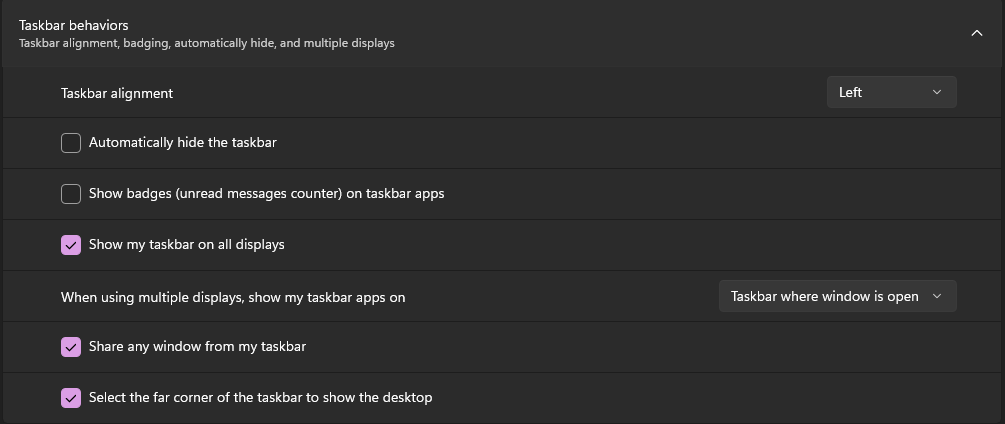
Sorted out my missing icons on the taskbar, needed to change option as per this attachment within Start11

And these setting in Personalization

Kevin

Reply #20 Top

Thanks! The Windows option "Show my taskbar on all displays" seems to be the culprit. The new taskbar does not work if that option is off.

Reply #21 Top

Quoting bncz1, reply 18

My suspicions were correct tho. I placed a few Pause commands in the purge bat and those commands that I mentioned previously are being interpreted as 

  Del E:\*.*
End of bncz1's quote

And if you echo %S11installpath64% prior to the pause, what is printed?

Sean Drohan
Stardock Support Manager

Reply #22 Top

Quoting sdRohan, reply 21


Quoting bncz1,

My suspicions were correct tho. I placed a few Pause commands in the purge bat and those commands that I mentioned previously are being interpreted as 

  Del E:\*.*


And if you echo %S11installpath64% prior to the pause, what is printed?

Sean Drohan
Stardock Support Manager

End of sdRohan's quote

The variable %S11installpath64% is well defined as C:\Program Files (x86)\Stardock\Start11

A problem is the other 9 variables are not defined such as  %S11installpath32% and %S10installpath64% etc

I think the real issue is where the purge bat file is run from. 

In my case I ran it from E:\Temp and the script tries to do a del "\*.*" 9 times , once for each undefined variable with E:\Temp as the active directory which ended up deleting about 15 files in the root of my E: drive.

However if the purge bat is run from the Desktop , the active directory becomes C:\Users\<profile name>\Desktop and the only file that it attempted to delete was something called C:\DumpStack.log

I have console logs from each run of the purge bat file if anyone is interested. 

Barry


Reply #23 Top
Quoting bncz1, reply 22
Quoting sdRohan,

Quoting bncz1,


My suspicions were correct tho. I placed a few Pause commands in the purge bat and those commands that I mentioned previously are being interpreted as 

  Del E:\*.*

And if you echo %S11installpath64% prior to the pause, what is printed?

Sean Drohan
Stardock Support Manager

The variable %S11installpath64% is well defined as C:\Program Files (x86)\Stardock\Start11

A problem is the other 9 variables are not defined such as  %S11installpath32% and %S10installpath64% etc

I think the real issue is where the purge bat file is run from. 

In my case I ran it from E:\Temp and the script tries to do a del "\*.*" 9 times , once for each undefined variable with E:\Temp as the active directory which ended up deleting about 15 files in the root of my E: drive.

However if the purge bat is run from the Desktop , the active directory becomes C:\Users\<profile name>\Desktop and the only file that it attempted to delete was something called C:\DumpStack.log

I have console logs from each run of the purge bat file if anyone is interested. 

Barry
 

End of bncz1's quote

Your time and testing are very much appreciated. 

As you might expect, that has been written by a few people over time (myself included) and it would appear an update is required.  I will make it a task for myself to clean it up.

I don't see Start11 on your account so I have added it to it as thanks. 

http://www.stardock.com/support/productkeyretrieval

Again, thanks for your time, bncz1.

Sean Drohan
Stardock Support Manager

+1 Loading…