Mulitpliocity 'Disconnected'

Process error: Path: error opening process

Long time user, since 2010. Went from Multiplicity Pro and upgraded to 2.0

Literally overnight MP stopped loading, icon is grey, in Process Explorer I get the same two errors for the following two processes:

Multipl2.exe and MPT2Control.exe: Path: error opening process

What I've tried(disabled all security software and Windows fw):

Uninstall and reinstall(with new download), failed, same error on same two processes

Uninstalled, deleted related folders, ran batch tool found here in forums, restarted and reinstalled, same errors on same processes

Uninstalled, deleted all related folders and registry points, restarted, reinstalled, same issue.

Uninstalled, deleted all related files, folders and registry points, restarted and used system restore, reinstalled, same issue on same two processes.


I'm out of my mind trying to figure out how to get it working, it loads on all three of my other systems, just the primary is wonky


I'm also a user of FencesPro, Start8, Start10

Any help would be greatly appreciated, thanks in advance.

10,317 views 22 replies
Reply #1 Top

Hello,

Sorry to hear you are having issues.

Multiplicity 3 is the latest version try that version https://www.stardock.com/products/multiplicity/

also FAQ section here https://forums.stardock.com/486104/multiplicity-support-faq

report back if you need further assistance .


AzDude
Stardock Community Assistant

Reply #2 Top

Quoting AzDude, reply 1

Hello,

Sorry to hear you are having issues.

Multiplicity 3 is the latest version try that version https://www.stardock.com/products/multiplicity/

also FAQ section here https://forums.stardock.com/486104/multiplicity-support-faq

report back if you need further assistance .


AzDude
Stardock Community Assistant
End of AzDude's quote

Thanks but I tried the newer version and ran into the same issue, the icon is faded and says "Disconnected."

I did as before, uninstalled all security software, uninstalled all related files, folders, registry entries, restarted and then reinstalled. No luck what so ever.

Any other suggestions or do I need to find another program? I don't mind spending the $40 if it works and supporting the company but I need it to work now as it has been for the last 10+ years.

Reply #3 Top

Quoting AzDude, reply 1

Hello,

Sorry to hear you are having issues.

Multiplicity 3 is the latest version try that version https://www.stardock.com/products/multiplicity/

also FAQ section here https://forums.stardock.com/486104/multiplicity-support-faq

report back if you need further assistance .


AzDude
Stardock Community Assistant
End of AzDude's quote

Well it's been over a week and no help, are there any other support options or am I looking for another program?

Reply #4 Top

Hello,

I have forwarded your report to the Stardock support team for their review and recommendations.

Please keep an eye on this thread for any updates.

We really do appreciate your feedback, thanks.

Reply #5 Top

Quoting AzDude, reply 4

Hello,

I have forwarded your report to the Stardock support team for their review and recommendations.

Please keep an eye on this thread for any updates.

We really do appreciate your feedback, thanks.
End of AzDude's quote

Thanks for your assistance

Reply #8 Top

Hello,

Sorry to hear you are having trouble.

What version of Windows (winver.exe) - post the screenshot of that, please.

Quoting TeMerc, reply 2

Thanks but I tried the newer version and ran into the same issue, the icon is faded and says "Disconnected."
End of TeMerc's quote

We can only work with a Multiplicity 3 install (on every device). 

While this is the most concerning:

Literally overnight MP stopped loading, icon is grey, in Process Explorer I get the same two errors for the following two processes:

Multipl2.exe and MPT2Control.exe: Path: error opening process
End of quote

Is the Multiplicity Service running?

If it is not running, right-click to start it.  If it is, proceed...

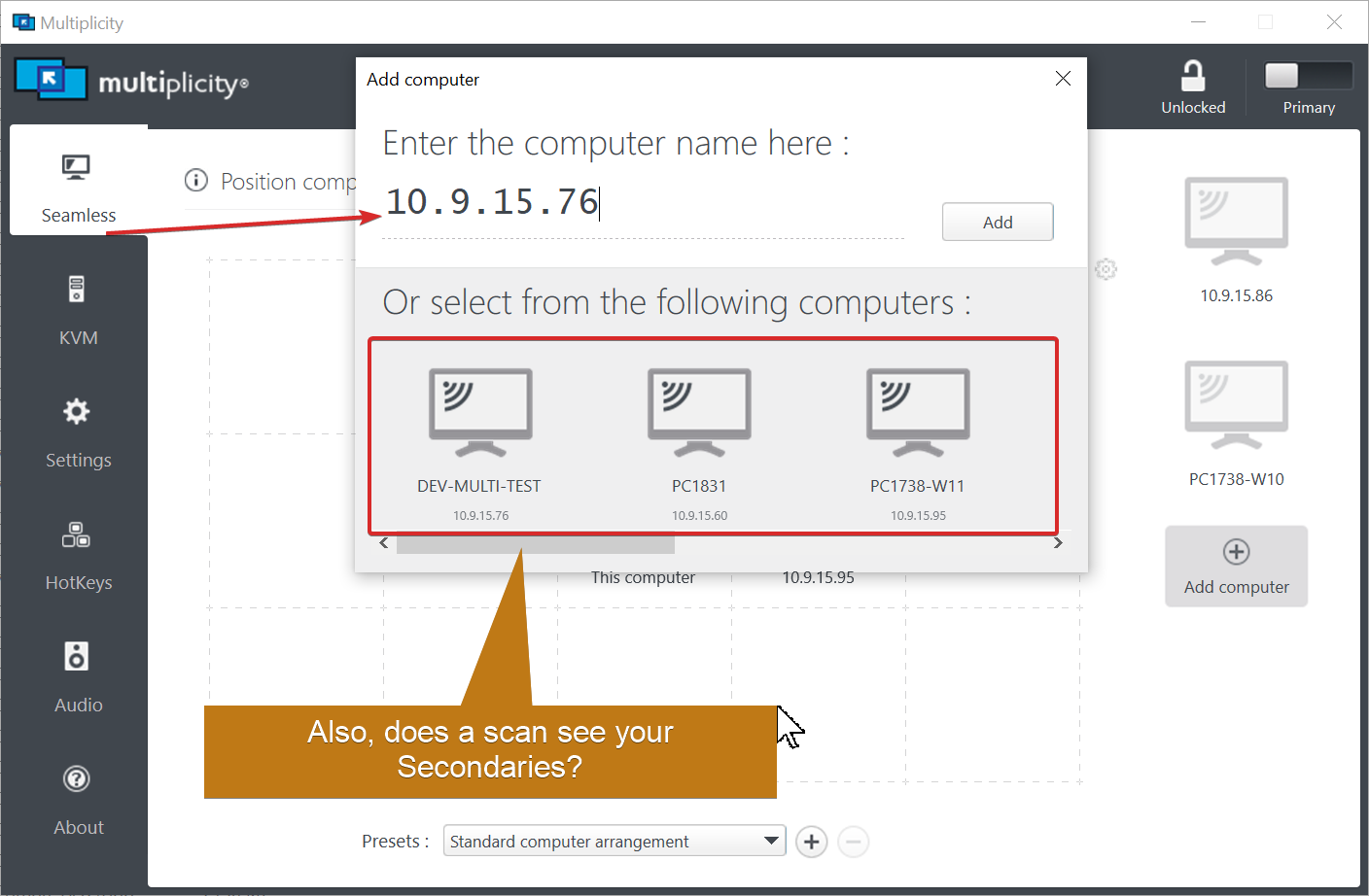
'Disconnected' only means it is not connected to any of the Secondaries.  What happens when you remove them (the Secondaries) and re-add them by IP, example:

Sean Drohan
Stardock Support Manager


Reply #9 Top

Quoting sdRohan, reply 8

Hello,

Sorry to hear you are having trouble.

What version of Windows (winver.exe) - post the screenshot of that, please.


Quoting TeMerc,

Thanks but I tried the newer version and ran into the same issue, the icon is faded and says "Disconnected."


We can only work with a Multiplicity 3 install (on every device). 

While this is the most concerning:


Literally overnight MP stopped loading, icon is grey, in Process Explorer I get the same two errors for the following two processes:

Multipl2.exe and MPT2Control.exe: Path: error opening process


Is the Multiplicity Service running?


If it is not running, right-click to start it.  If it is, proceed...

'Disconnected' only means it is not connected to any of the Secondaries.  What happens when you remove them (the Secondaries) and re-add them by IP, example:


Sean Drohan
Stardock Support Manager


End of sdRohan's quote

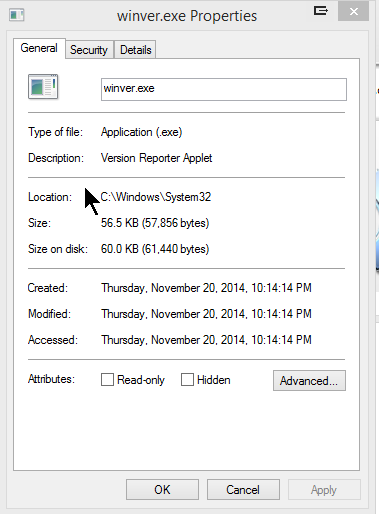
1- screenshot attachedwinver.exe

2- V 3 not installed on all systems yet. Will get to that.


3- Service is running

4- Yes, all other secondaries are seen both by name and IP, tried adding via IP and still no resolution, have removed and added them to primary.

Reply #10 Top

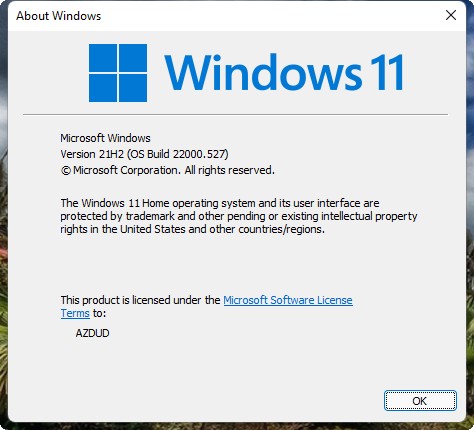
Your version of windows will look like this . Type in winver.exe in run 

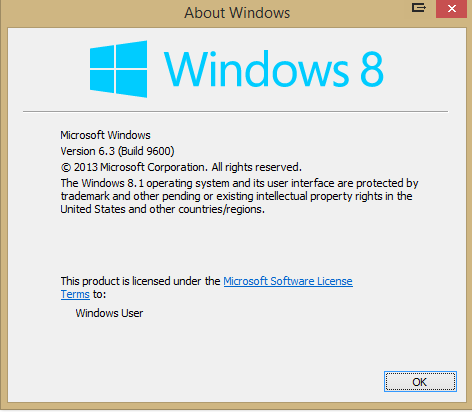
Please post your version - what you posted is not right .


Reply #11 Top

Quoting AzDude, reply 10

Your version of windows will look like this . Type in winver.exe in run 

Please post your version - what you posted is not right .


End of AzDude's quote

Reply #12 Top

Thanks for helping here, I installed the newly purchased license on all the other 3 systems, 2 systems recognized the upgrade and 2 do not, my license is supposed to be for 9 installs? 

I get he message that it is on another system and I need to buy another license? What am I missing, we're half way there. Both the other systems are W10.

Reply #14 Top

Quoting AzDude, reply 13

Hello,

Sorry to hear you are having issues.

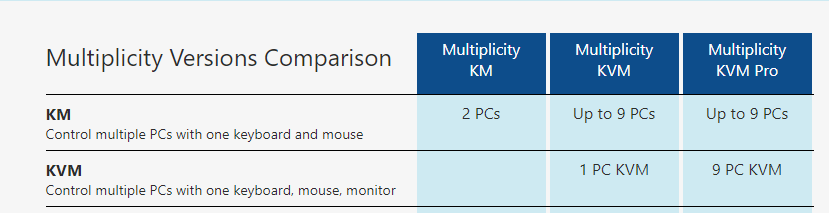
This link will explain what your options are for Lic. https://www.stardock.com/products/multiplicity/#comparison

What option did you by KVM or KVM Pro ?


AzDude
Stardock Community Assistant
End of AzDude's quote
As I said, I bought the one for 9 licenses or systems, Multiplicity KVM, on this page, which says it's good for 9 systems, paid $39.95:

Multiplicity | Software KVM Switch | Stardock


Reply #15 Top

Hello,

I have forwarded your report to the Stardock support team for their review and recommendations.

Please keep an eye on this thread for any updates.

We really do appreciate your feedback, thanks.

Reply #16 Top

Quoting TeMerc, reply 14

As I said, I bought the one for 9 licenses or systems, Multiplicity KVM, on this page, which says it's good for 9 systems, paid $39.95:
Multiplicity | Software KVM Switch | Stardock
 
End of TeMerc's quote

AzDude sending you this is relevant:

https://www.stardock.com/products/multiplicity/#comparison

Your Multiplicity 3 KVM purchase allows for:

1 Primary PC (the controller) and up to 8 Seamless PC and 1 concurrent KVM (remote) connection.

KVM Pro would allow for the same Seamless count but up to 8 concurrent KVM connections as well.

What is constant for all of them is that there is only 1 'license' for a Primary.  If you need more than 1 Primary per license, there is a corp 'single key \ multiple activation' option.

https://store.stardock.com/corporatepricing

Sean Drohan
Stardock Support Manager

Reply #17 Top

Quoting sdRohan, reply 16


Quoting TeMerc,

As I said, I bought the one for 9 licenses or systems, Multiplicity KVM, on this page, which says it's good for 9 systems, paid $39.95:
Multiplicity | Software KVM Switch | Stardock


AzDude sending you this is relevant:

https://www.stardock.com/products/multiplicity/#comparison


Your Multiplicity 3 KVM purchase allows for:

1 Primary PC (the controller) and up to 8 Seamless PC and 1 concurrent KVM (remote) connection.

KVM Pro would allow for the same Seamless count but up to 8 concurrent KVM connections as well.

What is constant for all of them is that there is only 1 'license' for a Primary.  If you need more than 1 Primary per license, there is a corp 'single key \ multiple activation' option.

https://store.stardock.com/corporatepricing

Sean Drohan
Stardock Support Manager

End of sdRohan's quote
Sorry, what am I missing here? I have one system which is the 'Primary', I have 4 other systems, of which currently I can control only two(2 desktops, directly wired with ethernet cables), two laptops, connected to my wi-fi which I get the previously described message on. 

Are these laptops not considered part of the package of nine? My set up is as depicted in my profile pic, adding one laptop as there is only one in that pic.

I had no trouble controlling all of them for years before with the previous license, excluding the second laptop which was added back in December, then over night a few weeks back I had issues altogether. So I figured let me buy another license and now I can't control even what I had controlled before? Seriously?

Please advise, thanks.

Reply #18 Top

I think you are confusing what is controlled ('Diconnect' message) vs what is controllable (Licensing).  

You are never going to get a 'Disconnected' message because of what product version you own.  What made me point out the versioning is when you said this:

Quoting TeMerc, reply 12

I get he message that it is on another system and I need to buy another license?
End of TeMerc's quote

Again, licensing (what that message is about) and the 'Disconnected' have nothing to do with each other.

To fix the 'buy another license' message would mean you understand that you can only ever have 1 Primary PC per license and that you only use one Primary.  If you need two Primary PCs, you need two licenses.

If you only need the 1 Primary, follow what the message says to deactivate any old Primary so the new one can be activated.  That 1 KVM Primary license (that you own) can then control 8 Seamless PCs and 1 concurrent KVM (remote) PC.

Sean Drohan
Stardock Support Manager

Reply #19 Top

Quoting sdRohan, reply 18

I think you are confusing what is controlled ('Diconnect' message) vs what is controllable (Licensing).  

You are never going to get a 'Disconnected' message because of what product version you own.  What made me point out the versioning is when you said this:


Quoting TeMerc,

I get he message that it is on another system and I need to buy another license?


Again, licensing (what that message is about) and the 'Disconnected' have nothing to do with each other.

To fix the 'buy another license' message would mean you understand that you can only ever have 1 Primary PC per license and that you only use one Primary.  If you need two Primary PCs, you need two licenses.

If you only need the 1 Primary, follow what the message says to deactivate any old Primary so the new one can be activated.  That 1 KVM Primary license (that you own) can then control 8 Seamless PCs and 1 concurrent KVM (remote) PC.

Sean Drohan
Stardock Support Manager

End of sdRohan's quote

Ok, let me see if I understand, before the glitch I had one primary system that controlled 3 others, 2 desktops and one laptop, connected wirelessly.

After glitch, I buy another license, hoping the newest version will fix it(didn't mind spending the money used the software for a long time and it worked great, no complaints). It does not fix anything, instead now I have control of two less systems after having spent money to control up to 9 systems as described on your page?  Literally nothing changed(all systems were exactly as they had been for years) other than me spending money for another license, I had control of 4 systems(same primary system) after adding the second laptop back in December.

Is that about right?

Reply #20 Top

Quoting TeMerc, reply 19

Is that about right?
End of TeMerc's quote

No, as I believe you are still mistakenly conflating the 'Disconnected' message with what is possible to control. 

'Disconnected' on a Primary only means that it is not currently connected to any Secondary PCs - not that it could not if it could see them.

You own 1 Multiplicity 3 KVM license. That allows for you to connect to:

  • 8 Seamless (local) PCs concurrently
  • 1 KVM (remote) PC

If it is the 'Disconnected' issue you are trying to solve, please see:

https://forums.stardock.com/486104/multiplicity-support-faq#connectionissues

If you want to burn it all down and start from scratch (not a bad idea), please do this on all the MP PCs:

https://forums.stardock.com/486104/multiplicity-support-faq#reinstalling

Sean Drohan
Stardock Support Manager

Reply #21 Top

Quoting sdRohan, reply 20


Quoting TeMerc,

Is that about right?


No, as I believe you are still mistakenly conflating the 'Disconnected' message with what is possible to control. 

'Disconnected' on a Primary only means that it is not currently connected to any Secondary PCs - not that it could not if it could see them.

You own 1 Multiplicity 3 KVM license. That allows for you to connect to:


    • 8 Seamless (local) PCs concurrently


    • 1 KVM (remote) PC


If it is the 'Disconnected' issue you are trying to solve, please see:

https://forums.stardock.com/486104/multiplicity-support-faq#connectionissues

If you want to burn it all down and start from scratch (not a bad idea), please do this on all the MP PCs:

https://forums.stardock.com/486104/multiplicity-support-faq#reinstalling

Sean Drohan
Stardock Support Manager

End of sdRohan's quote

Perhaps I wasn't clear, the 'disconnected' issue is resolved on the Primary system(that as the only system showing that message), it's the two laptops which won't get detected by the primary system to control when it scans for systems to add.

Sorry if that wasn't clear.

Reply #22 Top

Quoting TeMerc, reply 21

, it's the two laptops which won't get detected by the primary system to control when it scans for systems to add.
End of TeMerc's quote

Then that is a 'connection' issue, not a licensing one.

As detailed in the connection link I sent you, there are lots of things that can contribute to the Primary not seeing a Secondary - please work through it and let us know.

Sean Drohan
Stardock Support Manager