
Multiplicity Pro 1.21 on Win10?

I have a licensed copy of Pro 1.21 which I've used successfully on XP, Vista and 7. However when I tried to set up on upgraded to Win10 (same computers), the mouse pointer disappears from both primary and secondary upon switch. Keyboard has switched and operates secondary, but only way pointer becomes visible again is to use the secondary mouse to make it reappear, put over against switching edge (twice) and then pulling it back with primary mouse to primary's screen.

So... thought I'd try looking for updated version and found Multiplicity3_setup listed as an updated version for download - nothing specified about whether licensing transferred/applied from previously installed and licensed Pro 1.21. Installer refused to allow to specify/change install directory, which I would have done... but installed anyway, and license scheme has apparently changed and certainly didn't automatically recognize previous licensed version. Nor does website recognize any license for new version, but does acknowledge and recognize 1.21.

So... now 2 questions... first can 1.21 be made to work with Win10? (note: install and finding secondary went off cleanly and keyboard switch aspect seems to work. Mouse seems to be the problem) (note: current version - in 30 day trial mode at moment - seems to work fine all the way around - no mouse or keyboard issues... so probably not a resource or connection issue)

2nd question... does 1.21 Pro license carry forward to current version? If not, is there a version it does carry forward to that works with Win10. Or am I stuck with buying another license to use Multiplicity with Win10?

6,628 views 10 replies
Reply #1 Top

Hello,
I have forward your problem/question to Stardock Support Team for their assistance. Please keep an eye on this thread for any updates. We appreciate your feedback and patience.

Basj,
Stardock Community Assistant

Reply #2 Top


I have a licensed copy of Pro 1.21 which I've used successfully on XP, Vista and 7. However when I tried to set up on upgraded to Win10 (same computers), the mouse pointer disappears from both primary and secondary upon switch.
End of quote

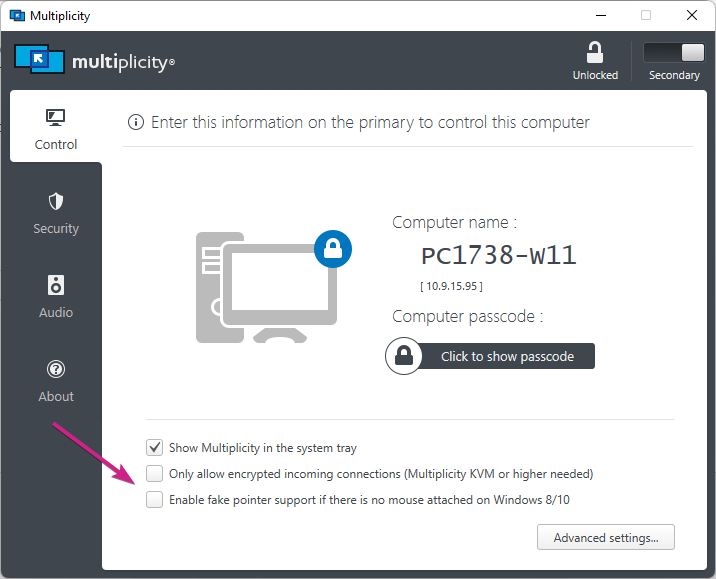
That is what this option is for in Multiplicity 3:


So... now 2 questions... first can 1.21 be made to work with Win10?
End of quote

It was never tested not should it be considered compatible.

does 1.21 Pro license carry forward to current version? If not, is there a version it does carry forward to that works with Win10. Or am I stuck with buying another license to use Multiplicity with Win10?
End of quote

It does not.  You an upgrade here:

https://www.stardock.com/products/multiplicity/

Sean Drohan
Stardock Support Manager

Reply #3 Top

What is the policy on license upgrades? If I spend the money on license for current version, what are the expectations I should have going forward as you release updates? What if I go to Win11 in near future, will that be another upgrade and another license? Do you have this info posted somewhere?

Also, I get you've never tested 1.21 with Win10, but have you had any of your users report issues or making it work with Win10?

Thanks,

Reply #4 Top

Ok... I found your policy re updates/upgrades which boils down to my license should work for any 1.x version but not 2.x or 3.x

So... What is the last 1.x version and how can I download that? I saw reference to 1.26 in forum but not sure if that is last 1.x version or not.

Your policy page also mentions possible discount for previous version upgrade to current version scenario... How do I find out about doing that?

Reply #5 Top

Quoting thodydanny, reply 4

So... What is the last 1.x version and how can I download that? I saw reference to 1.26 in forum but not sure if that is last 1.x version or not.
End of thodydanny's quote

Any version you own would be on your account page:

https://store.stardock.com/myaccount/products

http://www.stardock.com/support/productkeyretrieval

Quoting thodydanny, reply 4

Your policy page also mentions possible discount for previous version upgrade to current version scenario... How do I find out about doing that?
End of thodydanny's quote

There is not currently an 'upgrade' option for prior versions, rather, for version 3 from KM, KVM, KVM Pro listed here:

https://www.stardock.com/products/multiplicity/

Sean Drohan
Stardock Support Manager

Reply #6 Top

You didn't answer the question I asked...

What is the last version of 1.x

and Where can it be downloaded from?

I'm not trying to obtain my current product nor product key, though in fact - neither show up on the account page, though the account history indicates it will show recent purchases... (I doubt 2007/2008 qualifies as recent). However, I have 1.21 and the activation information for it. And your site recognizes my 'then' email address as a valid purchaser when I went through the activation process on Win10 for 1.21. Again, I have the info to activate presumably any 1.x version... I just am hoping to get and test the latest 1.x version, which according to your support info, I should be entitled to as a 1.x license holder.

Since I am seamlessly switching from just one PC to another there appears to be NO reason for me to upgrade from KV to KVM where monitor would be included in switching or more PC's would be supported. However, as the ONLY reason for upgrading from 1.x to 3.x would be Win10 compatibility, and your site specifically talks about a discount for version transition discount, I inquired how to go about getting what you advertised was available...

I'd like to at least try the latest version of 1.x against Win10 before being stuck with choice to pay for another license or do without. And clearly there are versions of 1.x beyond 1.21 which is the one I have a copy of.

Thanks,

Reply #7 Top

Quoting thodydanny, reply 6

What is the last version of 1.x

and Where can it be downloaded from?
End of thodydanny's quote

I don't recall what the last version was off hand (it was over a decade ago) - its why I told you that whatever it was, it would be on your account page if you had purchased 1.x as the latest is always there for any main version.

Since you have no products under the account you are posting under, I cant check it - I don't know what your old email address is.

That all said, there is no reason to believe that any 1.X version will resolve the issue you are having - again, two full Windows versions have been released since that version of Multiplicity was offered and two full versions of Multiplicity have followed as well.

If you want to merge any old email address with your new one, please use this form to do so:

https://stardock.atlassian.net/servicedesk/customer/portal/4/group/14/create/10142

Please do not post your email address here.

Quoting thodydanny, reply 6

However, as the ONLY reason for upgrading from 1.x to 3.x would be Win10 compatibility
End of thodydanny's quote

That is certainly not the only reason.  Both Windows and MP have changed a great deal over the last 12+ years. 

Quoting thodydanny, reply 6

your site specifically talks about a discount for version transition discount, I inquired how to go about getting what you advertised was available...
End of thodydanny's quote

Can you post a link to where it reads there is a discount from going from a prior major version of MP (1.x, 2.x, etc) to another? I am not saying that a discount cannot be had, I am just not aware of anything we present that reads as such.

Sean Drohan
Stardock Support Manager


Reply #8 Top

Thanks for the info...

I'd still like to see what happens in Win10 with the last 1.x version. I note with interest that the issue I describe is mentioned in forums as occurring with a 3.x earlier version, so... maybe, who knows until you try...

I've been able to make quite a few things that were designed for XP or even earlier work fine in Win10.

I have utilized the link re providing my old email address that activation of 1.21 was linked to.

I'll clarify that it was my only reason for considering upgrade - since the features in 1.21 provided all that I was looking for in this area and worked well in XP, Vista and 7 for the purposes I was using it for, but it doesn't function in Win10.

https://www.stardock.com/support/maintenance

is the link you requested and below is the relevant provision highlighted by me.

New Version Product Releases

New version product releases will be designated by an increase in the top level release version number. For example, when product version 2.xx has a version upgrade the new version number would be 3.xx. New version product releases must be purchased. Discounted upgrade pricing may be available to owners of previous version levels.

Reply #9 Top

Sean,

Thanks for merging my accounts, the process worked in that I was able to download 1.26, which I presume to be the last 1.x version. I've yet to try it out, but intend to soon. Will post back here if I have success with it working on Win10.

Since I've started a 30 day trial of current version, I'm curious what happens if I uninstall it, try 1.26 and then end up reinstalling... will the 30 day trial expire on the same time as it was going to if I'd done nothing? Will it continue to be useable at all?

Thanks,

Reply #10 Top

Quoting thodydanny, reply 9

Since I've started a 30 day trial of current version, I'm curious what happens if I uninstall it, try 1.26 and then end up reinstalling... will the 30 day trial expire on the same time as it was going to if I'd done nothing? Will it continue to be useable at all?
End of thodydanny's quote

It would be useable still, yes.

Sean Drohan
Stardock Support Manager