Icons not moving when next desktop comes

https://1drv.ms/v/s!AsSAqqbI6b3Xg4dh2YxFVugtTnCjWg?e=qsRxcS

Icons on the original desktop do not move when I drag in icons from another desktops. The following link is to a video that clearly shows the problem. Have reinstalled the program but that did not solve the issue. Grateful for a fix.

https://1drv.ms/v/s!AsSAqqbI6b3Xg4dh2YxFVugtTnCjWg?e=qsRxcS


8,700 views 9 replies
Reply #1 Top

Hello,
Sorry to hear you are having issues. Is those icons inside an invisible Fences?

Thanks
Basj,
Stardock Community Assistant.

Reply #3 Top

Please try purge and reinstall steps as mentioned here: [link]. Just make sure to redownload the latest version from your account. Reboot after the purged. Reinstall, and Reboot again after the installation. Retest it. Report back here.

Thank you,

Basj,
Stardock Community Assistant

Reply #4 Top

I have purged but not reinstalled because the problem has worsened. Click link below to see photo. If I r/click an empty spot on the desktop > view > uncheck ‘show icons’ = I get the desktop as it was before the issue, but all icons are frozen, nothing works and nothing can be deleted or moved. If I recheck ‘show icons’ I get double images as per the photo. The top icon in each double image works as usual - that is, the top icon can be opened moved or deleted.


https://1drv.ms/u/s!AsSAqqbI6b3Xg4dkcUel8qfhWDO5Qw?e=Y31ABz

Reply #5 Top

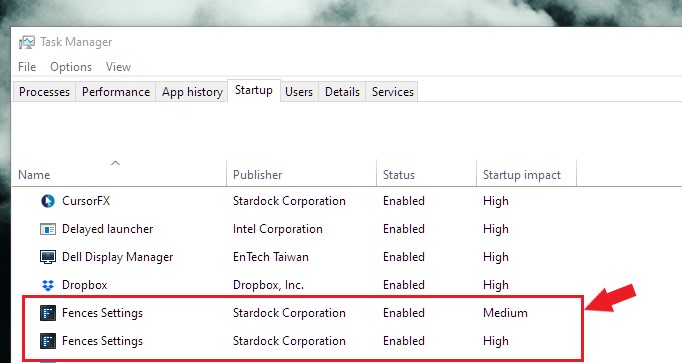
If you already done the purge and it still is happening. Than check if Fences still loading at boot. Check your task Manager->Startup and see if Fences still listed there. If it is still there and Startup is enable. Disable it on both Fences startup. Reboot. Do the purge again if neccessary. Than report back here.

Thank you,

Basj,
Stardock Community Assistant

Reply #6 Top

This is B_e_n. talking with ‘basj’. I have checked startup in Task Manager. I added the startup columns titled ‘running now’ and ‘command line’. There is nothing running in startup from Fences. Also, all command lines do not show anything from Fences. 

I also checked C drive for traces left after the purge. I removed (but archived) the contents of 2 leftover folders - one in 'Local and the other in 'Roaming.'  (The Local folder contained the SasLog.txt. The Roaming folder contained both 'Backups' and ''TroubleshootingLog_old' files. The Backups subfolder contained screen snapshots and XML files.) All folders were emptied before I restarted my PC. But the issue remains. I checked the folder after restart. They were still empty.

Reply #7 Top

Hey Ben,

If Fences is already not in your system except the saved layout snapshots than if the issue still happening, that is showing that the issue is not due to Fences. Please check if you have a corrupt system or there is something else is causing it.

To check, 

Please try the following:

-For Win8/10 Users: Open the Start Screen, and type 'cmd'. Right-click on the search result and select 'Run as administrator' from below.

-For 7 Users: click Start, in the start search field type 'cmd'. Right-click on the search result and select 'Run as administrator'.

-Type: sfc /scannow

-Wait for the scan to complete (this can take several minutes)

Some help on how this looks should you need it:

https://support.microsoft.com/en-us/help/929833/use-the-system-file-checker-tool-to-repair-missing-or-corrupted-system

If the SFC finds errors, but cannot fix them, please also run the following command in the same command prompt window:

dism.exe /online /Cleanup-Image /RestoreHealth

Some help on how this looks should you need it:

https://www.windowscentral.com/how-use-dism-command-line-utility-repair-windows-10-image

The above command should assist with replacing any damaged or problematic system files. Please note, however, since it may require restoring certain files, this process can take some time and you will need to be patient until it has completed.

Please let me know whether this resolves your problem or if you have any additional questions.


Once that is done, do the Cleanboot : https://forums.stardock.com/486084/fences-support-faq#cleanboot


Thank you,

Basj,
Stardock Community Assistant

Reply #8 Top

Thanks for that.

SFC Scannow was OK, but DISM delivered an error: -


C: \WINDOWS\system32>dism.exe /online /C1eanup-Image

Deployment Image Servicing and Management tool

Jersion: 10.0.19041.844

Image Version: 10.0.19043.1348

Error: 87

an error occurred while processing the command.

Ensure that the command -line arguments are valid. For more information,

The DISM log file can be found at C: \WINDOWS\Logs\DISM\dism.log

review the log file.


The log is available via the following link

https://1drv.ms/u/s!AsSAqqbI6b3Xg4dlsdrrif9Wa-wUOw?e=Z44I01


Grateful for advice

Reply #9 Top

If there is an error from DISM command with /restorehealth mean that DISM cannot do the restore health part. Than you will need to do the suggested option in that link I provided above : https://www.windowscentral.com/how-use-dism-command-line-utility-repair-windows-10-image. or Do a new clean install of Windows.

Thank you,

Basj,
Stardock Community Assistant