Loss of mouse and keyboard on primary computer

Morning,


I am on the trial version of Multiplicity.

I initially downloaded it the other week and added just a single secondary machine then a second.


Today I added 3 more however I have total loss of my keyboard and mouse on my primary machine


The only thing I can do is CTRL ALT DELETE but then I cannot navigate the Task Manager and have to press the power button to shut down


This happens when I am connect to just one machine


I have now unloaded it but I was at the point where I liked it enough that I had decided that I would buy it


Hopefully this can be resolved


I am running Windows 10 Pro 21H1

I5-8600 with 8Gb RAM but am going to upgrade


Thanks in advance


Steve

4,616 views 8 replies
Reply #1 Top

Hello,
I have forward your problem/question to Stardock Support Team for their assistance. Please keep an eye on this thread for any updates. We appreciate your feedback and patience.

Basj,
Stardock Community Assistant

Reply #3 Top

Quoting steve299, reply 2

Hi 

Even having it running causes the problem 

Steve
End of steve299's quote

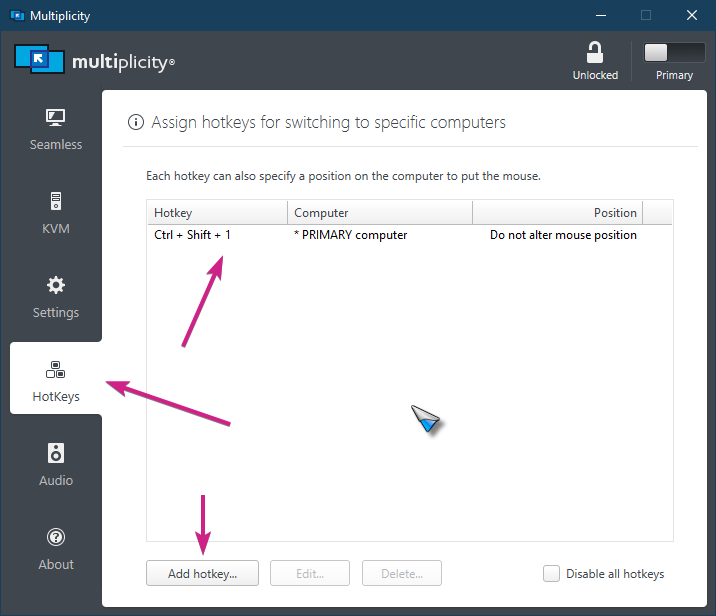
Are you certain the cursor is not actually on the PC you 'Seamlessly' connected to at the time?  That is how a Seamless connection works, that you can move your cursor to the other connected PC.  An easy way to get it back is to create a hotkey to the Primary PC, for example:

If that is not it, that you totally lose the cursor no matter what:

  • Are you using any software to change the cursor
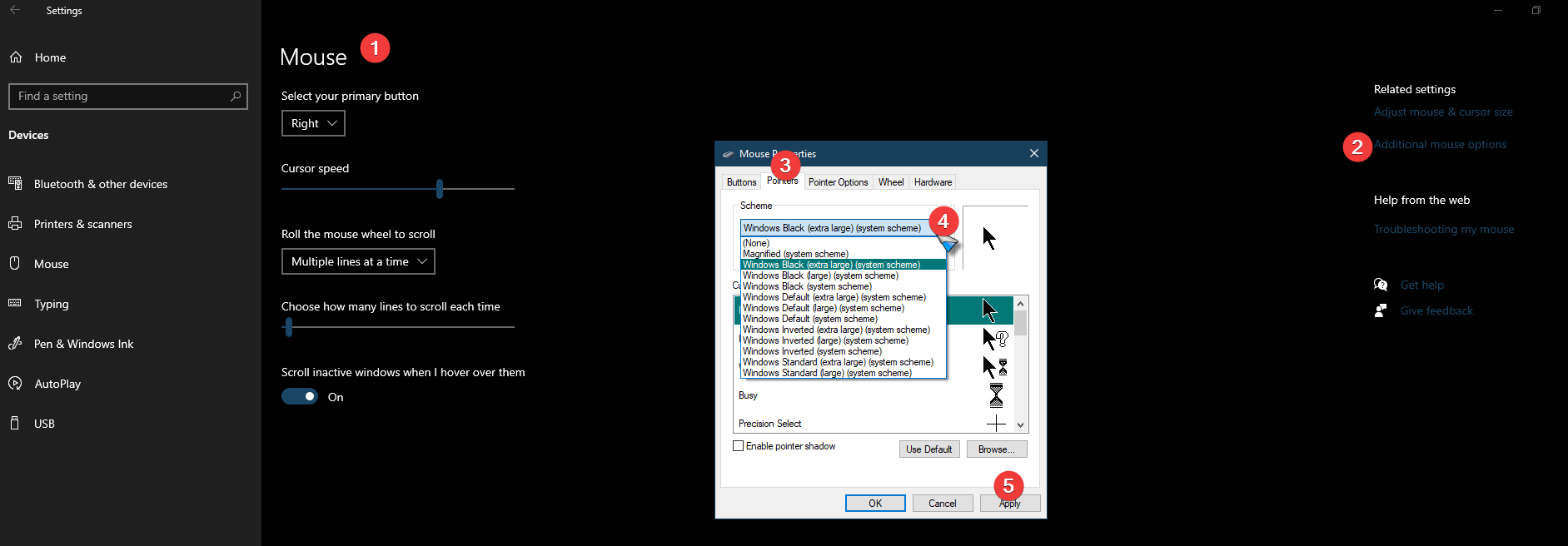
  • Does changing the schema do anything to solve it, example:

Sean Drohan
Stardock Support Manager

Reply #4 Top

Hi


So we do not have any cursor changing software and I changed the Schema but the same problem


I have found out that it is connecting to the secondary machine automatically upon launch.

However, we did not realise as moving the mouse does not move the mouse on the secondary however when I did a CTRL ALT DEL I had to do it twice and discovered that one of my secondary machines had TASK MANAGER running which the user did not initiate.


I have now added a hotkey and so far, nothing has happened

I could not find a setting that automatically connects to a secondary computer upon launch. Is there one

I would not expect it to do that automatically


Steve

Reply #5 Top

Hello again,

So it is connecting randomly

I now use the hot keys to disconnect but a few minutes later it reconnects


is this supposed to work like this?


Steve


Reply #6 Top

Quoting steve299, reply 5

I now use the hot keys to disconnect but a few minutes later it reconnects


is this supposed to work like this?
End of steve299's quote

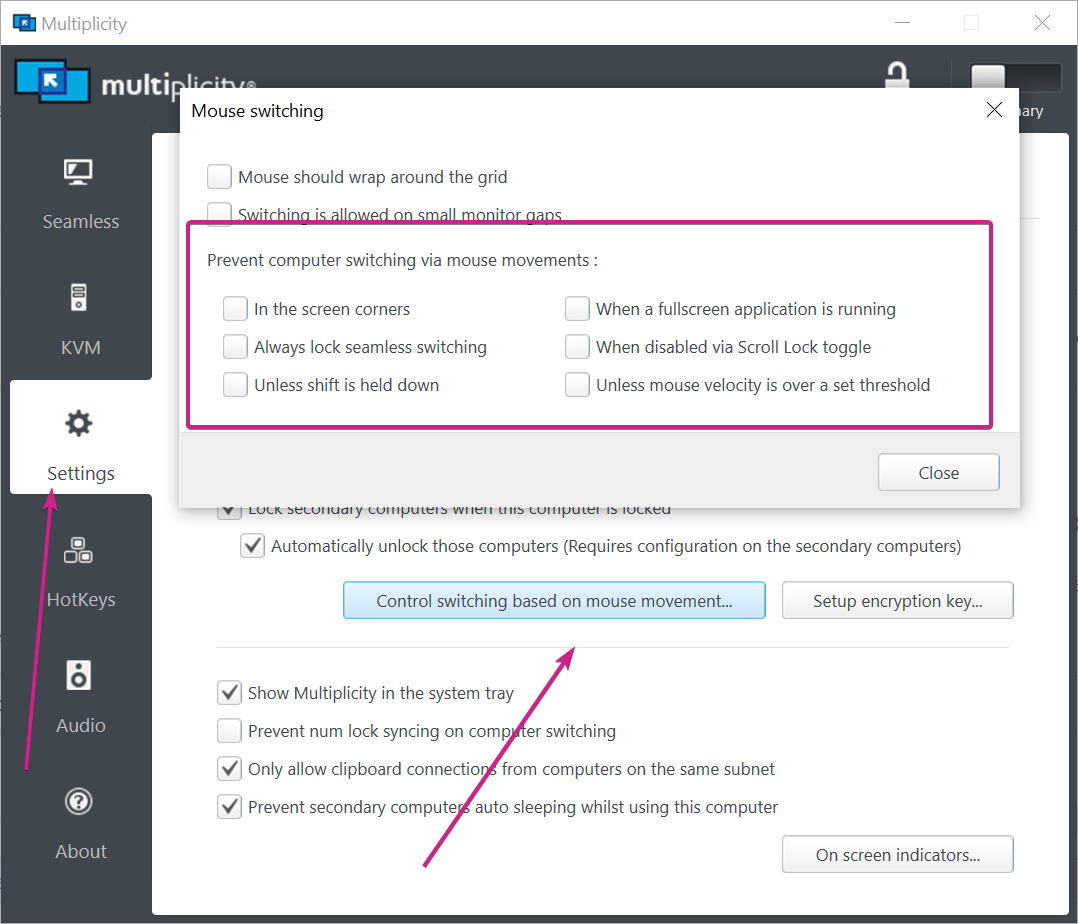
For Seamless connections, yes, it is always connected (and should be).  You can stop the cursor from moving to the Secondary unintentionally if that is indeed the issue (you have not said if it is):

Sean Drohan
Stardock Support Manager

Reply #7 Top

The application is minimised in the notification area and is not on the screen at the time
Are you suggesting that even with it minimised it activates?


This did not happen when I just had 2 secondaries but now that I have added 4 more it does


I will check tomorrow


Steve

Reply #8 Top

Quoting steve299, reply 7

The application is minimised in the notification area and is not on the screen at the time
Are you suggesting that even with it minimised it activates?
End of steve299's quote

If you ever believed that the MP UI needed to be open with focus for Seamless connections to work (not KVM connections mind you), you have had a fundamental misunderstanding of how it function(ed / s).

Seamless connections (again, not to be confused with remote KVM connections in MP KVM and MP KVM Pro), once made in the MP UI, are always active or 'connected'. This may help:

https://forums.stardock.com/486104/multiplicity-support-faq#seamlesskvm

Sean Drohan
Stardock Support Manager