Unlocking password reset

Would anybody know why the Multiplicity automatic unlocking password stops working?  It happens constantly.  To fix it I go into the secondary computer and set the automatic unlocking password which allows the automatic unlock to work for about 4-12 hours then it stops working again and I have to set it again.  It's almost like it's not saving it.  I tried running the configuration tool (used to set the password) as admin but that doesn't seem to make any difference.

The secondary computer (a laptop) does not go to sleep or power off during the aforementioned 4-12h period.  It sits at my desk powered on the whole time.  At the end of the day, I put the secondary computer to hibernate then it's powered up the next day and back to work.  It's not like it's rebooting or shutting down every day.  I only shut it down over the weekends or reboot for updates. 

It's annoying to have to go in and set the password all the time.  Any ideas?

FYI - I'm using a KVM Pro license.

6,248 views 8 replies
Reply #1 Top

Hello,

I have forwarded your report to the Stardock support team for their review and recommendations.

Please keep an eye on this thread for any updates.

We really do appreciate your feedback, thanks.

Reply #2 Top

This is a shot in the dark but do you have Window Controlled Folder access on?  If so, and as a test, turn it off:

https://support.microsoft.com/en-us/windows/allow-an-app-to-access-controlled-folders-b5b6627a-b008-2ca2-7931-7e51e912b034

Sean Drohan
Stardock Support Manager

Reply #3 Top

Hello.  I checked and controlled folder access is turned off on my computer.

For whatever reason, my secondary computer is unlocking today when I unlock my primary but I haven't re-set the password on the secondary like I normally would.  Yesterday the automatic unlocking on the secondary wasn't working.  It's very unpredictable.

I know the two computers are connected via Multiplicity when I begin logging into my primary computer since I'll see the prompt on the screen and I have mouse and keyboard control of both computers.

It's almost as if I unlock the primary computer but the secondary doesn't get the message that it should unlock now but I have no way of verifying this.

Reply #4 Top

Just so you know, the option in MP is only to unlock the Secondary if its already been booted and logged into a user.  If the Secondary is just coming off a boot (no user logged in yet), MP will do nothing when unlocking the Primary.

Just making sure expectations were correct.

Sean Drohan
Stardock Support Manager

Reply #5 Top

Yes I'm aware of that.  It's very flaky.  On Friday it was working fine.  Today it's not.  I just returned from a meeting and logged in to my primary computer and the secondary did not unlock.  What did happen is the secondary computer's screen turned on and the prompt showed for a password like it was going to work but didn't complete the process.  It's clearly communicating because it goes to the password prompt but it's not completing the process.

Just to clarify, the secondary computer is always on but occassionally the screen is sleeping if it's been idle for over an hour.  Only the screen is sleeping.  The CPU is still on and the computer is still accessible via the network.  This doesn't seem to impact the results as I've seen the problem when the screen is already on as well as when the screen is off and "wakes up".  What always happens is the screen wakes up (if it's sleeping) and when I press Ctrl+Alt+Del on the primary computer the secondary computer goes to the password prompt like it's waiting for someone to enter the password.  When it works then I'll see a bunch of black dots (representing the password) and the machine unlocks otherwise I'll see no activity.

I wish I could see or know what happens after the primary computer unlocks but the communications are encrypted and I don't see any debugging logs or other diagnostic information that would give me any information.  Like I said, the primary is communicating to the secondary but it doesn't reliably complete the process.

Reply #6 Top

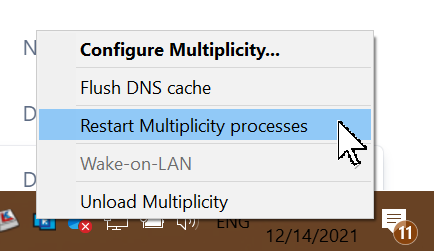
If when this happens, and you restart the Primary MP services, does it then work?

Sean Drohan
Stardock Support Manager

Reply #7 Top

Quoting sdRohan, reply 6

If when this happens, and you restart the Primary MP services, does it then work?


Sean Drohan
Stardock Support Manager
End of sdRohan's quote


Yes that does work.  I just had the problem so I restarted the services as you outlined then I locked my host PC again.  This time when I unlocked it the secondary PC unlocked as expected.

So what does that mean?

Reply #8 Top

Quoting Tim135, reply 7

So what does that mean?
End of Tim135's quote

Its hard to say but perhaps a purge \ reinstall is in order on every MP PC:

https://forums.stardock.com/486104/multiplicity-support-faq#reinstalling

Sean Drohan
Stardock Support Manager