Don't want updates popup

Ive bought a fences license for version 3.04 now upgraded to 3.09.

When i update its asking for my serial and activation, put it in and no go.

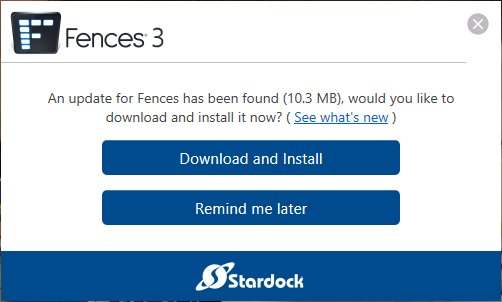
And my bought license is dead. Now i keep getting pop-ups for installing the update.

How or where can I disable getting pop-up of the fences software?

If anyone can help thank you in advance.


Kind Regards, Jeroen van Veen

19,199 views 24 replies
Reply #2 Top

I understand that UpgradeChech.zip is user profile specific and also requires admin permissions to run. Can you please confirm it being profile specific and a work around to be able to run UpgradeChech.zip on a user profile that does not have admin permissions.

Thank you.

Reply #3 Top

Hello,
Sorry to hear you are having issues. But, from what I know if you bought Fences 3.X your keys should work with the current version which is Fences V3.1.3.3. Maybe your issue for not able to activate this version is because you have maximize activation. Please try this steps to deactivate your old activation : https://forums.stardock.com/486311/accounts-and-activation-support-faq#deactivateproduct.


Basj,
Stardock Community Assistant.

Reply #4 Top

So my main issue is not an issue with activation. When I deploy Fences to my users, they don't have admin permissions to install software on their Windows 10 desktop. So I have to install Fences under my account which has admin permissions. But when the user is logged in, the update message comes up and they cannon install that update. And I don't want them to. If I install the UpgradeCheck.zip, it stops the upgrade message but for only under my user profile. I am not worried about using the most latest version of Fences. I just want the user to use the version they have installed and not have to worry to upgrade. Does that make sense?

Reply #5 Top

Hello,
Sorry to hear you are having issues. Need to understand more. What do you mean by "my users"? Please elaborate.

Thanks
Basj,
Stardock Community Assistant.

Reply #7 Top

Hello,
I have forward your problem/question to Stardock Support Team for their assistance. Please keep an eye on this thread for any updates. We appreciate your feedback and patience.

Basj,
Stardock Community Assistant

Reply #8 Top

Quoting neilkcera, reply 2

I understand that UpgradeChech.zip is user profile specific and also requires admin permissions to run. Can you please confirm it being profile specific and a work around to be able to run UpgradeChech.zip on a user profile that does not have admin permissions.

Thank you.
End of neilkcera's quote

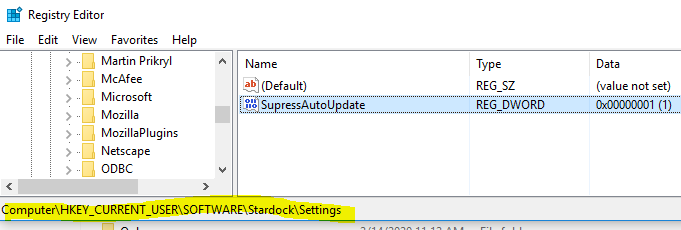
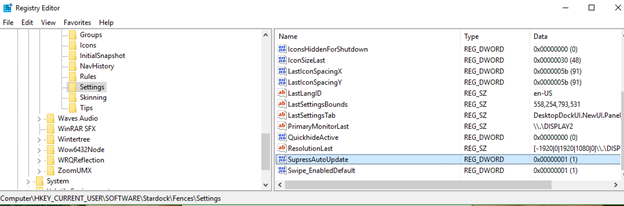
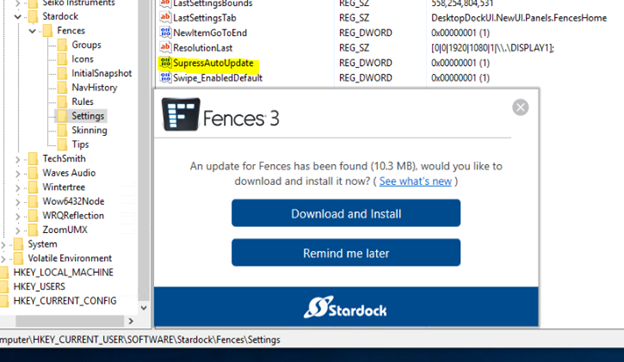
The batch file includes the Reg edits (what controls the notice) you can push to your users in any manner you see fit.

Sean Drohan
Stardock Support Manager


Reply #9 Top

Well, I have manually installed it on multiple computers and it only works under my user profile. I need it to work under all user profiles on the computer. Any suggestions?

Reply #10 Top

Quoting neilkcera, reply 9

Well, I have manually installed it on multiple computers and it only works under my user profile. I need it to work under all user profiles on the computer. Any suggestions?
End of neilkcera's quote

Are you unfamiliar with how to edit the registry and distribute such edits to your users via GPO or the like?

Sean Drohan
Stardock Support Manager

Reply #11 Top

Is that your only solution? I don't have Fences installed on all desktops and using GP would mean having to apply on multiple OUs that don't need it.

Reply #12 Top

Quoting neilkcera, reply 11

Is that your only solution? I don't have Fences installed on all desktops and using GP would mean having to apply on multiple OUs that don't need it.
End of neilkcera's quote

Yes, that is the only current solution.

Sean Drohan
Stardock Support Manager

Reply #13 Top

I manually added the "SupressAutoUpdate" to the registry of the affected computer and the update message still comes up. Any ideas?


Reply #14 Top

Quoting neilkcera, reply 13

I manually added the "SupressAutoUpdate" to the registry of the affected computer and the update message still comes up. Any ideas?


End of neilkcera's quote

Did it do this post regedit and reboot?

If so (and only if so), post a screenshot of the prompt and post an export of the regkey value, please.

Sean Drohan
Stardock Support Manager


Reply #17 Top

Quoting neilkcera, reply 16

Any suggestions?
End of neilkcera's quote

Did you reboot under the same user you disabled it under?

Sean Drohan
Stardock Support Manager

Reply #19 Top

Quoting neilkcera, reply 9

Well, I have manually installed it on multiple computers and it only works under my user profile. I need it to work under all user profiles on the computer
End of neilkcera's quote

Is that still the case, you are not asked under your profile?

Sean Drohan
Stardock Support Manager

Reply #21 Top

Quoting neilkcera, reply 20

Correct, I am under the user's profile not an admin.
End of neilkcera's quote

Right, but are you asked at all under yours now?

Sean Drohan
Stardock Support Manager

Reply #22 Top

So under my windows profile which is an admin account, I also get the upgrade pop-up message. I also do not have the registry fix applied under my user profile, so that would seem reasonable to expect.

Reply #23 Top

Quoting neilkcera, reply 22

So under my windows profile which is an admin account, I also get the upgrade pop-up message. I also do not have the registry fix applied under my user profile, so that would seem reasonable to expect.
End of neilkcera's quote

And if you do add the registry entry under your account...?

Sean Drohan
Stardock Support Manager