Multiplicity Free Trial

I tried the free trial of Multiplicity this morning and spent the next two and a half hours trying to set it up with my laptop and desktop.  Never could get the second computer installed and decided to cancel the free trial.  That may take another 2 1/2 hours as it's not just as easy as sending an email saying, "Please cancel my free trial".  No, you are sent to forums and FAQ's and links that don't work and you never know whether they have cancelled or not.  Software should not be this hard to install and set up, and cancelling a free trial should be quick and easy.

3,326 views 6 replies
Reply #1 Top

Hello,

I have forwarded your report to the Stardock support team for their review and recommendations.

Please keep an eye on this thread for any updates.

We really do appreciate your feedback, thanks.

Reply #2 Top

Hello,

Sorry to hear you are having trouble.

These is no need to cancel a trial, one would just uninstall and the term would naturally expire in 30 days time.

That said, we would certainly like to help you see what the issue was or clear up what misconceptions you may have about how it works.

If so, what does this mean:

Never could get the second computer installed
End of quote

Could not actually install the product or could not get the Primary to connect to it once you did?

Sean Drohan
Stardock Support Manager

Reply #3 Top

Thank you for your prompt response.  I did uninstall the program and all traces of it, but I am interested in the product if I can get it to work for me.  My trouble began in trying to get it to install my desktop which is in the same office and on the same wireless network.

The program could not "see" the other computer even after I entered the name and IP address.  It also asked for passcode or password which I found confusing.  Does this mean the PW for the internet connection (I tried this but no success) or the desktop computer?  I have no PW for the computer, just a 4 digit pin to start Windows.  There were a few other bothersome items I messed with and finally gave up and uninstalled it.

Reply #4 Top

Quoting Toddney224, reply 3

Thank you for your prompt response.  I did uninstall the program and all traces of it, but I am interested in the product if I can get it to work for me.  My trouble began in trying to get it to install my desktop which is in the same office and on the same wireless network.

The program could not "see" the other computer even after I entered the name and IP address.  It also asked for passcode or password which I found confusing.  Does this mean the PW for the internet connection (I tried this but no success) or the desktop computer?  I have no PW for the computer, just a 4 digit pin to start Windows.  There were a few other bothersome items I messed with and finally gave up and uninstalled it.
End of Toddney224's quote

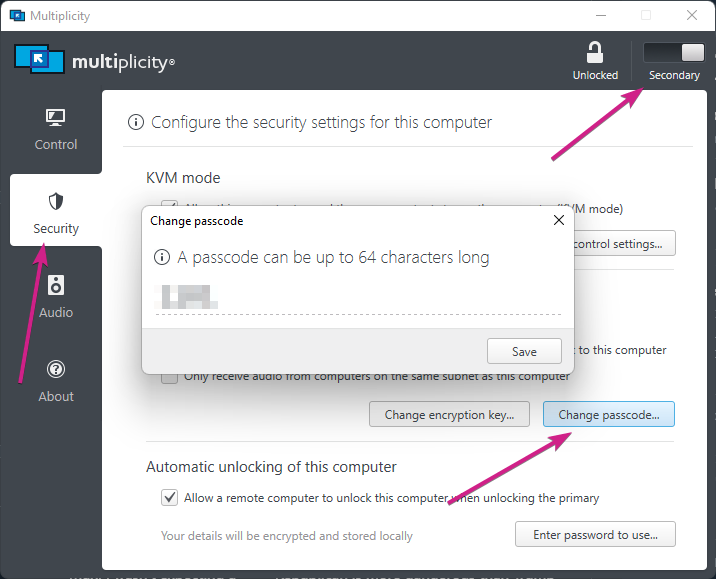
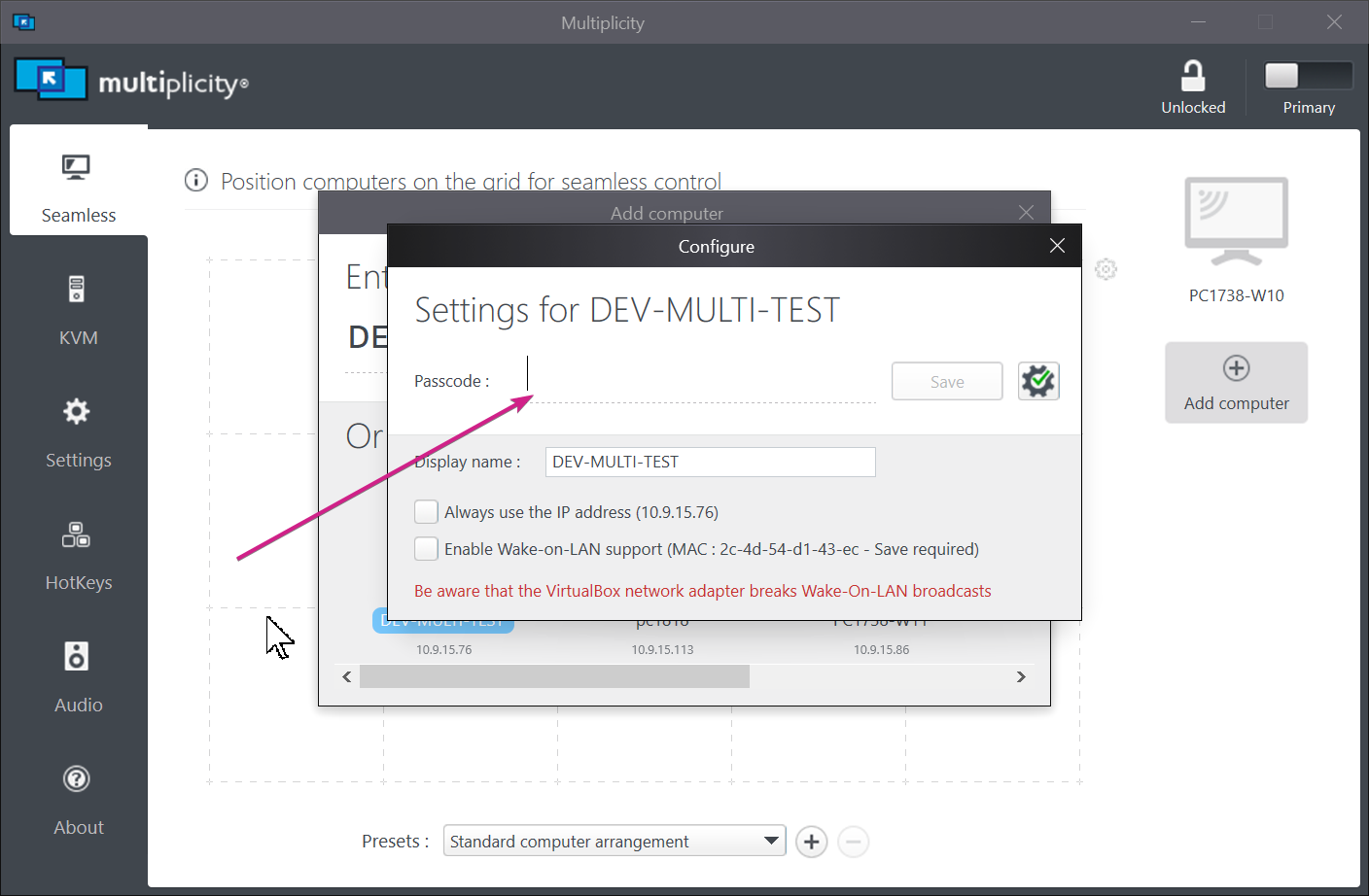
No, it would be the passcode for the MP Secondary, you would use the random one generated at install or change it yourself.

When adding a Secondary on the Primary, this:

Needs to match what is here on the Secondary:

It would be prudent to have the same key for them all, just like you need for the 'Encryption Key'

Sean Drohan
Stardock Support Manager

Reply #5 Top

I realized when I posted the reply below that I did not specify the fact I selected my laptop as the primary computer and my desktop as the secondary computer.

"Thank you for your prompt response.  I did uninstall the program and all traces of it, but I am interested in the product if I can get it to work for me.  My trouble began in trying to get it to install my desktop which is in the same office and on the same wireless network.

The program could not "see" the other computer even after I entered the name and IP address.  It also asked for passcode or password which I found confusing.  Does this mean the PW for the internet connection (I tried this but no success) or the desktop computer?  I have no PW for the computer, just a 4 digit pin to start Windows.  There were a few other bothersome items I messed with and finally gave up and uninstalled it."

Reply #6 Top

My problem came from not installing the secondary computer first, which gives you the passcode.

My complaint is that it doesn't seem intuitive to install the secondary first and I did not find this in any of the helps.  Looking at your reply made me think I had everything backwards.

Bingo, it works!