
Move Some Icons to the Desktop

i have just done my initial sorting with a new PC.

Is it possible to move a few of the Icons out of the fences and on to the Desktop?  Fences will hold 99% of the icons but there are few like "This PC" to actually be on the desktop.
5,018 views 7 replies
Reply #1 Top

Hello,
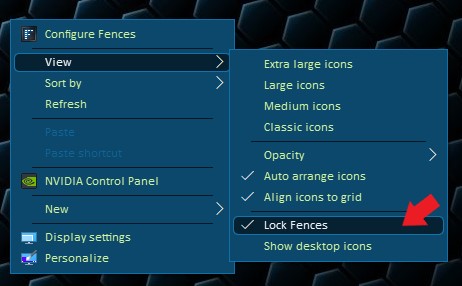
Yes, you can move it our of the Fences if you wish. You can just click and drag it out from the fence. It should work as long as you not lock the fences. If you do, please unlock it. Right Click on the desktop -> View -> Lock Fences.


Basj,
Stardock Community Assistant.

Reply #3 Top

Do you have 360 total security installed?


Thank you,

Basj,
Stardock Community Assistant

Reply #4 Top

No but.....

I got it.  After a reboot I was able right click drag and create a shortcut on the desktop.

Reply #5 Top

Actually I didn't get it.  Some things work and others do not work and just snap back.  Also. I inadvertently moved a few items from one fence to another and now I cannot move them back.  Attempting to do so, they just snap back.

It looks like I have to uninstall Fences. 

Reply #6 Top

Hello,
First, please try purge and reinstall steps as mentioned here: https://forums.stardock.com/486084/fences-support-faq#reinstalling. Just make sure to re-download the latest version from your account. Reboot after the purged. Reinstall, and Reboot again after the installation. Retest it. Report back here.

Thank you,

Basj,
Stardock Community Assistant