Deactivate Start10 From a Computer

I bought Start10 in my name a while back when my wife and I owned 4 Windows computers between us and installed Start10 on each of those 4 computers. Recently, we bought 2 more computers (for a total of 6 computers) which sent us over the install limit of 5 computers for one copy of the program.  So now there are 4 computers that I use and 2 computers that my wife uses.  What we did then was to purchase a second copy of Start10 in my wife's name.  I deleted my copy of Start10 from her computer of Start10 and then installed my wife's copy on both of her computers.

So that's the situation and here's my question:  Do I have to do anything else to make sure that the one computer used by my wife is no longer recorded as having my copy of Start10 installed on it?  Is there something I need to do using the Start10tweak.exe application perhaps?  Or does the Stardock site somehow automatically recognize via the program activation process that the uninstall from my wife's computer was done and know that that my copy of Start10 is currently only on three computers?

See:  https://forums.stardock.com/486022/start10-support-faq#disablestart10

Theoretically I could now put my copy of Start10 on 2 more computers.  It's actually unlikely that I would ever need to because with 6 machines I reckon we have enough computers at our house to suit our needs but then again:  It's it ever possible to have too many computers?  LOL!  :)

Any help in answering this question would be appreciated.  Thanks in advance and have a good day.  :)

2,545 views 5 replies
Reply #2 Top

@Basj:  Thanks for your response.

I looked over the information on the links you provided.  I had already learned about the deactivation process using the Start10tweak.exe application, as I mentioned in my original post.  Note that what I have already done was to DELETE my copy of the software from my wife's computer and after that I loaded her copy of the software on her computer.

At this point, what I believe I ought to have done was first deactivate my copy of Start10 on my wife's computer and then load her copy on her computer.  I am guessing that the deactivation procedure would be the only way to free up one copy of my Start10 program for use on another machine.

I am thinking that in order to free up my Start10, I would have to deactivate my wife's Start10 on her machine, then delete the program and then reload my copy of Start10 on her computer, deactivate it and then delete the program and reload her copy on her machine.  A bit tedious but not overly legthy.

Does the above procedure make sense?

Reply #3 Top

Quoting trilayer3, reply 2

I am guessing that the deactivation procedure would be the only way to free up one copy of my Start10 program for use on another machine.
End of trilayer3's quote

Yes.

Quoting trilayer3, reply 2

I would have to deactivate my wife's Start10 on her machine, then delete the program and then reload my copy of Start10 on her computer, deactivate it and then delete the program and reload her copy on her machine. A bit tedious but not overly legthy.
End of trilayer3's quote

You actually can deactivate it via the online method as mentioned in the guide above. You can deactivate in via her computer but if already removed it from her computer than you can deactivate it using the online method. Actually, I never use the Start10Tweak.exe method. The online method is much much easier for me.

With this you can see how many activated and which activation need deactivate.

Thank you,

Basj,
Stardock Community Assistant


Reply #4 Top

Okay, the issue is solved now.

I went to the link you gave me at:  https://forums.stardock.com/486311/accounts-and-activation-support-faq#deactivateproduct

On the above noted page, in the section "Stardock Website Deactivation" I found the link:  https://store.stardock.com/myaccount/products

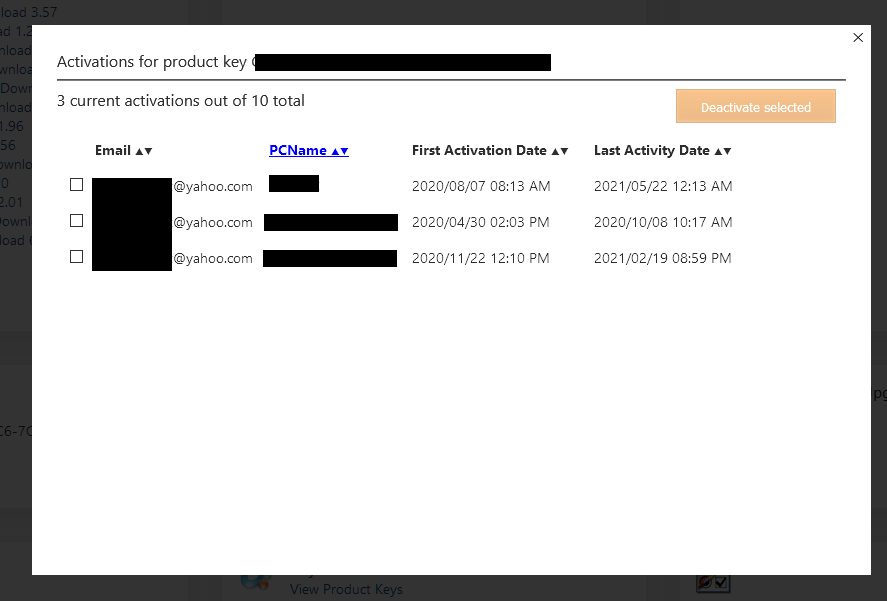
That link takes me to a page entitled "My Downloads".  That page has a box for Start10 which is the only Stardock program that I own at present.  There is a link in the Stardock box that reads "View Product Keys".  When I click on that link I see the product key for my copy of the Start!0 program.  When I click on the "?" symbol to the right of the product key, I get a pop-up window that shows me all of the computers on which I have loaded my copy of the Start10 program, identified by the computer name assigned by Microsoft when I loaded Windows 10 on the machine.  The format for the computer names is, for example, something like "DESKTOP-3K67TW5".  that's an invented computer name and not one of my actual computer names.  So I can tick a check box to the left of each computer and deactivate Start10 from that particular computer if I so choose.

I described what I did to find the list of computers with my copy of Start10 for the benefit of anyone else who reads this thread who needs to deactivate Start10 on a computer.  As it is, all of the computers on the list mentioned above have my copy of Start10 active.  My wife's computer does not appear on that list, so clearly my copy of Start10 is not active on her machine and thus everything is as it should be.

Thanks very much for your help with this issue Basj.  It was all rather cryptic and confusing when I first looked at the instructions but is now quite clear and simple in my mind.  Many thanks my friend and have a very good day!  :)

Reply #5 Top

Great, glad to help.

Thank you,

Basj,
Stardock Community Assistant