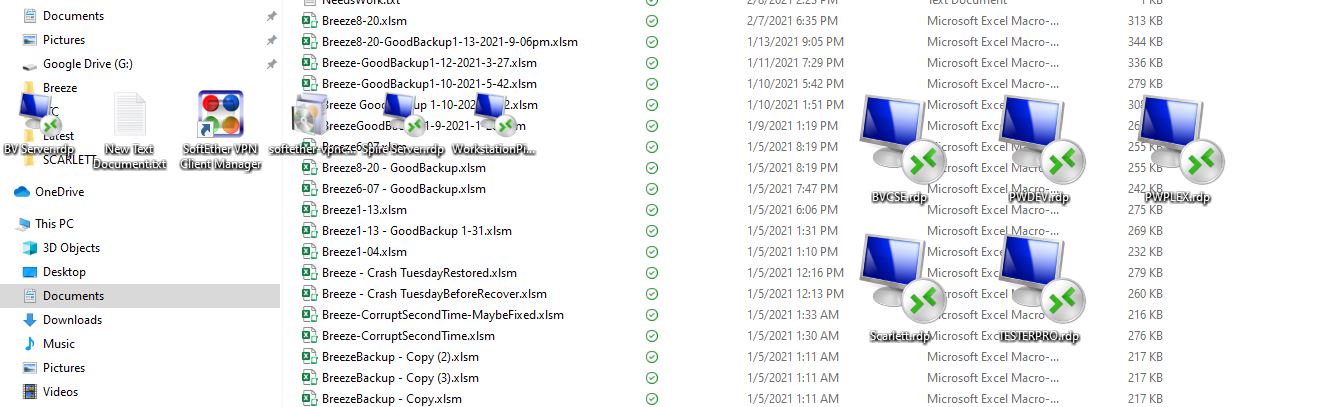
Icons from fences showing on top of current window

This is happening all the time now.

Those icons are from the fences directly underneath my active window.


15,456 views 20 replies
Reply #1 Top

Hello,

Sorry to hear you are having issues.

What version of Windows ( full numbered version use winver.exe for that info )

What version of Fences ?


AzDude
Stardock Community Assistant

Reply #3 Top

Hello,

Would you do this PURGE: https://forums.stardock.com/486084/fences-support-faq#reinstalling

Reboot and ReInstall the latest version from your account https://store.stardock.com/myaccount/products/

Reboot , test and report back here please .


AzDude
Stardock Community Assistant

Reply #4 Top

OK, when I ran the purge app, all my desktops went black.  My start menu disappeared.  The text document that popped up told me to click ok but there was no OK.  I had to cycle through my running apps with alt tab.  No app with OK button.  I had to close all my apps manually, then use ctrl alt delete to get to log in screen.  I'm left handed but my mouse buttons were now switched, but I was able to shut down.

Restarted the computer, seems OK.  Fences pops up and says it's not licensed.  OK.  I check to see if Fences is installed, it's not in my list of add/remove programs.  But it's still in my start menu, and running. 

So I move to step 2, re-install fences.  Install says it can't install as fences is already running.  Nothing obvious in the task manager, like "Fences".  So I can't remove it and I can't install the latest version.

That batch file is nasty.

What next?


Reply #5 Top

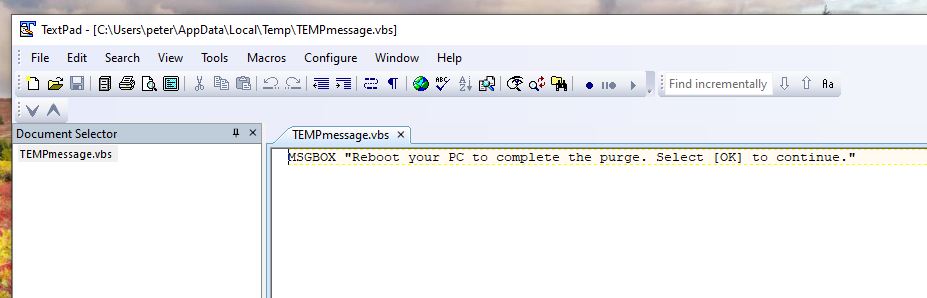
Tried again.  I see now that the text editor window that appeared maybe because I have .VBS files associated with a text editor.

Rather than the intended message box, I got this:

This time, when I closed the TextPad window, it did launch the uninstaller and ran.


Reply #6 Top

I have Fences back up and running and have not seen the problem occur again yet.

Thanks for your help.

Reply #7 Top

"Hello,

Would you do this PURGE: https://forums.stardock.com/486084/fences-support-faq#reinstalling

Reboot and ReInstall the latest version from your account https://store.stardock.com/myaccount/products/

Reboot , test and report back here please .


AzDude
Stardock Community Assistant"


Hi Az, 

I came here because I too have an issue with my Fences ( 3.0.9.11).

I've tried uninstalling and reinstalling several times, I've tried using the above listed purge instructions, but still end up with the same problem even with a fresh installation.

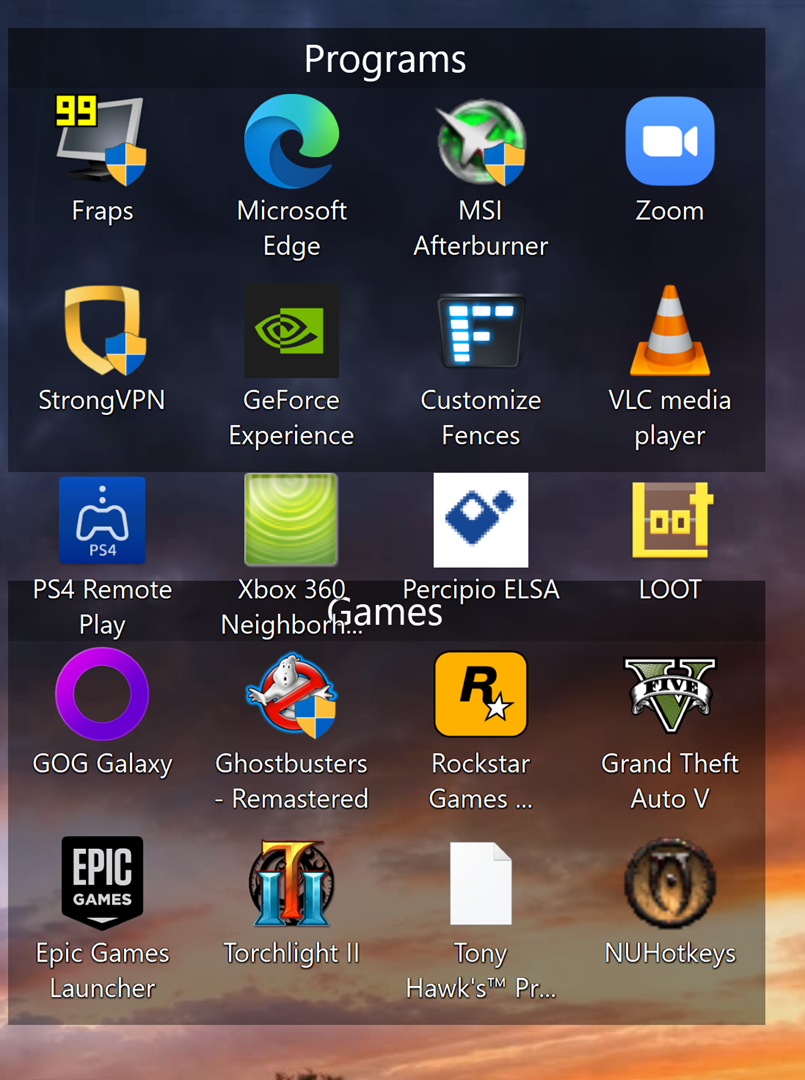
After I uninstall | reinstall, I'll be able to successfully add my icons to my fences, but when I right click to pull up my context window on my desktop, my icons go all over the place and don't stay within the fence.

The screenshot in Figure 1 shows 4 icons that should be in the fence labeled "Programs" but when I scroll up and down, they don't stay within the fence.

This happens to all of the fences I create.

When I double click  to hide, the borders of the fence themselves disappear but the icons remain.

Any help would be much appreciated.

-David.


Figure 1

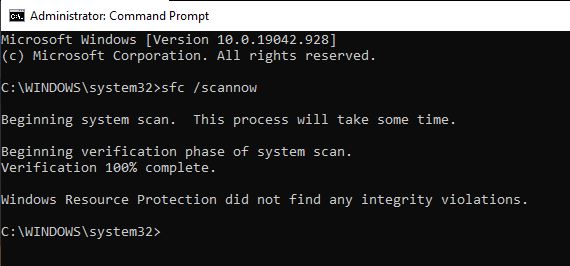
Edit: Upon looking at .bat file, I noticed that there were some error messages and an "Access denied" message illustrated in Figure 2. 

Perhaps this is a contributing factor?


Figure 2

Reply #8 Top

Hello David,

Would like to know more on your system and issues

  1. Windows version, please use Winver.exe to get Windows full version numbers.
  2. Fences version.
  3. Do you have wallpaper engine running in the background?
  4. Does restart Windows explorer solve your issue?

Thank you,

Basj,
Stardock Community Assistant

Reply #9 Top

Regarding my problem, it is happening again.  At the moment it is occurring when I return to the computer with black screens and log back in to windows.

Reply #10 Top

Hello Pandajack,

Please try the following:

-For Win8/10 Users: Open the Start Screen, and type 'cmd'. Right-click on the search result and select 'Run as administrator' from below.

-Type: sfc /scannow

-Wait for the scan to complete (this can take several minutes)

Some help on how this looks should you need it:

https://support.microsoft.com/en-us/help/929833/use-the-system-file-checker-tool-to-repair-missing-or-corrupted-system

If the SFC finds errors, but cannot fix them, please also run the following command in the same command prompt window:

dism.exe /online /Cleanup-Image /RestoreHealth

Some help on how this looks should you need it:

https://www.windowscentral.com/how-use-dism-command-line-utility-repair-windows-10-image

The above command should assist with replacing any damaged or problematic system files. Please note, however, since it may require restoring certain files, this process can take some time and you will need to be patient until it has completed.

Please let me know whether this resolves your problem or if you have any additional questions.


Thank you,

Basj,
Stardock Community Assistant

Reply #12 Top

Ok, these Fences icons that appear ontop of your open windows. Does it work if you click on it?

and please try Cleanboot as mentioned here : https://forums.stardock.com/486084/fences-support-faq#cleanboot

Thank you,

Basj,
Stardock Community Assistant

Reply #13 Top

Edit: See below

___________________

Quoting basj, reply 8

Hello David,

Would like to know more on your system and issues

Windows version, please use Winver.exe to get Windows full version numbers.
Fences version.
Do you have wallpaper engine running in the background?
Does restart Windows explorer solve your issue?
Thank you,

Basj,
End of basj's quote

Fences: 3.09

I use an animated Wallpaper using DeskScapes

Restarting Windows Explorer DOES seem to fix the issue!

Thank you!!

Here's hoping it sticks.


Pandajack-

These are the steps I took:

1. Make sure you have Fences installed (reboot if prompted)

2. I took the necessary actions to *break" my fences so that the icons are jumping- for me it's just right clicking on my desktop

MOST IMPORTANT

3.  Restart Windows Explorer by:

-  Accessing your task Manager (Ctrl + Shift + Escape)

-  Scroll down down to Windows Explorer listed in Background Processes

-  Click Restart

*It doesn't sound like it would be related but it seems to have fixed the issue, at least for me.

**Edit**

After restarting my CPU I tested to see if my fences would again break.

To my disappointment, they did.

Running the Windows Explorer Restart did again fix the issue-- but only temporarily.

So, the restart appears to fix the problem temporarily. 


Basj-

Do you have any further suggestions to fix this issue on a permanent basis?

Reply #14 Top

Hello,

David, I am confused with your post. Do you have it resolved or not? It would be great if you could post in black font over white background for me to read it.

Thank you,

Basj,
Stardock Community Assistant

Reply #15 Top

Quoting basj, reply 14

Hello,

David, I am confused with your post. Do you have it resolved or not? It would be great if you could post in black font over white background for me to read it.

Thank you,

Basj,
Stardock Community Assistant
End of basj's quote

Basj- I'm sorry for the font color. I use Dark Reader, and didn't realize it was making my text so light.

Also, sorry about the confusion, let me try and clarify-

You're suggestion to restart Windows Explorer temporarily fixed the issue.

However, when I restarted my computer, it came back.

Restarting Windows Explorer does fix the issue, but I have to reapply the fix upon ever reboot. 


I was wondering if you had any suggestions for a more permanent fix?

P.S. I edited my comments above in efforts to make it easier to read.

Thanks for your time and suggestions.

-David.

Reply #17 Top

Basj-

I did the Clean boot method.

The problem did not occur while in a clean boot state, which according to the article indicates that Fences is conflicting with another startup application. 

This article (https://support.microsoft.com/en-us/topic/how-to-perform-a-clean-boot-in-windows-da2f9573-6eec-00ad-2f8a-a97a1807f3dd) suggests to isolate the issue by comparing the various start up programs against Fences to see which one might be causing the problem.

Before I go that route, I wanted to see if you had an alternative, and perhaps simpler solution in mind?

Thank you.

Reply #18 Top

I think that is the only way I can suggest. Unless you know which of your application has conflicting issue.

Thank you,

Basj,
Stardock Community Assistant

Reply #19 Top

Quoting basj, reply 18

I think that is the only way I can suggest. Unless you know which of your application has conflicting issue.

Thank you,

Basj,
Stardock Community Assistant
End of basj's quote

Hi Basj-

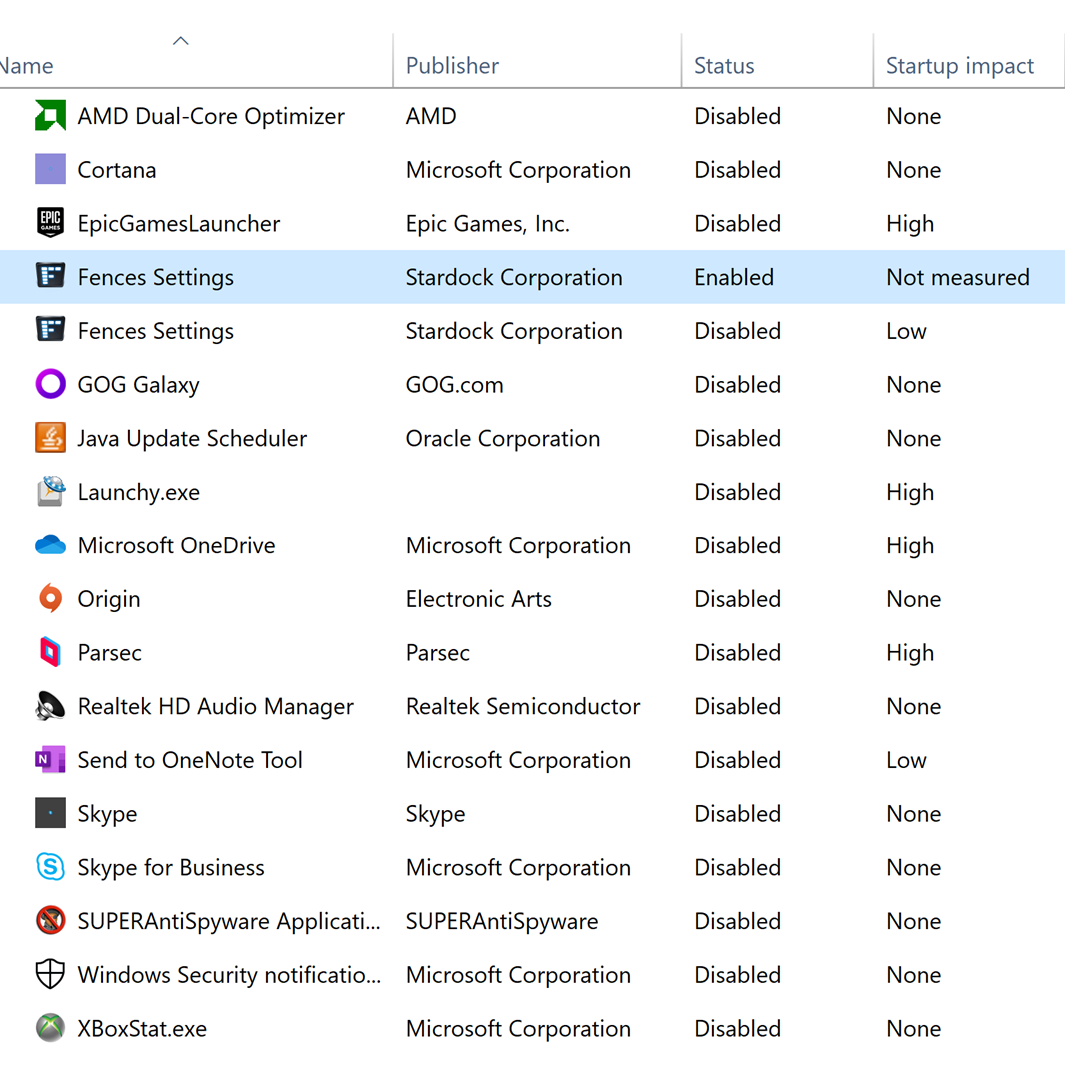
So I disabled all of my startup application as illustrated in Figure 1. As you can see, the only application I have listed as enabled is Fences. Despite my efforts, the problem prevails unfortunately.

Additionally, I noticed that I have Fences listed twice in my startup apps. Is that normal?

Since we ruled out possible startup interferences, what would be the next step in troubleshooting?

Figure 1:

Thank you as always for your time.

-David.

p.s.

Since Fences seems to malfunction primarily when I click my right mouse button, I thought perhaps a screenshot of my context menu might be useful.

Reply #20 Top
  1. Well, a lot of time from other who has done the Cleanboot steps. The first step, creating a new admin account, solve the issue, showing that the Original admin account was corrupted.
  2. Fences need to be started twice, so both startup need to be enable.

Thank you,

Basj,
Stardock Community Assistant