
Cannot Move Icons Within Fence

Hi

I installed Fences, configured it to my liking and now used it the way it was for a few months. So far so good.

Today I wanted to add an icon (shortcut) and to move the fences.

First:

When I move a fence, the icons/shortcuts stay at the same place and disappear. So, if I grab a fence on its bar and move it with the mouse far enough, all icons disappear! It looks like the fence is empty at its new place. Then, I can move the fence back and the icons are being displayed again in the viewport of the fence. The icons do not follow the fence, they stay at their place!

I'm unsure, but believe this is not the behavior of fences. Was it not the case that the icons move along with the fence on the desktop? Silly me bought a program to handle desktop icons and then it cannot move the icons!?!

Second:

If I place a new shortcut on the desktop into a fence, it "falls" behind the fence and disappears! If I move the fence away I can see the icon again. Hu?


Does anybody has an idea what is wrong? A setting? Problem between my shoulders?

Fences version 3.0.9.11

Windows 10 20H2 (Build 19042.804)

Thanks for your help

ImZoo
22,656 views 7 replies
Reply #1 Top

Hello,
Sorry to hear you are having issues. Need to know

  1. What changed recently since it was working before? New Windows updated? Changed in Antivirus or security software? Driver update?
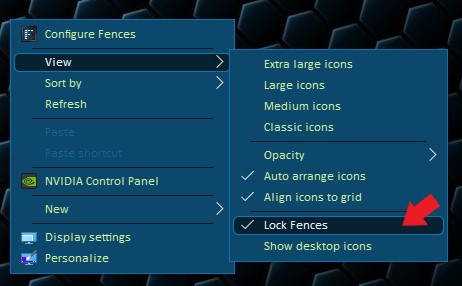
  2. Is the Fences locked? If yes, unlock it and try again.
  3. Have you tried purge and reinstall steps as mentioned here?: https://forums.stardock.com/486084/fences-support-faq#reinstalling  Just make sure to re-download the latest version from your account. Reboot after the purged. Reinstall, and Reboot again after the installation. Retest it. Report back here.

Thank you,

Basj,
Stardock Community Assistant

Reply #2 Top

Hi Basj


It was probably deactivated after one year or because I installed "Sizer" program (brianapps.net). It is too expensive right now and generally I don't like returning costs.

So yes, back to manual handling. Thanks for your response.

Reply #3 Top

Quoting ImZoo, reply 2

It was probably deactivated after one year
End of ImZoo's quote

Not really sure what deactivated after one year? If you mean Fences, from what I know there is no such thing for fences. Please clarify.

Thank you,

Basj,
Stardock Community Assistant

Reply #4 Top

Hi Basj, thanks for your response.

It says so on my download page : "Expired". I have bought the Stardock Suite for 20-something Dollars.
I tried it first at home, and then used it at my business place. Therefore the activation count is probably up too high.

I remember having troubles with payment on the business site with not having my password from home. In tricked myself with the online accounts I have with back and forth between my home and workplace, and now a second license lurks somewhere in nirvana. :-)

I understand, that it looks like I try to use it at two places. But I paid twice.

Well, everybody can say that....
I'll search to fix the license issue, but since I have a lot of work and kids. Not very long.


Reply #5 Top

Hello,

The Expired subscription is just that you can't download anymore updates/upgrades or installer from your account. But the software still work at it full function as long as it is activated. As mentioned here : https://forums.stardock.com/486310/object-desktop-support-faq#objectdesktop

If your activation is full you need to deactivate it using this guide : https://forums.stardock.com/486311/accounts-and-activation-support-faq#deactivateproduct after that you should be able to activate it again.

Thank you,

Basj,
Stardock Community Assistant

Reply #6 Top

In other words, the last version you had before your subscription lapsed should work forever.  This is one reason to archive your installers. Especially before letting your subscription lapse.

Reply #7 Top

Thanks for the clarification. Really good support here for this product! I know other companies where you have no reply after months!
I'll try to clean up the mess/self-confusion with my accounts and then start fresh. With a fresh install, I assume, it will work.

The thing with the no longer downloadable files offers room for improvement for Stardock.

Thanks again!
Cheers