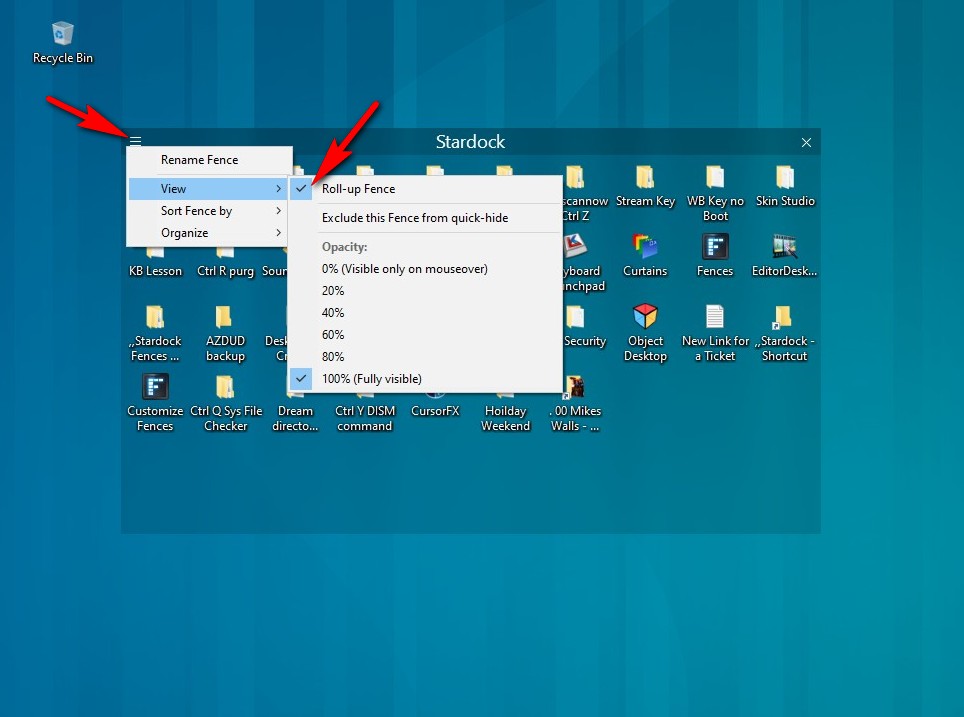
How do I unroll a fence ONLY on double click - not on hover?

As I move my mouse, my fences are flying open as I scroll across & it's really annoying.

I don't want them to open unless I double click the title bar...

I might as well just create desktop folders filled with icons...

3,258 views 2 replies
Reply #1 Top

Hello,

Sorry to hear you are having issues.

Right click on Fence and un check roll up ( see Image )


AzDude
Stardock Community Assistant

Reply #2 Top

Thanks for the reply, but I don't want my "fences" to stay unrolled & that is what that checkmark does.

I want my fences to stay rolled up until I double click them & never unroll until I DBL-click (they unroll on hover now).

I also want that "fence" to stay open until I double click again to close that particular fence (window / folder).

I hope that made sense - the hover roll out is annoying & interferes with using my other fences.

This is really like creating a folder on my desktop & adding shortcuts... which I might end up doing.