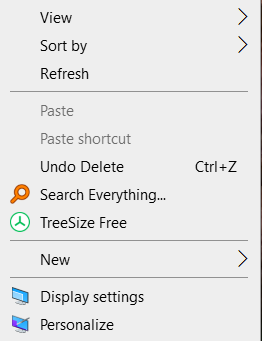
Desktop R click doesn't show Fences option

A right click on the desktop (Windows 10 64) should show "Fences" among the other items (View, Refresh, New, etc.). It doesn't. A reinstall of Fences makes no difference. Any ideas?

5,989 views 9 replies
Reply #3 Top

I'm sorry, I linked to wrong one. Please try again.

Thank you,

Basj,
Stardock Community Assistant

Reply #4 Top

Thanks, the link works now, but that doesn't answer my question. I don't have the fences option in my right click menu.


Reply #5 Top

That is to check if Fences is starting up and running correctly on the background. Does Fences running and the issue just with right click?

Thank you,

Basj,
Stardock Community Assistant

Reply #6 Top

Yes, that's right. Fences runs just fine, I just can't open it from right click to do things like a screen save.

Reply #8 Top

Ok, I've fixed it by editing the registry. Instructions are here: https://www.thewindowsclub.com/add-any-application-to-right-click-menu-in-windows-10#:~:text=Right%2Dclick%20in%20the%20right,the%20right%2Dclick%20context%20menu.

Reply #9 Top

Great, glad you solved it.

Thank you,

Basj,
Stardock Community Assistant