Monitor with built in KVM

Question

I getting 2 monitors with built in kvms however one of the monitors will have another computer plugged into it.

My question would the software still work ok with a built in kvm in the monitor? Like would the software would move from between monitors but would it get tripped up on the monitor that has both computers plugged in? 

FYI the monitors Im referencing are the Dell U4919DW.


4,431 views 9 replies
Reply #1 Top

So no replies to this thread. Ok no worries I'll just take my money else where.

Reply #2 Top

Hello,

I have forwarded your report to the Stardock support team for their review and recommendations.

Please keep an eye on this thread for any updates.

We really do appreciate your feedback, thanks.

Keep in mind Stardock support desk is Closed right now for

the Holidays so a response might be delayed ..


AzDude
Stardock Community Assistant

Reply #3 Top

Hello,

After reading a bit about how the Dell U4919DW KVM functionality works, I would depend on where you placed the PCs on the Multiplicity grid. You would also, from what I can understand, not include the one PC that you are using the monitor KVM with on the Multiplicity grid.

Sean Drohan
Stardock Support Manager

Reply #4 Top

Thanks for responding Sean. So you suggesting to not use the kvm function in the monitor itself. As far as the grid, how should it be placed?I can tell you physically the monitors will be stacked on top of each other. I think what i will do, when I get the monitors I will test the software. Which version would I need btw?

Reply #5 Top

Quoting Throned, reply 4

Which version would I need btw?
End of Throned's quote

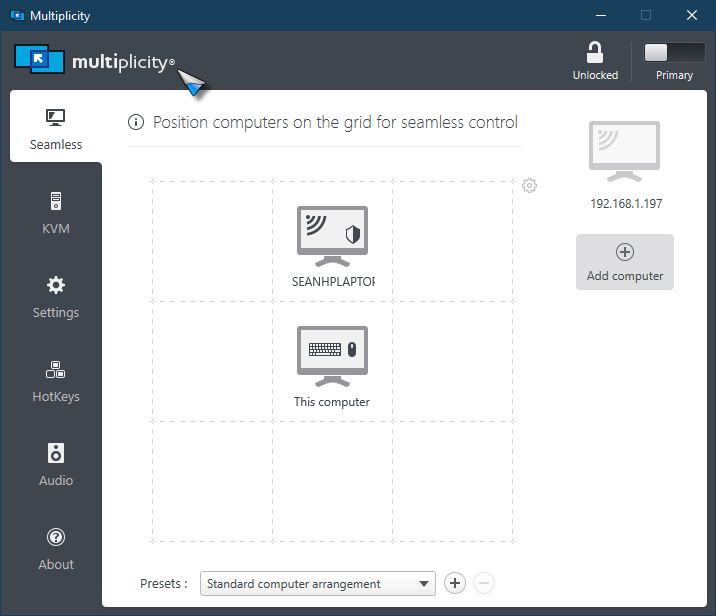
If its just the 2 PCs, then MP KM (1 Primary, 1 Secondary) and you don't have to worry about the hardware option.

It's if you have more PCs is where it gets complicated and you would have other decisions to make.

Quoting Throned, reply 4

As far as the grid, how should it be placed?I can tell you physically the monitors will be stacked on top of each other.
End of Throned's quote

Again, if just for the 2 PCs, the MP grid would look like this if you main \ 'Primary' PC were on the bottom:

Sean Drohan
Stardock Support Manager

Reply #6 Top

So yes it will only be 2 pcs for now , but just for clarity I should not use the built in kvm function of the monitor if Im going to run MP correct?

Reply #7 Top

Quoting Throned, reply 6

So yes it will only be 2 pcs for now , but just for clarity I should not use the built in kvm function of the monitor if Im going to run MP correct?
End of Throned's quote

Right, you would not need to. Kinda the beauty of MP, it's a software solution to cumbersome hardware ones.

Oh, and if you have an extra one of those monitors, Ill take one, ty ;)

Sean Drohan
Stardock Support Manager

Reply #8 Top

Haha, thanks Sean. Yeah I havent gotten the ones I ordered, looks like they on backorder or something! I see you guys got the MP KM on a fire sale so I will steal it. Hell for 10 buck even if it doesnt work i wont be mad, hahah.

Reply #9 Top

Quoting Throned, reply 8

Haha, thanks Sean. Yeah I havent gotten the ones I ordered, looks like they on backorder or something! I see you guys got the MP KM on a fire sale so I will steal it. Hell for 10 buck even if it doesnt work i wont be mad, hahah.
End of Throned's quote

MP is a fantastic product - you will wonder how you ever did without it, trust me.

If you have any trouble, just hit me up.

Sean Drohan
Stardock Support Manager