How to add item to the top of All Programs

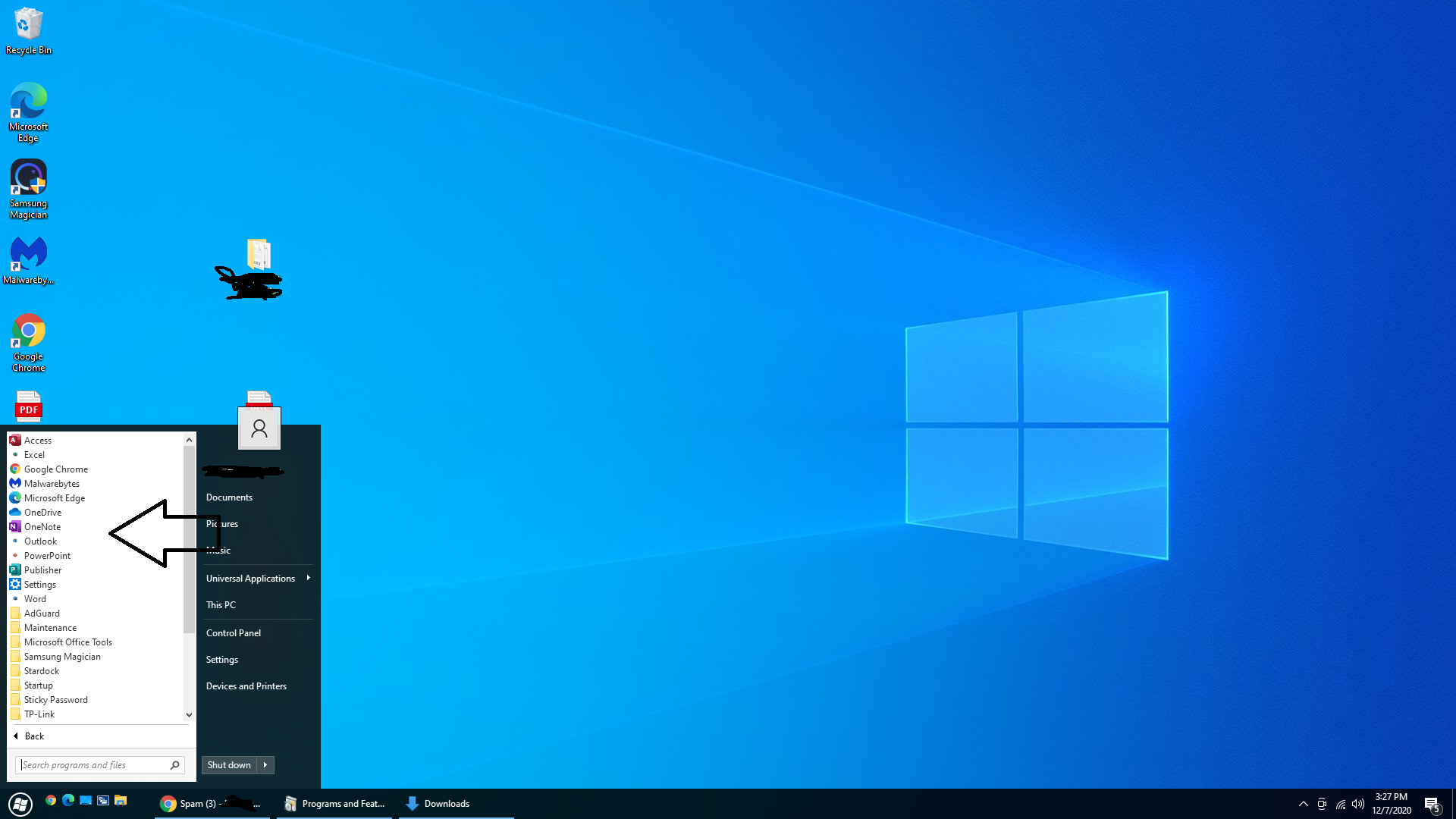
Hi all, I recently bought Start10 and have a question.  When I open the menu and click "All Programs," some programs (like Malwarebytes and Microsoft Edge for example) that are not part of a group appear at the top of the list (see my arrow in the photo below).  If an item is already part of a group, I can drag it there, and that works.  But if it isn't, I don't quite know how to get it there.  The first thing I tried was going into File Explorer and dragging a file to the Start10 menu and choosing "Add to programs."  That seems like it should work, but sometimes it doesn't -- they are added to programs temporarily, but disappear if I refresh/reclick the windows button.  Is there an easier way to do this?  Add to Start Menu (Start10) doesn't really accomplish what I want, because it always pins it to the Start Menu.  I don't want that -- I just want it to appear if and when I select "All Programs."  Hopefully you get what I mean!
3,220 views 10 replies
Reply #1 Top

Hello,
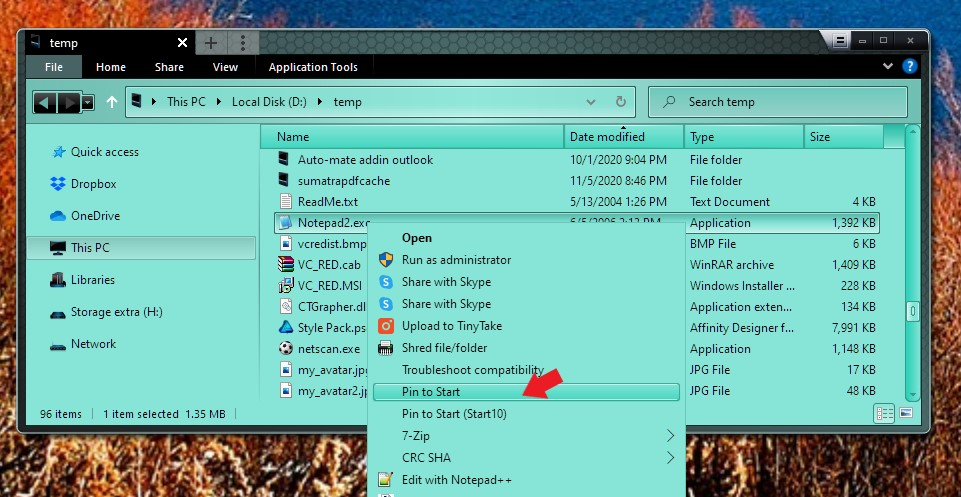
Sorry to hear you are having issues. Please try this. Via File explorer, right click on the application and select Pin to Start to make it appear on the "All Program" menu or Pin to Start(Start10) to make it appear on your main Start10 left panel.


Basj,
Stardock Community Assistant.

Reply #2 Top

Thank you.  I was able to fix this by manually creating a shortcut to the desired programs in ProgramData\Microsoft\Windows\Start Menu\Programs.

Reply #3 Top

Great, glad you work it out.

Thank you,

Basj,
Stardock Community Assistant

Reply #4 Top

Actually, I'm still not sure this is working as intended.  If I select "Pin to Start," it pins it only to the Windows 10 start menu (but not in Start10 at all - even under "All Programs").  If I select "Pin to Start (Start10), it shows up when I click the Start button to enter the Start10 menu; but if I click "All Programs," it isn't listed there.  I tried uninstalling and reinstalling Start10, but that didn't help.  Is this functioning as intended or is something maybe wrong with my install?  Thank you!

Reply #5 Top

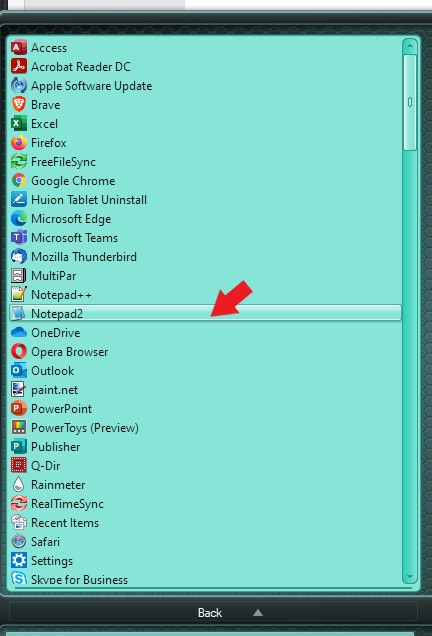
If you do the "Pin to Start" it will appear on your all program as shown here. Not really sure why it does not appear on your system.

Thank you,

Basj,
Stardock Community Assistant

Reply #6 Top

That doesn't work for me, even after uninstalling and reinstalling. Is there a way to do a complete uninstall?  When I uninstall and reinstall, it remembers all of my settings. I wonder if I did a complete uninstall (including all settings) and reinstall, it might help.

Reply #7 Top

Please try purge and reinstall steps as mentioned here: https://forums.stardock.com/486022/start10-support-faq#reinstalling Just make sure to redownload the latest version from your account. Reboot after the purged. Reinstall, and Reboot again after the installation. Retest it. Report back here.

Thank you,

Basj,
Stardock Community Assistant

Reply #8 Top

Hi Basj, I followed those steps and it's working (sort of) now.  If I click on a file in File Explorer and select an EXE file and "Pin to Start" it DOES show up in "All Programs."  So that's great -- and really fixes most of my problem.  The catch is that if a program is already in a folder in the start menu (for example a link to start "Samsung Magician" for me is in a folder called, appropriately, "Samsung Magician") I cannot also have the "Samsung Magician" link appear at the top of the All Programs list - it's one or the other.  Either I can have it within a folder, or I can have it at the top list of "All Programs" apps, but not both.  In your example from Reply #5, where "Firefox" appears at the top of your list, I could not also have it in a folder (like Mozilla -> Firefox).  Maybe this is exactly how it's intended, I just never noticed it before.  In any event, I think you solved my issue, because I couldn't get ANYTHING to appear in "All Programs" before I did the uninstall / clean reinstall.  So at least I got somewhere! :)

Reply #9 Top

Great, glad it worked out for you. I wanted to suggest to make a shortcut out of the xxxx.exe and pin to Start the shortcut itself. But, it don't work on Samsung Magician on my system too. It did work for my Comodo's "Cis.exe". So, not really sure why. Maybe its Windows 10 limitation itself.

Thank you,

Basj,
Stardock Community Assistant