Failed to start Fences setting on Windows 10 1909

Unable to use on company standard PC's

Hi,


Last week my PC faced some issue that has to rebuild, the windows version has upgraded from 1809 to 1909.


However, I don't know what effected the application, it just wont work. Only way to use it is by click Start using Fences after installation.


I tried use local admin account to install it (mostly I use domain user account), but still won't work. The anti-virus log also no any record of it, I believe the anti-virus application has no issue to the Fences.


I can provide anything you need to help fix the issue on my PC.

16,838 views 17 replies
Reply #1 Top

Hello,
Sorry to hear you are having issues. Please try purge and reinstall steps as mentioned here: https://forums.stardock.com/486084/fences-support-faq#reinstalling Just make sure to redownload the latest version from your account. Reboot after the purged. Reinstall, and Reboot again after the installation. Retest it. Report back here.

Thank you,

Basj,
Stardock Community Assistant

Reply #2 Top

Thanks for the respond.

I have tried the batch script, but no use.

Our company standard OS is highly privilege controlled, what I guess is privilege issue.

After the purge action, I started installation, find the way to run the installer under admin access, but there popped up three times of privilege elevation since the installation.


Now, I have find the application developed by Tencent, it can perfectly running on my PC: Tencent_DeskGo


However, I still wish to use Fences 3. I can help do more tests and send you the log files.


Reply #3 Top

Do you have Forcepoint /Websence or something similar in your system? This applications has compatibility issue with Fences.

Thank you,

Basj,
Stardock Community Assistant

Reply #4 Top

We have TrendMicro Apex-One installed on PC, but previous 1809 version it's also installed, also I see no any record in current TrendMicro log. Is there some abnormal event can be recorded in event viewer or find out by windows debugging tools ?

Reply #5 Top

Hello,
I have forward your problem/question to Stardock Support Team for their assistance. Please keep an eye on this thread for any updates. We appreciate your feedback and patience.

Before that, just check if Fences is enable twice on task manager startup tabs :

and try cleanboot procedure to ironout if there is something blocking fences from doing its job.

https://forums.stardock.com/486084/fences-support-faq#cleanboot

Basj,
Stardock Community Assistant

Reply #6 Top

To create a local administrator account is totally unavailable in company environment.

But I have tried use a existing local admin account to login to the PC, and the two Fences settings are both enabled, but I still unable to create a new fence on desktop.

Reply #7 Top

Quoting kifgep, reply 6

But I have tried use a existing local admin account to login to the PC, and the two Fences settings are both enabled, but I still unable to create a new fence on desktop.
End of kifgep's quote

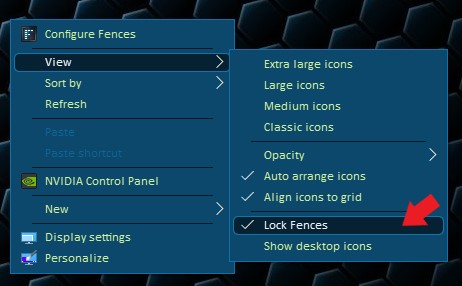
See if it is not locked. If it is locked, please unlock it.  And try again.

Thank you,

Basj,
Stardock Community Assistant

Reply #8 Top

Thanks, but how can I troubleshoot what caused the settings panel can't open properly?

Reply #9 Top

Can't you tried running msconfig.exe and enable those one at a time to see which is the conflicting application?

Thank you,

Basj,
Stardock Community Assistant


Reply #10 Top

Quoting kifgep, reply 2

Our company standard OS is highly privilege controlled, what I guess is privilege issue.
End of kifgep's quote

It seems the only way forward is to get with your IT people to see what they can do to allow Fences to run as intended.

Sean Drohan
Stardock Support Manager

Reply #11 Top

Please take a look at these.


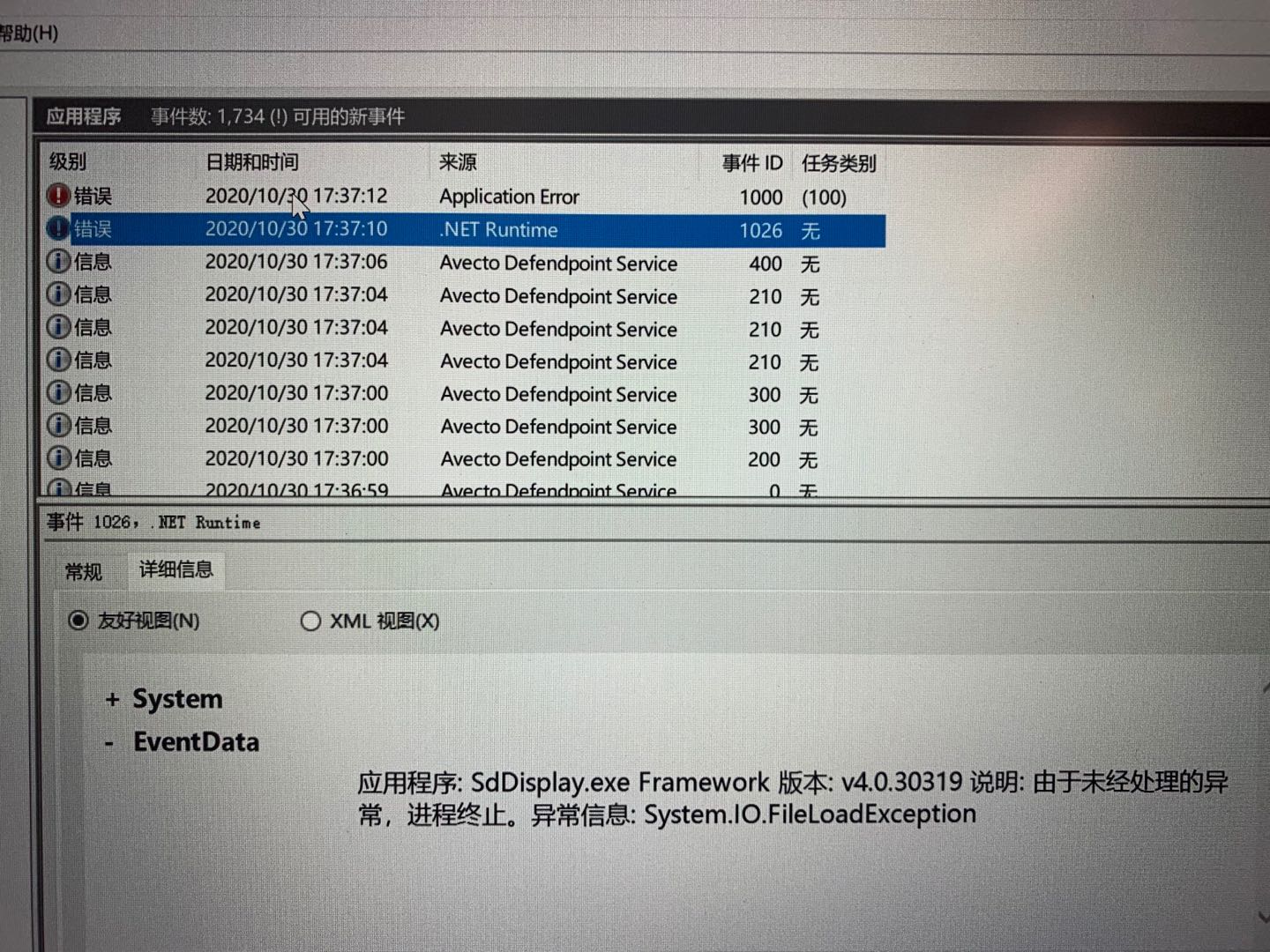
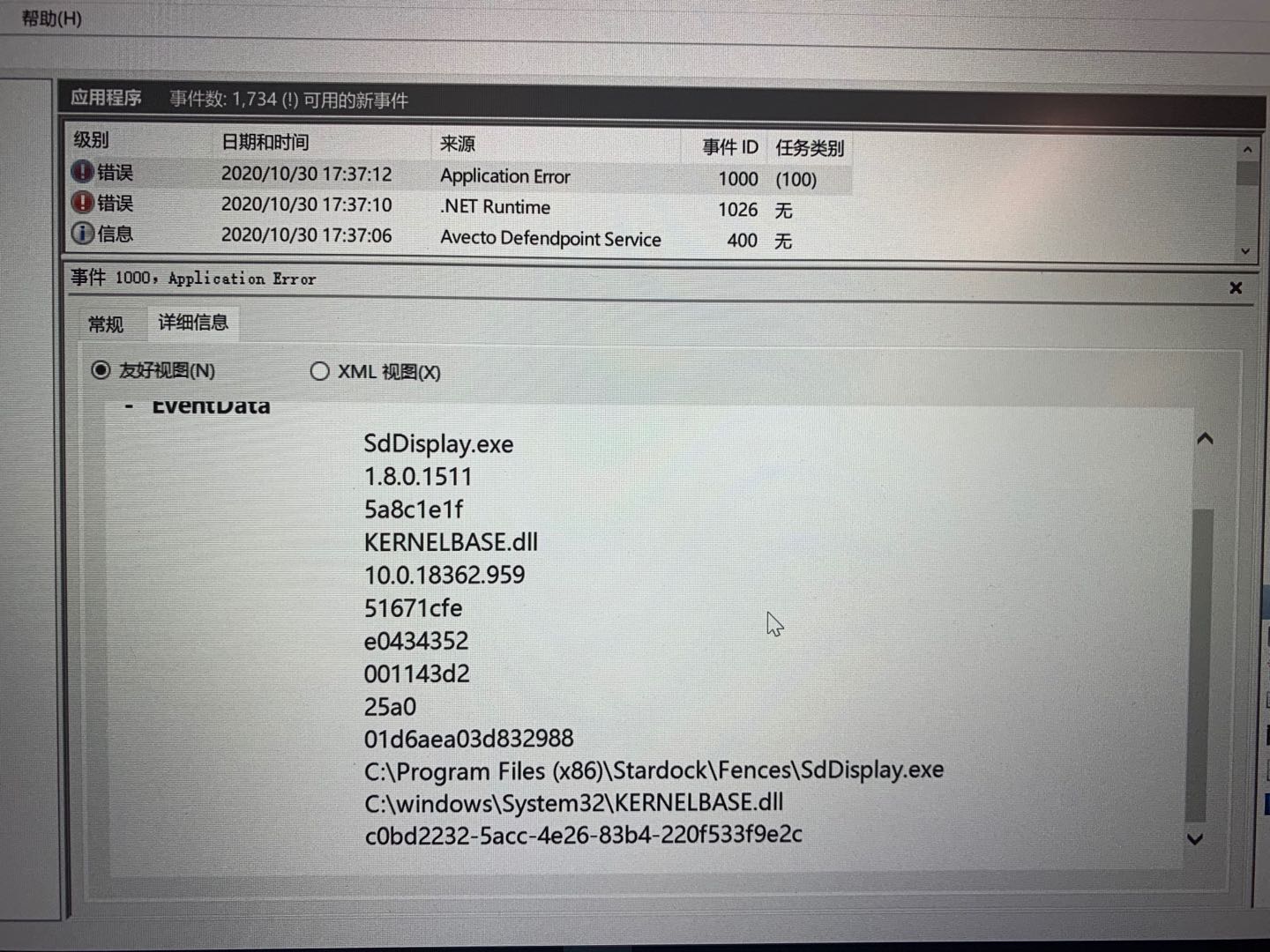
I found these two records in event viewer when I trying to open Fences setting.


Reply #12 Top

Hello,

Its currently on weekend so support might be slow, but for me, looking at your screenshot above, you might need to see if the Avecto Defendpoint is blocking Fences. Might be something very similar to Forcepoint, which usually need to have your Company IT people to whitelist Fences in your system.

Thank you,

Basj,
Stardock Community Assistant

Reply #13 Top

I will disable the defendpoint and try again next week, thanks for your response at weekend!

Reply #14 Top

I have did following steps.


1. Install Fences

2. Disable DefendPoint service

3. Uninstall Fences

4. Reboot

5. Disable DefendPoint service

6. Install Fences


And I found following screenshot for your information.


there will have an event with ID 0 when I shutdown Defend Point service. 

but fences still not working, you can see two error records above.

What I guessing is Fences needs .NetFramework 3.5 to working properly (in readme.txt file), but even when I manually reinstalled framework, it still calling 4.0, check below.


Anyway, I am start using other desktop organization application instead, you can keep tacking this issue or leave it, but I am really expecting your new build can resolve this issue.

Reply #15 Top

I wonder, if you still interested,try uninstall Defendpoint, reboot and reinstall Fences and see if it get to working. From experience, certain program still active in the background even though it been disabled, especially security program.


Basj,
Stardock Community Assistant

Reply #16 Top

I am still excepting to use Fences, but we are unable to uninstall any of security application on company PCs.

What curious is Fences can be running on 1809 of our company PCs, but not 1909 (latest company build).


I can only help you keep dig the error to help you find the real issue of the application, and wish you can fix this in next build.

Reply #17 Top

Hello,
I have forward your problem/question again to Stardock Support Team for their assistance. Please keep an eye on this thread for any updates. We appreciate your feedback and patience.

Basj,
Stardock Community Assistant