Issues with fences starting

Hello, I'm having issues with fences starting with windows 10, explorer just crashes and fences fails to open.

I attempted to download the purge bat but the link in the other forums and in the FAQ is dead. I removed everything I could find from registry and the folders and reinstall but I'm still getting the same issues.

Thanks.

15,741 views 21 replies
Reply #1 Top

Hello,

Sorry to hear you are having issues.

Please open Task Manager and check that both Fences settings are enabled.

Reboot and Test and report back please.


AzDude
Stardock Community Assistant

Reply #2 Top

Fences is enabled however there is only one listed in startup. This has persisted through a few reinstalls including the one that I removed anything I could find.


To elaborate a little more on the starting issue, when I attempt to start fences all the icons and explorer flash twice then crashes. If I attempt to open fences from the start menu or from the exe I get "Fences does not appear to be loaded. You may need to reinstall Fences." 

Thats what lead me reinstalling and when a plain reinstall didn't work I uninstalled using the exe, finally I uninstalled and deleted all registry entries and files I could find. Which didnt work, so then I googled some more and found the purge bat listed on the forums here and in the FAQ (but is no longer an active link to it) and thats where I am now.

Thanks again for the help.

Reply #3 Top

 Hello,

Follow these steps and links , please.

Would you do this PURGE: https://forums.stardock.com/486084/fences-support-faq#reinstalling

Reboot and ReInstall the latest version from your account https://store.stardock.com/myaccount/products/

Reboot , test and report back if this works.

Again check Task Manager both Fences settings are enabled .

in your SS above only one was enabled .


AzDude
Stardock Community Assistant

Reply #4 Top

The link in that FAQ for the Purge bat doesn't work, that's where my issue has been.


I've tired with multiple connections and  computers and end up with a dead link.

Thanks again for the help.

Reply #5 Top

Hello,

Sorry to hear you are having issues.

Did you try another browser .

It's working for me using Chrome .

or try Chrome in Incognito Window in settings .


AzDude
Stardock Community Assistant

Reply #6 Top

Okay I feel stupid now, the Bat file was being caught as a threat in my network IDS/IPS system. Turned off my network protection and was able to download it. 

Everything is now working correctly. 

As a side note to anyone else with the issue of downloading the file, some routers have basic network protection and might flag the file as well including anything with Trend Micro DB (The one that was flagged for me).

Thanks Az I should have looked further in to the downloading issue before posting. Appreciate the help!

Reply #7 Top

Glad is working for you now :thumbsup:  

Reply #8 Top

Also having this problem since the 20H2 Windows 10 update tonight.
I had to purge and now it works, but I can't reinstall Fences, I think we might need a hotfix?

Reply #9 Top

Quoting filoppi, reply 8

I had to purge and now it works, but I can't reinstall Fences, I think we might need a hotfix?
End of filoppi's quote

Hello,
Sorry to hear you are having issues. But not sure on your situation. You get it to work or not? Please explain more details.

And need more information on your system.

  1. Windows version. Please use Winver.exe for full Windows version numbers.
  2. Fences version.
  3. Details on your issues.

Thanks
Basj,
Stardock Community Assistant.

Reply #10 Top

1. 20H2 Build 19042.546
2. Fences was the latest from steam (3.0.4? Whatever, it's up to date, and I think there hasn't been any new versions in a while)
3. My issue is that explorer would restart every few seconds, leaving me unable to see my desktop or even the start menu. Uninstalling Fences fixed it, but I can't install it back.

Just try that build with the same Fences version and see. It would be nice to get version 4 at some point as well :) . Thanks.

Reply #11 Top

Quoting filoppi, reply 10

1. 20H2 Build 19042.546
End of filoppi's quote

Thank you for your report, I have forward your report to Stardock Support Team for their assistance. Please keep an eye on this thread for any updates. We appreciate your feedback and patience.

Basj,
Stardock Community Assistant

Reply #12 Top

Quoting filoppi, reply 8

I had to purge and now it works, but I can't reinstall Fences, 
End of filoppi's quote

Quoting filoppi, reply 10

but I can't install it back.
End of filoppi's quote

'Cant' implies you are getting an error when you try to install.  It would be of great help to know what that error is or what is happening to where you cant install.

Sean Drohan
Stardock Support Manager

Reply #13 Top

No I just meant that it breaks again if I install it so it's better without it. 

Reply #14 Top

Quoting filoppi, reply 13

No I just meant that it breaks again if I install it so it's better without it. 
End of filoppi's quote

Is this PC in question in a corp environment?  If so, are you (the PC) using ForcePoinst \ Websense?

Sean Drohan
Stardock Support Manager

Reply #16 Top

Quoting filoppi, reply 15

No, it's a home PC, purchased through Steam.
End of filoppi's quote

Does a clean boot produce any other results:

https://forums.stardock.com/486084/fences-support-faq#cleanboot

Sean Drohan
Stardock Support Manager

Reply #18 Top

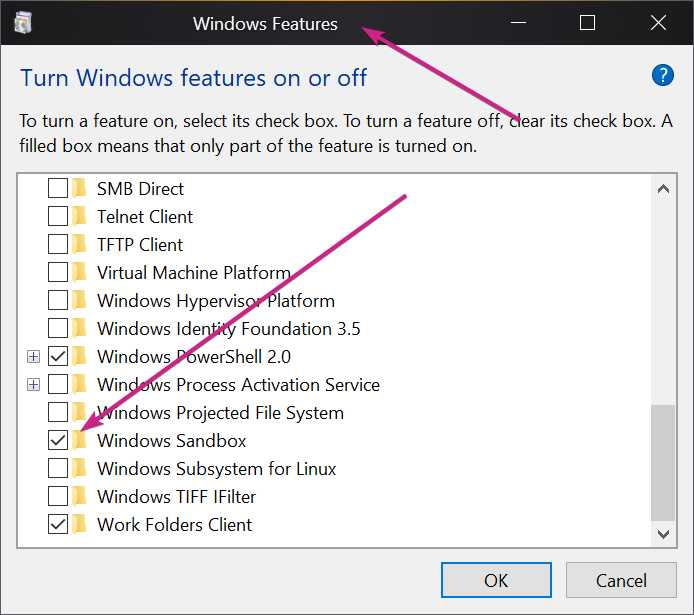
If you enable Windows Sandbox:

Install Fences on a running instance of it, does it work on it?

Sean Drohan
Stardock Support Manager

Reply #20 Top

Quoting filoppi, reply 19

Seems like reinstalling it fixed it
End of filoppi's quote

While pleased to hear it, you had not used that support option detailed prior in the thread?

Sean Drohan
Stardock Support Manager

Reply #21 Top

No I just reinstalled after a clean uninstall. Maybe I had an outdated version, but I think that just the last Windows upgrade broke it and reinstalling it fixed it.