How to delete a fence from the desktop
from  Stardock Forums
Stardock Forums
I accidentally create a fence I don't need. How do I remove it?

 Stardock Forums
I accidentally create a fence I don't need. How do I remove it?

Make sure that right-click on Desktop that Lock Fences is Un- Checked to delete your Fence .

I cannot remove a fence from the desktop. Lock fences is not checked. I created a second fence and now I cannot remove either one. I've used Fences since it was free so please don't tell me to use the X.
Hello,
Sorry to hear you are having issues. Need to know you on Windows 7,8,10 or 11? Also need its full version numbers. Use Winver.exe. And, need your Fences version number too.
Thanks
Basj,
Stardock Community Assistant.
saw this thread and i found i can't delete a fence i emptied.
have 3.133 and i don't see an X.. just an empty fence.
Hello,
Sorry to hear you are having issues. But, have you tried unlocked it first?
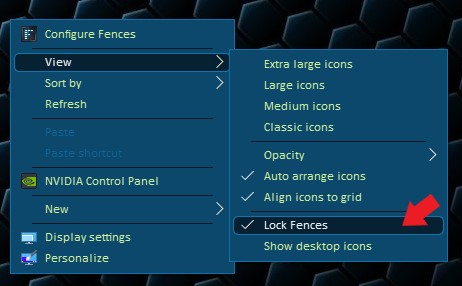
Basj,
Stardock Community Assistant.
Welcome Guest! Please take the time to register with us.
Select a reason for giving karma:
You're about to visit an external site:
Sign up here to get the latest news, updates, and special offers delivered directly to your inbox.

