How to delete a fence from the desktop
from  Stardock Forums
Stardock Forums
I accidentally create a fence I don't need. How do I remove it?



 Stardock Forums
I accidentally create a fence I don't need. How do I remove it?
Stardock Forums
Top
Hit the X in the corner of the fence.

Stardock Forums
Top
Thank you!! 
 Stardock Forums
Top
Stardock Forums
Top
Make sure that right-click on Desktop that Lock Fences is Un- Checked to delete your Fence .

Stardock Forums
Top
I cannot remove a fence from the desktop. Lock fences is not checked. I created a second fence and now I cannot remove either one. I've used Fences since it was free so please don't tell me to use the X.
Stardock Forums
Top
Hello,
Sorry to hear you are having issues. Need to know you on Windows 7,8,10 or 11? Also need its full version numbers. Use Winver.exe. And, need your Fences version number too.
Thanks
Basj,
Stardock Community Assistant.
Stardock Forums
Top
saw this thread and i found i can't delete a fence i emptied.
have 3.133 and i don't see an X.. just an empty fence.
Stardock Forums
Top
Hello,
Sorry to hear you are having issues. But, have you tried unlocked it first?
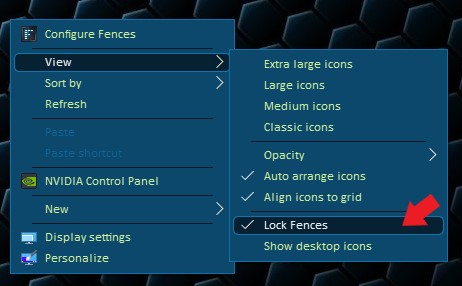
Basj,
Stardock Community Assistant.
Welcome Guest! Please take the time to register with us.