Folders Portal Navigation and Multiple Screen Profiles
 Stardock Forums
Hi,
I've been using fances for only one month and a half, so far it's very very good! Probably the best addon for windows I use.
There is two thing that I'd enjoy even more if it is possible to implement.
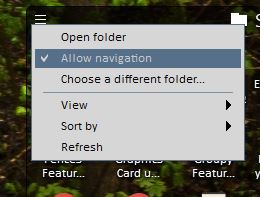
1) Navigable Folder Portals.
Most of the time, I use the files and Folder as they are in the Portals, but sometimes I get myself wanting to navigate to some subfolder in the portal, and get a little frustrated that it open windows explorer (very poor implementation of microsoft, by the way)
If i could navigate to one or two subfolder would be awesome. And maybe have a little home button, to get back to the main folder. Or have an option to return after clicking outside the portal....
2) Multiple Screen Profiles
My main computer is a laptop. Most of the time I use it with external monitor (with the same resolution as my laptop screen).
But sometimes I need to use both my laptop screen and the external monitor. And, for some reason, Fences get a little confused and change the Fences to one or the other monitor. (so far, just a little annoyance...). The trouble comes when I use monitor with different resolutions.
If i had a 4K or a 1440p screen and my laptop was still 1080p, faces get confused, and no matter what option i use, the configuration is completely different from what i want to be.
So, If you had an option to configure profiles, for example: Profile 1: Laptop Screen ( i have configuration x), Profile 2: Laptop Screen and 1080p external monitor (i have configuration y), etc.... would be so easy to change between work modes.
So far that's all i got.
Regards,
Pedro Melo