Default Audio Level

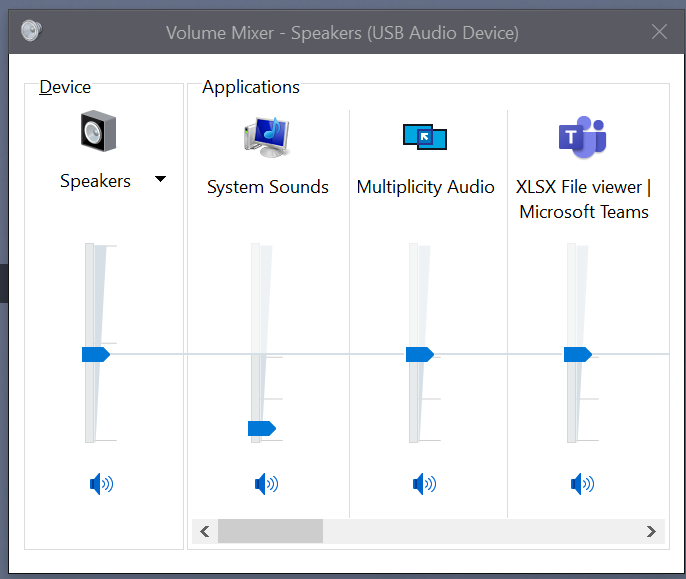
Hey, 2 questions. 1] Whenever Multiplicity starts, it's at 100% volume in windows. It's way too loud for me so I set it at 5% in the control panel. But when I restart my computer, it's back at 100%. All other programs save their % at whatever I last kept it at, except multiplicity. Is there any workaround or fix for this so that I can default it to 5%? 2] It seems that the max speed cap for copy/paste is 70mbps. Is there a way to transfer at gigabit speeds? Upto 1000mbps? I feel like maybe the default encryption may be the reason why it's so slow...just wanted to know if there was a solution for this. Thanks a lot!


7,376 views 17 replies
Reply #1 Top

Hello,

Sorry to hear you are having issues.

See if this link helps and report back results please https://forums.stardock.com/486104/multiplicity-support-faq#audio

Multiplicity Manual https://www.stardock.com/products/multiplicity/v3/manual/


AzDude
Stardock Community Assistant

Reply #2 Top

Thanks for the prompt reply, however unfortunately I have already gone through the manual and the Audio support page. I have also checked past posts on the forums, but could not find any relevant information.

NOWHERE does it mention DEFAULT VOLUME, or any other solution pertaining to the issue I had.   :(

Please do let me know if there is any other way I can fix these issues! Thanks again!

Reply #3 Top

Hello,

I have forwarded your report to the Stardock support team for their review and recommendations.

Please keep an eye on this thread for any updates.

We really do appreciate your feedback, thanks.


AzDude
Stardock Community Assistant

Reply #4 Top

Hello,

Sorry to hear you are having trouble.

1] Whenever Multiplicity starts, it's at 100% volume in windows.
End of quote

After setting MP below the max default sound, reboot, it remained the same for me:

Is there a way to transfer at gigabit speeds? Upto 1000mbps?
End of quote

In terms of copy speed, that will be limited by HD write and read speeds and the size of files.  Lots of small files is very inefficient.  One large file is very efficient 

Sean Drohan
Stardock Support Manager

Reply #5 Top

Thank you so much for your reply!


1] Sound Level:

I have tried changing the volume and restarting my PC on 5 different machines. It has never saved the value. Is there something I'm missing? Have asked friends to try as well and they aren't able to save it either.

I have even reformatted one of the machines to check and only installed multiplicity on it, left windows completely default, it still doesn't save the sound level. Please let me know how you were able to save it so I may replicated it.


2]Gigabit Copy Paste:

As for Gigabit speeds, I have tried with just 1 large file, copying between 2 computers with NVME SSD's. They are more than capable 1000mbps (roughly 100MB/s read and write)

When I copy and paste files using windows explorer I get the full 1000mbps, I even tried another program called Input Director, to copy paste files, and it works at 1000mbps as well. Only multiplicity has a speed cap while transferring files. Please let me know how you were able to get 1000mbps to work and I shall replicate the same.


Once again, thank you very much for your reply! :) 

Hope to hear back from you very soon!

Reply #6 Top

Seems I was mistaken about the volume thing, it is reset with each reboot but I don't know how MP would contribute to that...

Ill get with the lead dev on it.

Internal ref: 

Volume: ODNT-1020

File transfer: ODNT-1019

Sean Drohan
Stardock Support Manager

Reply #8 Top

With regards to the performance of file copies, this is going to be investigated further this week as a brief test on a Surface Pro 2 showed performance lower than expected.

Reply #10 Top

Testing confirmed the speed was not as it should have been,

We have an updated internal build which should increase this significantly.  Encryption does carry a cost however so it will not be quite as fast as a network share, especially if you are using a 2.5Gbit/5Gbit/10Gbit connection.

Reply #11 Top

Quoting Neil, reply 10

Testing confirmed the speed was not as it should have been,
End of Neil's quote

😉

Sean Drohan
Stardock Support Manager


Reply #12 Top

Quoting Neil, reply 10

Testing confirmed the speed was not as it should have been,

We have an updated internal build which should increase this significantly.  Encryption does carry a cost however so it will not be quite as fast as a network share, especially if you are using a 2.5Gbit/5Gbit/10Gbit connection.
End of Neil's quote

Alright, thank you for updating. Glad to hear that you guys have an updated internal build as well. Eagerly awaiting it's release.


Just wanted to know about the status of the audio level in the mean while. Were you able to find a way to patch that as well? 

I have been doing a little research myself, and I'm not sure if this helps you in ANY way at all, but if it does, then great! I read that it could have something to do with the boot order? Something about how multiplicity loads before the user's stuff loads? Sorry if I don't understand much else about it! But I read that it MIGHT be the reason. Perhaps if you could look further into that, you might find a similar reason or way to fix it.


Thanks again for the support. 

Will wait to hear from you soon! 

Reply #13 Top

Quoting konobujinandanoda, reply 12


Quoting Neil Banfield,

Testing confirmed the speed was not as it should have been,

We have an updated internal build which should increase this significantly.  Encryption does carry a cost however so it will not be quite as fast as a network share, especially if you are using a 2.5Gbit/5Gbit/10Gbit connection.


Alright, thank you for updating. Glad to hear that you guys have an updated internal build as well. Eagerly awaiting it's release.


Just wanted to know about the status of the audio level in the mean while. Were you able to find a way to patch that as well? 

I have been doing a little research myself, and I'm not sure if this helps you in ANY way at all, but if it does, then great! I read that it could have something to do with the boot order? Something about how multiplicity loads before the user's stuff loads? Sorry if I don't understand much else about it! But I read that it MIGHT be the reason. Perhaps if you could look further into that, you might find a similar reason or way to fix it.


Thanks again for the support. 

Will wait to hear from you soon! 

End of konobujinandanoda's quote

We have also been able to make it save the level and mute status.  The issue is Windows doesn't save it for the process because it runs on the winlogon desktop so we have to manually do it ourselves.

Reply #14 Top

I assume you mean "Unable"?

Also do you think that there will be anyway to fix it in the near future, or an upcoming patch? Or should I just assume that it is not possible to fix this in any way.

Thanks again for the reply.

Reply #15 Top

Quoting konobujinandanoda, reply 14

I assume you mean "Unable"?

Also do you think that there will be anyway to fix it in the near future, or an upcoming patch? Or should I just assume that it is not possible to fix this in any way.

Thanks again for the reply.
End of konobujinandanoda's quote

No I mean we were able to.  We have added manual save code to our code rather than letting the OS remember as it seems it simply can't handle this edge case.

Reply #16 Top

That's awesome! Glad to hear that both issues have been mostly resolved!

Approx when do you think the update would be available to download?

Reply #17 Top

Quoting konobujinandanoda, reply 16

Approx when do you think the update would be available to download?
End of konobujinandanoda's quote

Wont be long.

Sean Drohan
Stardock Support Manager