
New copy won't activate

I bought it recently for use on my new tablet running Win 10. All other functions/apps are working normally. I already have a copy of Fences on a Win 7 computer and so I know how it works. 

The installation file downloads normally and the icon appears. But it’s impossible to create a window on the desktop. When I make a rectangle it vanishes when I release the  mouse button. 

At various times messages appear saying I may need to reinstall Fences. I have done this several times. Or it says Fences has not loaded, but does not say why. . 

I have spent quite a bit of time  on this to no avail. Can someone assist? Thanks. 


PETER MORTON
 

5,140 views 7 replies
Reply #1 Top

Hello,
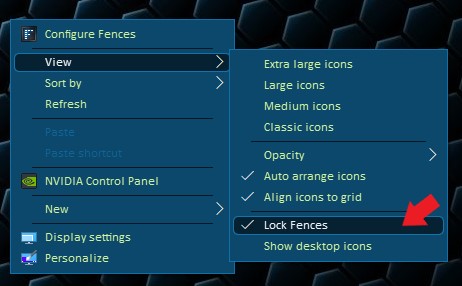
Sorry to hear you are having issues. Please check if you have accidentally lock your fences. If you did please unlock it and try again.


Basj,
Stardock Community Assistant.

Reply #2 Top

I have no dialog box called 'configure fences'. I completely uninstalled fences using Revo uninstaller and started again. The only icon that appears is called 'Customise'.  There is no configure option in there. 

A new message has appeared saying 'the integrity of Fences may have bee compromised' and maybe to reinstall again (for the  nth time). When I did it, It's exactly the same. 

PETER MORTON


Reply #3 Top

Try this From : https://forums.stardock.com/494392/get;3780664

Quoting OrangeChronic, reply 4

Very late on the issue but i had this problem myself Windows 10 Pro build 1909 where when opening fences it would crash immediately and stop responding and this one setting within windows defender prevents certain devices (mainly laptops) to install/launch certain programs properly if you head to Settings > Update & Security > Windows Security > App & Browser control > Scroll to the bottom and find exploit protection settings > disable "Force randomization for images (Mandatory ASLR)" and "Force memory allocations (Bottom-up ASLR)" after doing that you'll notice "High-entropy ASLR" disable reboot and try again. This has fixed so many broken/corrupted programs for me and also fixed Fences.
End of OrangeChronic's quote

Try that and report back.

Thank you,

Basj,
Stardock Community Assistant

Reply #4 Top

Thank you OrangeChronic. My win10 doesn't have all those exploit protection settings. I disabled the ones it does have but no luck

Basj: I don't have a 'configuration' box at all; see message above. What does this signify, please? And what does the 'integrity' message mean? 

I'm no further forward with installing Fences. 

Reply #5 Top

Don't fully understand what you mean above.Please let us know more on your tablet.

1) Is the CPU base on ARM?

2) More details on the tablet.

Thanks

Basj,
Stardock Community Assistant

Reply #6 Top

Your message of 21 August (shown above) shows an image of a 'Configure Fences' box. I definitely can't find that box anywhere on my installation of Fences. The only Fences icon in Desktop is called 'Customise Fences' and it has nothing relevant in it. 

Surely the lack of a 'Configure Fences' box means there is something wrong with my download?


PETER MORTON

Reply #7 Top

Quoting basj, reply 5

1) Is the CPU base on ARM?

2) More details on the tablet.
End of basj's quote

Information on this please.

Thank you,

Basj,
Stardock Community Assistant
