Explorer crashes, Fences fails to start

Hello,

Fences 3 worked on Win10 ver1909  and stopped to work with message : 

Résultats de recherche

Résultats Web

Explorer crashes, Fences fails to start
 
Tried to re-activate and same message comeback.
 
uninstalled and reinstalled and same issue. 
 
What's wrong ? 
9,971 views 11 replies
Reply #1 Top

Hello,

Would you do this PURGE: https://forums.stardock.com/486084/fences-support-faq#reinstalling

Reboot and ReInstall the latest version from your account https://store.stardock.com/myaccount/products/

Reboot , test and report back please ..


AzDude
Stardock Community Assistant

Reply #2 Top

I have this same issue. Tried with Fences 2 and 3. Both do the same. 

I've tried the steps outlined above and same issue still exists.

I just had my PC reinstalled and it is running Windows 10 Pro Build 10.0.18363. Before the re-install, Fences was working fine. Since all the same software installed previously is installed again, the only difference is the Windows 10 version running now is newer.

Error I'm getting is "Fences has detected that Explorer was not closed properly. As a precaution, Fences has been temporarily disabled. To re-enable Fences, right click your desktop and choose "Enable Fences"."

If I choose to Enable Fences, same thing happens and same error pops up.


Reply #3 Top

Quoting bragland, reply 2

I have this same issue. Tried with Fences 2 and 3. Both do the same. 

I've tried the steps outlined above and same issue still exists.

I just had my PC reinstalled and it is running Windows 10 Pro Build 10.0.18363. Before the re-install, Fences was working fine. Since all the same software installed previously is installed again, the only difference is the Windows 10 version running now is newer.

Error I'm getting is "Fences has detected that Explorer was not closed properly. As a precaution, Fences has been temporarily disabled. To re-enable Fences, right click your desktop and choose "Enable Fences"."

If I choose to Enable Fences, same thing happens and same error pops up.

 
End of bragland's quote

Hello,
Sorry to hear you are having issues. It best for you to start your own thread. Anyway, need more information.

1) Your AV or security software installed in your system.

Thanks

Basj,
Stardock Community Assistant.

Reply #4 Top

Anti-virus is stock one that comes with Windows. Otherwise, IT dept has us on a Barracuda Networks firewall. No other local security software installed that I can see. 

Reply #5 Top

Hello,

Maybe you can try this solution that offer by others : https://forums.stardock.com/494392/get;3780664

Try that and report back.

Thank you,

Basj
Stardock Community Assistant.

Reply #6 Top

Quoting basj, reply 5

Hello,

Maybe you can try this solution that offer by others : https://forums.stardock.com/494392/get;3780664

Try that and report back.

Thank you,

Basj
Stardock Community Assistant.

End of basj's quote

I tried the steps listed in the last post from that thread. Made the changes, uninstalled Fences, used the Purge.bat file, rebooted, and re-installed from Stardock site as admin.

No change. Explorer error pops up immediately and Fences will not enable.

Reply #7 Top

Quoting bragland, reply 4

IT dept has us on a Barracuda Networks firewall.
End of bragland's quote

I never use this software, maybe you need your IT guy, to help to exclude/whitelist Fences from it.

Thank you,

Basj,
Stardock Community Assistant

Reply #8 Top

Quoting basj, reply 7


Quoting bragland,

IT dept has us on a Barracuda Networks firewall.


I never use this software, maybe you need your IT guy, to help to exclude/whitelist Fences from it.

Thank you,

Basj,
Stardock Community Assistant

End of basj's quote

If they have blacklisted it, I would think it would not be allowed to be installed. I have admin rights on this machine and have not had an issue with installing any software I want on it.

Fences installs it just won't run. 

The real problem is with Stardock. I have to use a forum to try and troubleshoot with people that have never even used the software. Also, why are there no error logs to look at so we don't have to guess about what is going on when Fences tries to start?


Reply #9 Top

I never said I never use Fences, I just said I don't use "Barracuda Network Firewall". Anyway, I have forward your problem/question to Stardock Support Team for their assistance. Please keep an eye on this thread for any updates. We appreciate your feedback and patience.

Basj,
Stardock Community Assistant

Reply #10 Top

Quoting bragland, reply 8

If they have blacklisted it, I would think it would not be allowed to be installed. I have admin rights on this machine and have not had an issue with installing any software I want on it.
End of bragland's quote

Since the overwhelming majority do not have the issue, we need to see what is unique to your (any) situation.

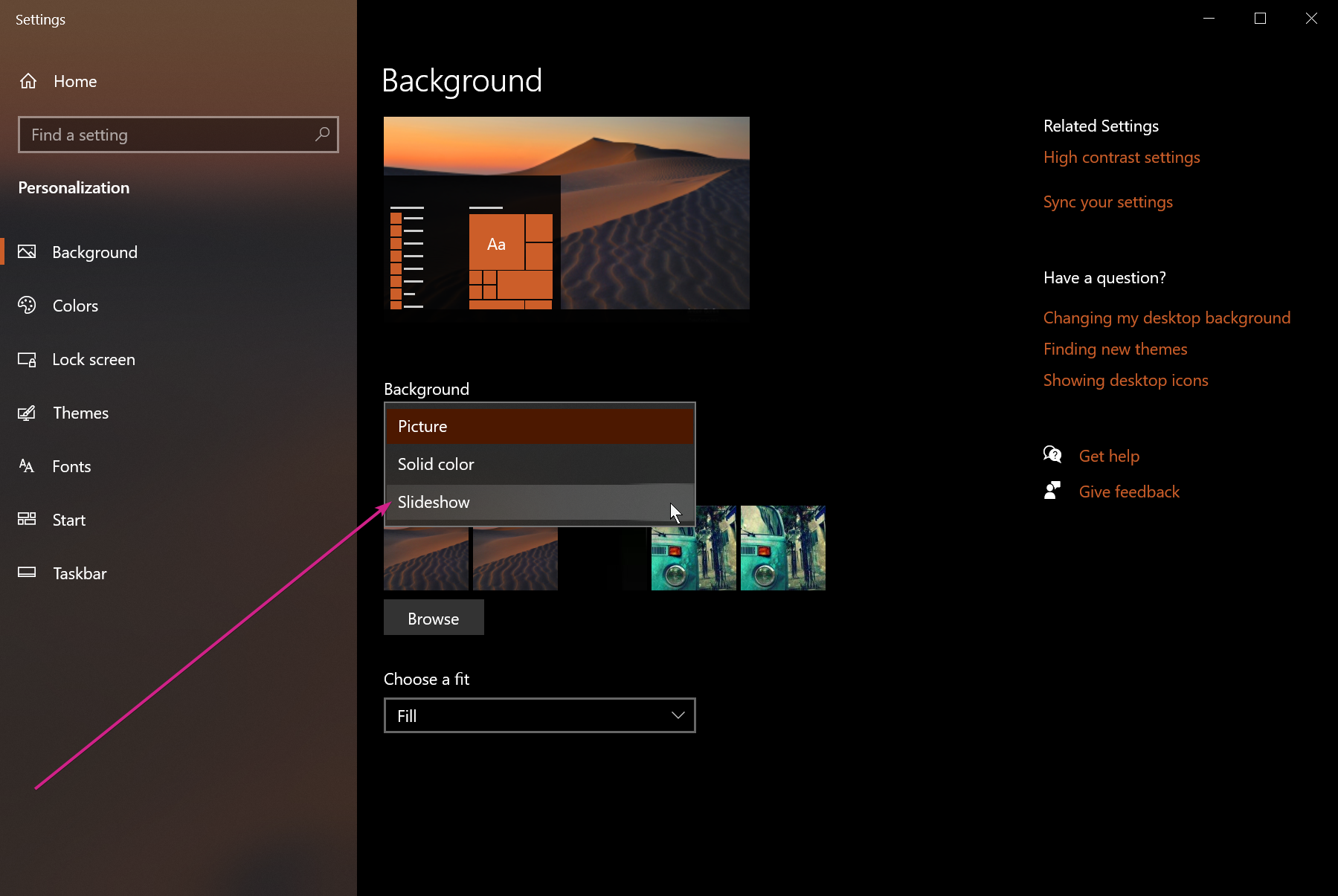
As you may have seen in other threads, almost every time we see this issue it is in a corporate environment.  The only other time - but not everytime - is if someone is using Windows Slideshow desktop option:

If that is not your issue, we are going to have to ask that you run this by your IT people - to see if they have any insight or allow you to test without any group policy \ AV software enabled.

Sean Drohan
Stardock Support Manager

Reply #11 Top

Quoting sdRohan, reply 10


Quoting bragland,

If they have blacklisted it, I would think it would not be allowed to be installed. I have admin rights on this machine and have not had an issue with installing any software I want on it.


Since the overwhelming majority do not have the issue, we need to see what is unique to your (any) situation.

As you may have seen in other threads, almost every time we see this issue it is in a corporate environment.  The only other time - but not everytime - is if someone is using Windows Slideshow desktop option:

Reduced 47%
Original 725 x 485


If that is not your issue, we are going to have to ask that you run this by your IT people - to see if they have any insight or allow you to test without any group policy \ AV software enabled.

Sean Drohan
Stardock Support Manager

End of sdRohan's quote

Setting is on "Picture" so I will reach out to the IT dept.to see if they know what might be different.


Thanks.