avoid welcome windows
from  Stardock Forums
Stardock Forums
there is a way to avoid Fence welcome screen/windows at any windows startup ?

 Stardock Forums
there is a way to avoid Fence welcome screen/windows at any windows startup ?
Hello,
Sorry to hear you are having issues. Please screen capture the Welcome screen and post it here.
Thanks
Basj,
Stardock Community Assistant.
https://cdn.stardock.us/forums/64/12/6412242/d266e9ab-5f1c-4c88-bc56-23cb7cc3a1bd.jpg
May be it's a silly question with a setup mistake, but pls help to find a solution

Hello,
Please try the purge and reinstall steps as mentioned here : https://forums.stardock.com/486084/fences-support-faq#reinstalling
Just make sure to re-download the latest version from your account. Reboot after the purge. Reinstall using the latest version you just downloaded. Reboot after the installation. Retest and report back.
Thanks
Basj,
Stardock Community Assistant.
HI,
carefully followed your suggestion from purge to reinstall, new setup and double reboot. but the welcome to Fences window is always showing up.
I run windows 10 pro on a Dell 5810
Are you sure is not a simple check to be set on setup ? I have been unable to find it but I presume could exist.
Thanks for your time
Manlio
Hello,
I have forwarded your report to the Stardock support team for their review and recommendations.
Please keep an eye on this thread for any updates.
We really do appreciate your feedback, thanks.
AzDude
Stardock Community Assistant
Hello,
If your running Fences.exe as Admin *** Do Not do that ***
Can we see a screenshot of your task manager for Fences
should look like this 2 Fences enabled .
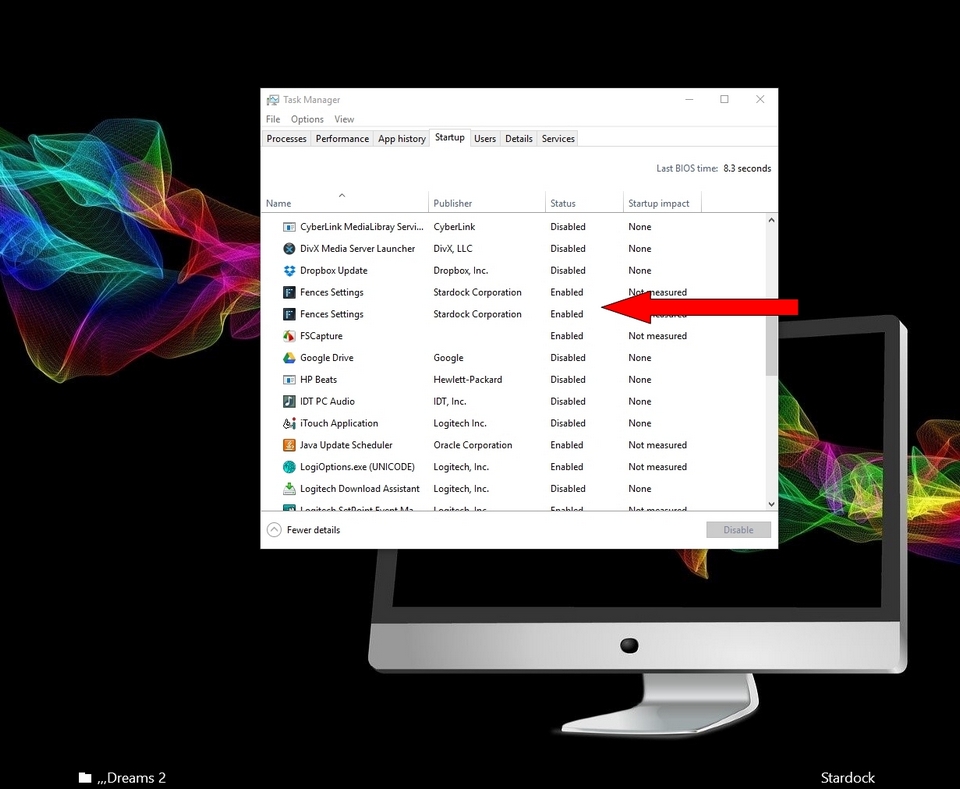
AzDude
Stardock Community Assistant
Hello,
Sorry to hear you are having issues. Please the purge again. And without reinstalling please see if there are Fences startup listed again in your task manager.
Thanks
Basj,
Stardock Community Assistant.
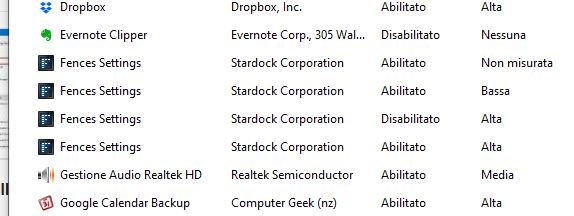
This the startup section of task manager after a purge without any reboot
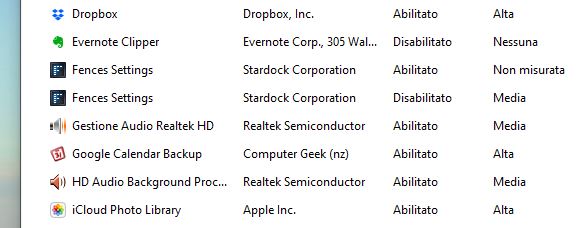
more … neither any reinstall. Waiting for your answer before reinstalling Fences
After the purge and reboot, is the Task manager startup listing still have Fences in it?
Thank you,
Basj
Stardock Community Assistant.
YES ! exactly as I wrote, see above.
I understand that this is unusual, but I reported to you, as requested, just to hear your instructions. The screen shot of task manager was reported after purge, without requested boot and without reinstalling Fence: i.e. now I have no fences working.
Hope now it's clear.
Hello,
I have forwarded your questions/problems to the Stardock Support team for their assistance. Please keep an eye on this thread for any updates. We appreciate your feedback and patience.
Thank You,
Basj
Stardock Community Assistant.
Hello,
Sorry to hear you are having trouble.
This is likely due to you installing Fence in a non-default location.
If after a purge, and a reboot, you still have Fences in your startup, right-click the Fences item in Startup and go to the file location:

Delete the folder that it took you to. Do the same for any other location for Fences.
Reboot.
See that Fences is no longer part of the Startup.
If its not, reinstall and try again.
Sean Drohan
Stardock Support Manager
Mr. Drohan,
thanks for your attention and the time you dedicated to my problem.
Ad due time, when I installed Fence for the first time, I made a default installation. For that time upto now I upgraded from Windows 7 64 to Window 10 pro. Those are the only modifications done.
Anyhow I will make a carefull cleaning, "manually" and then reinstall fences.
BTW your software is great.
If At reinstallation everything will be ok I will not return to you and pls consider the ticket closed with my best regards and thanks
Manlio Laschena
Milan - Italy
Welcome Guest! Please take the time to register with us.
Select a reason for giving karma:
You're about to visit an external site:
Sign up here to get the latest news, updates, and special offers delivered directly to your inbox.
 WinCustomize Forums