Rendering weirdness with menu translucency enabled
from  Stardock Forums
Stardock Forums
(On the latest version)
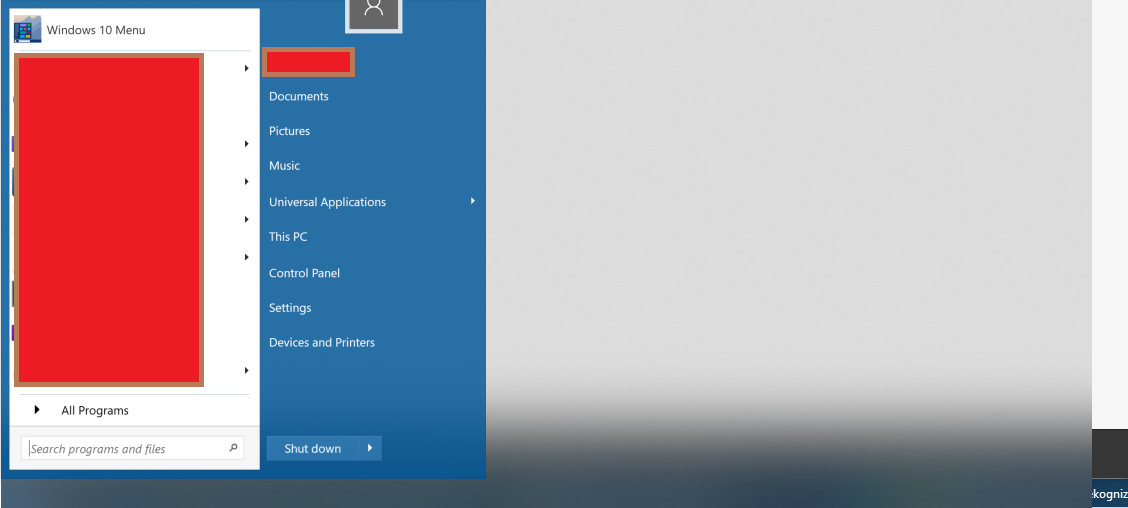


Hello,
Sorry to hear you are having issues. Need to know more.
1) Windows 10 version. Please use Winver.exe for full version numbers.
2) Start10 version.
3) Monitors setup : Scaling (100%,125%,150% etc).
Basj,
Stardock Community Assistant.
1) 1908
2) whatever start10 version was released ~today
3) primary screen: 3840x1440 at 100%
Secondary screen (left of primary): 3840x2160 at 125% (I'm not confident of my recollection of the scales... will validate that in the morning)

Is the issue happened on both monitors start panel?
Thank you,
Basj
Stardock Community Assistant.
I could not reproduce the issue on my secondary (left) display.
I was able to reproduce the issue today on my primary screen. However, after opening it on my second display, I had some trouble reproducing it getting stuck on my primary display... BUT I WAS EVENTUALLY able to reproduce it on my primary display after opening it on my secondary display.
On my primary display, the issue happens sometimes... but when it doesn't happen, I can still see a rectangle for a fraction of a second when the menu is coming up. (it disappears before my windows 7 style recent program list loads)... I'm not sure if it's the start menu appearing and then jumping left to the corner of my screen? or if it's the blurry rectangle appearing and then disappearing.
The issue is happening primarily when I have a window snapped to the left half of my primary screen focused, but that might be coincidental.
Is there any reason for you not updating to the latest Windows 10 v1909? and also just for testing purpose please set both monitors to 100% scaling and retest. You can apply back that the scaling after the test. And report back.
Thank you,
Basj
Stardock Community Assistant.
Just rebooted on a whim, and it appears the issue is no longer occurring... Neither is the momentary rectangle that I saw before... Even at 100/125 pri/sec scale
Great, glad it worked out.
Thank you,
Basj
Stardock Community Assistant.
Welcome Guest! Please take the time to register with us.
Select a reason for giving karma:
You're about to visit an external site:
Sign up here to get the latest news, updates, and special offers delivered directly to your inbox.