Start10 Beta 1.90-j75 - Start Menu MRU entries don't work

Installed the Start 10 beta and noticed that the MRU enties for apps (like recent Excel sheets or Remote Desktop hosts) no long work.  If you pick the app it works, but if you open the MRU list next to it and select one of those nothing happens at all.

Reverting to 1.80d restores the functionality.

One other minor problem - the entry in Add/Remove Programs has been inconsistent over the last few version, sometimes spelt Start10 and other times spelt "Start10 ".  This results in an orphan entry in Remove programs that needs to be manually tidied up.  Be good if the install process could do this.

Kevin

4,153 views 10 replies
Reply #1 Top

Hello,
Sorry to hear you are having issues. Can't reproduce in my system. Excel from startpanel using its MRU list on the right open that spreadsheet as it should. Need more information.

1) Windows 10 version. Please use Winver.exe for full version numbers.

2) Excel version.

Thanks

Basj,
Stardock Community Assistant.

Reply #2 Top

1909 fully patched (10.0.18363.719) x64

Excel 2016

Remote Desktop Connection 

Pretty well all apps.  


Reply #3 Top

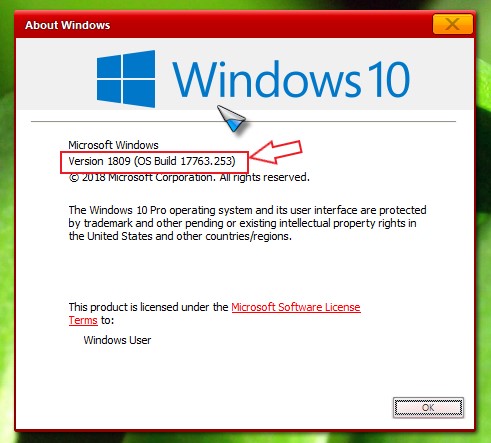
Need something like this. Please use Winver.exe


And

All other app/program MSU on Start10 list also now working, not just Excel?

Thank you,

Basj
Stardock Community Assistant.

Reply #4 Top

Sorry for the delay - did your website just crash ?

Version 1909 (OS Build 18363.719)

It's weird.  Just reinstalled 1.9. 

  • Pinned Notepad to Start10.  MRU works
  • Tried Excel 2016 MRU.  Nothing
  • Opened Excel 2016 and manually opened a recent file.
  • Tried Excel 2016 MRU again.  Some file entries work e.g. the file I just opened but others do not.  As you  know, if you dwell on the MRU it shows you the filename.It looks like the local files (c:\users\xxxx\documents...) work but those in my OneDrive which display https://d.docs/live.net as a prefix don't
  • None of the MRU shortcuts for Remote Desktop Connection work.

Previously reverting and everything works just fine.  Having trouble reverting at the moment - Activation server down ?

Reply #5 Top

Hello,
I have forwarded your questions/problems to the Stardock Support team for their assistance. Please keep an eye on this thread for any updates. We appreciate you feedback and patience.

Thank You,
Basj
Stardock Community Assistant.

Reply #6 Top

Thanks.  Can you also chase the fact the activation server is down as I can't reinstall 1.8 at the moment.

Reply #7 Top

Quoting marchk01, reply 6

Thanks.  Can you also chase the fact the activation server is down as I can't reinstall 1.8 at the moment.
End of marchk01's quote

We had a momentary issue but activation is working now.

Sean Drohan
Stardock Support Manager

Reply #8 Top

Please try the activation again and report back. If it still fail. Please post the error massage you get while trying to activate it.

Thank you,

Basj
Stardock Community Assistant.

Reply #9 Top

Thanks.  Successfully downgraded to 1.8.  All MRU instances now working again (Excel with OneDrive links; Remote Desktop Connection hosts etc)

Reply #10 Top

Hello,

Sorry to hear you are having trouble.

I was able to repro this with some of the most recently used links.  I bugged it internally.

Thank you for the report.

Internal ref: ODNT-314

Sean Drohan
Stardock Support Manager