desktop at system startup

icons and fences display

When I start up my Desktop, everything is working except that I do not see any icons or my created fences on the screen.
If I right-click on the mouse, however, everything shows up (and all shortcuts & programs that are depicted in the fences work).

In orde to overcome this problem, I tried to make some settings in the fences setup but to no avail :
I even uninstalled the program, (then after system startup, all the icons showed up), re-installed it and re-created all my fences
but the same problem happened.
if, in menu "Home" (basic options) I uncheck 'activate Fences", then all my icons appear on the mainscreen
if 'activate Fences" is checked, then the desktop does not show either the icons,nor the fences.
They only become visible after a right-click on the mouse.

Info:
In the "Startup" section of the "Task manager" there are two fields (both'Fences settings' and switched on)
I checked the registry and all keys seem to be correct and in the right place.

The problem is only a minor one as I only have to right-click the mouse, but it's intriguing...

Thanks for support

Marc

[email protected]


6,415 views 10 replies
Reply #1 Top

Hello,
Sorry to hear you are having issues.Need more information.

1) Windows version, please use Winver.exe for full version numbers

2) Fences version.

3) Have you try the purge and reinstall steps as mentioned here? : https://forums.stardock.com/486084/fences-support-faq#reinstalling

Please try it, just make sure to re-download the latest version from your account. Reinstall that version and reboot. Retest and report back here.

Basj,
Stardock Community Assistant.

Reply #2 Top

Hello Basj
1. Windows version is 1919 build 18363.657

2. Fences version is 3.0.9.11 which is the latest version

3. I uninstalled the program with Smarty uninstaller 4, which completely erases all remnants of the program and clears all relevant registry     
   keys.   I then re-installed the program (latest version)

If you think I should use the purge program, I will do so but then I suppose I then have to create all my fences again.
I suggest that I make a mirror backup of my C-drive (Acronis True image), then purge fences, re-install it and create one or two fences with some shortcuts and see how that works.
If the problems occurs again, then I will use the True image mirror to revert to the mirror backup and live with it 😊

Thanks for support

Marc j.

Reply #4 Top

Hello Basj.
I have found the snapshots on the C-drive, but will still make the mirror image.

I will then use the purge, re-install the program, and recall the snapshot from the C-drive.
restart the PC and hope for the best
I let you know how I get on.

Cheers

Marc

Reply #5 Top

Hello Basj

I purged the program, re-installed it (Fences_3.09_setup_sd.exe), switched off the PC, restarted but
nothing changed, I still had to right-click the mouse.
I used the snapshot taken earlier on and all fences came up and worked
(except that all fences had the same color and label color- but that was quickly corrected).

So back to square one, but it's really not a big issue (it's even safer as, if somebody else starts up the machine,
they see a blank screen -😁)

Thanks for your patience and support

Marc j.

Reply #6 Top

Hello,

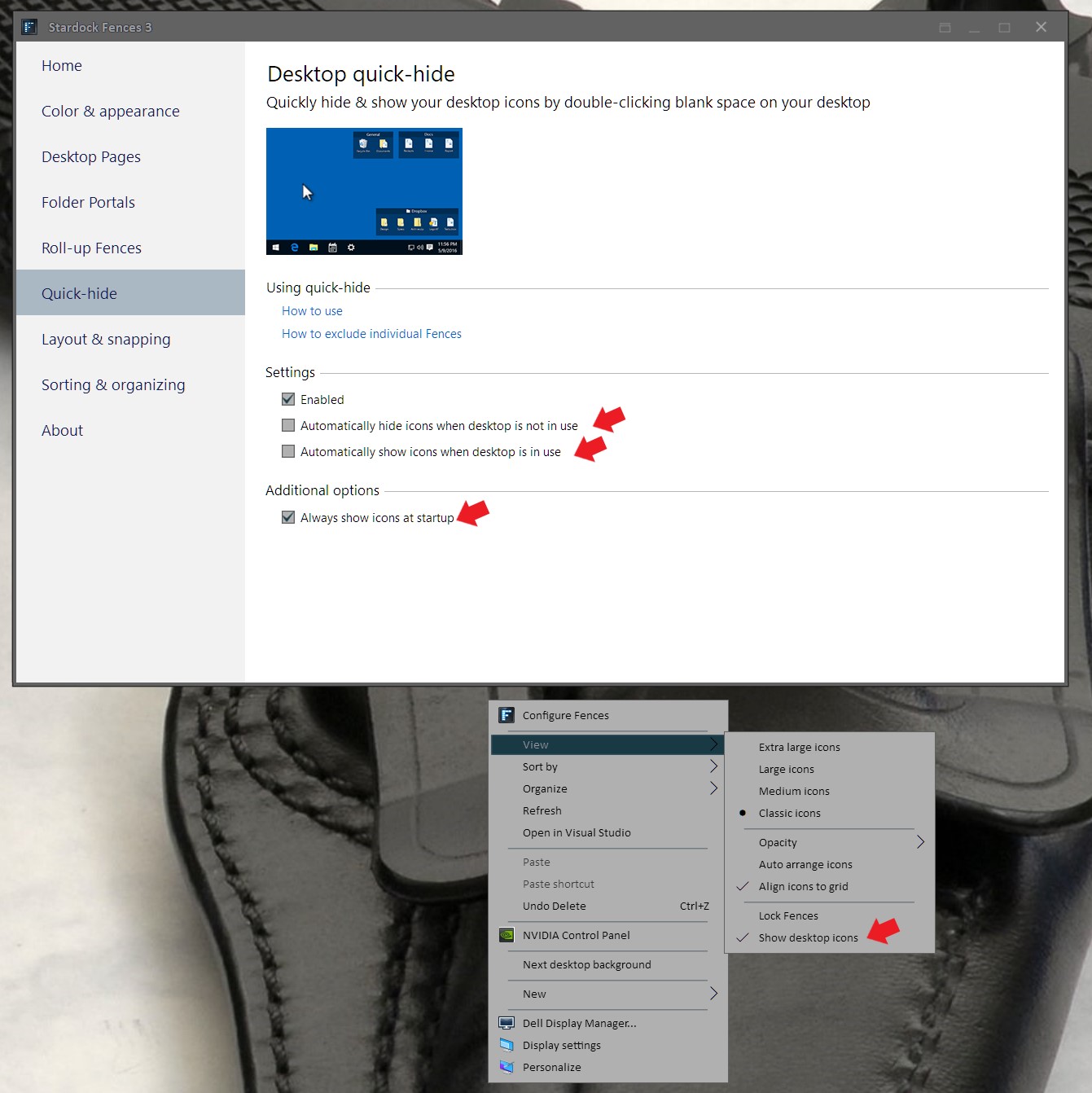
If you still interested, I wonder what is your setting on this few items (Red arrows)


Basj,
Stardock Community Assistant.

Reply #7 Top

Hi Basj

The settings are exactly as depicted in your screenshot above (red arrows and view settings)

Marc j.


Reply #9 Top

I did all that (except making a new administrator account) but the thing stayed as before.  As I said, it's not a great issue to me.
The 'problem' appeared after a Windows update on my new PC some time ago.
Don't worry, I can live with it. If a miracle occurs and things start 'as advertised', I will let you know.
If I have a lot of time next week, I will start an extra "Administrators account', then purge and start all over again
(but still keep my C-drive mirror in case of a possible cock-up)
i will keep you posted

Cheers

Marc j.


Reply #10 Top

Great, keep us update.

Thank you,

Basj
Stardock Community Assistant.