

Fences latest version issue on Windows 10 Pro

Dear Users,

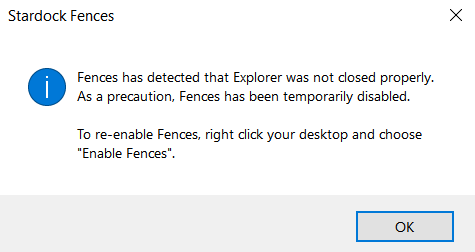
I have a Windows 10 Pro operation system with a gamer type harware specification and I installed Fences 3.0 version, but when I clicked twice the icon the first attached picture always appears then closing the second too.

Should I set anything e.g. between the security part or anywhere?

Could you help me?

Thank you in advance.


1.)
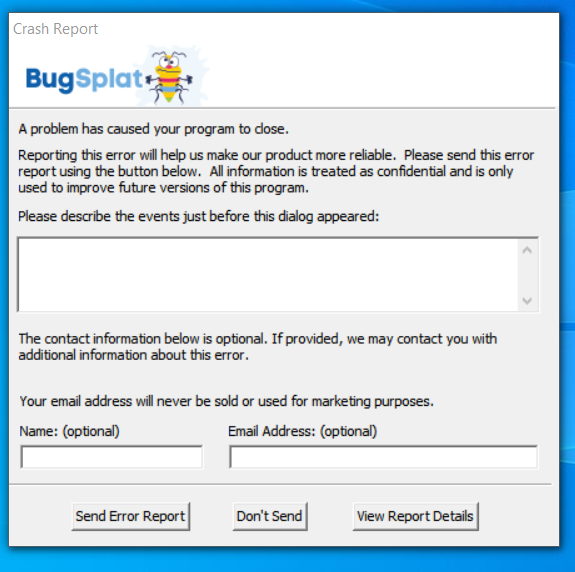
 

2.)
 

9,558 views 8 replies
Reply #1 Top

Hello,
Sorry to hear you are having issues. Please try the purge and reinstall steps as mentioned here : https://forums.stardock.com/486084/fences-support-faq#reinstalling

Just make sure to re-download the latest version from your account.Reboot after the purge, reinstall using the latest you just download, reboot again and retest. Report back here.

Thanks

Basj,
Stardock Community Assistant.

Reply #3 Top

Hello,

From what I understand the purge will work on trial version. You can reinstall using the trial version after the purge reboot. And reboot again after the install and test it. Report back.

Thank you,

Basj
Stardock Community Assistant.

Reply #4 Top

Dear Basj,

unfortunatelly the pop-up windows were appeared again after I followed the steps to reproduce the correct working under trial version. Could you keep in touch with me to solve this problem via Teamviewer?

Thank you.

fences_user07

Reply #5 Top

Hello,
I have forwarded your questions/problems to the Stardock Support team for their assistance. Please keep an eye on this thread for any updates. We appreciate you feedback and patience.

Thank You,
Basj
Stardock Community Assistant.

Reply #6 Top

Hello,

Sorry to hear you are having trouble.

Is this PC in a corp environment - perhaps where WebSense / Forcepoint is being used? 

Are you using Windows Slideshow for your desktop background?  If so, and you use a solid color, does it still happen?

Sean Drohan
Stardock Support Manager

Reply #7 Top

Dear Sean Drohan,

WebSense, Forcepoint and Windows Slideshow are not being used on my notebook. If I change the background picture to 'one colour' type from the three options, I get the same messages like in my first post.

fences_user07

Reply #8 Top

Pretty extensive for a trial but you could try this:

https://forums.stardock.com/486084/fences-support-faq#cleanboot

It is something on the PC that is causing Fences to be unhappy.  The error you posted is something we see where Forcepoint is being used - usually in a corp environment but could be other AV software products.  It could also be a windows shell extension (Fences runs in the Windows Explorer process) that is causing an issue.

In any case, a clean boot, under a different account, could help determine that.

Sean Drohan
Stardock Support Manager