Fences Simply Stopped Working
from  Stardock Forums
Stardock Forums
Hi
Nothing works. Unable to click on anything
Pls assist

 Stardock Forums
Hi
Nothing works. Unable to click on anything
Pls assist
Hello,
Sorry to hear you are having issues. Please check if you have accidentally lock Fences. Right click anywhere on desktop-> View-> Untick "Lock Fences"
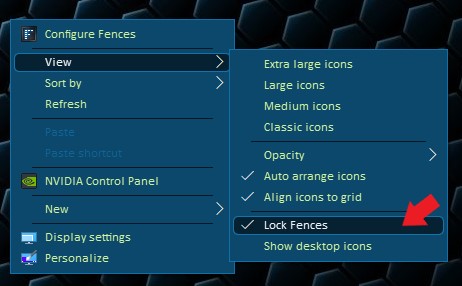
Try it and let us know if you still need our assistance.
Thanks
Basj,
Stardock Community Assistant.
Hi
Thank u for your response.
I have checked, and the Lock Fences is 'unticked'.
Fences simply stopped working from one moment to the next. There was no change to my Notebook in any way at that time (no newly installed or uninstalled programmes etc).
I suddenly was not able to create, nor adjust the fences already there. Actually the roll-up feature was running array, even with the icons on my desktop completely vanishing.
I have uninstalled & downloaded afresh few times. It is still not working.
I need further assistance pls

Hello,
Need more information.
1) Windows version, please use Winver.exe for full version numbers
2) Fences version.
3) Single/Dual or more monitors setup and info on each monitor/s Resolution, Scaling applied (100,125,150% etc), connection type (DVI, HDMI, VGA, DP, USB etc)
and
Please try the purge and reinstall steps as mentioned here : https://forums.stardock.com/486084/fences-support-faq#reinstalling
Just make sure to re-download the latest version from your account. Reboot after the purge. Re-install it and reboot again. Retest and report back.
Thank you,
Basj
Stardock Community Assistant.
Need more information.
1) Windows version, please use Winver.exe for full version numbers
Windows1. Dont understand what Winver.exe means
2) Fences version.
Ver 3
3) Single/Dual or more monitors setup and info on each monitor/s Resolution, Scaling applied (100,125,150% etc), connection type (DVI, HDMI, VGA, DP, USB etc)
Just my notebook, no additional monitors
and
Please try the purge and reinstall steps as mentioned here : https://forums.stardock.com/486084/fences-support-faq#reinstalling
Done. Downloaded from a/c. Same problem
Just make sure to re-download the latest version from your account. Reboot after the purge. Re-install it and reboot again. Retest and report back.
Cant create new Fence. Cant click to modify existing fences
Winver.exe is a simple program that come with Windows to tell us what version of Windows is currently running. It give a full version numbers.
Resolution and scaling applied on that single notebook monitor?
and please try the cleanboot steps as mentioned here : https://forums.stardock.com/486084/fences-support-faq#cleanboot
This should help determine if there is programs that blocking Fences from work properly.
Thank you,
Basj
Stardock Community Assistant.
Welcome Guest! Please take the time to register with us.
Select a reason for giving karma:
You're about to visit an external site:
Sign up here to get the latest news, updates, and special offers delivered directly to your inbox.