
Cannot add or remove files from Fences

Hello. I am seeking help with the Fences software. I am not able to add or remove any new files to my Fences on the desktop. If I attempt to add a file it just jumps it back to where it was originally on the desktop. Likewise if I try to remove a file from a file from the Fence onto the regular desktop, it just jumps it back to within the Fence. It seems that the Fences have locked the files, but I do not know if this is a software malfunction or whether there is a toggle selection for this (that somehow got selected?). Any help would be appreciated. Do I need to unload and reload the software?

Desmond
5,798 views 5 replies
Reply #1 Top

Hello,
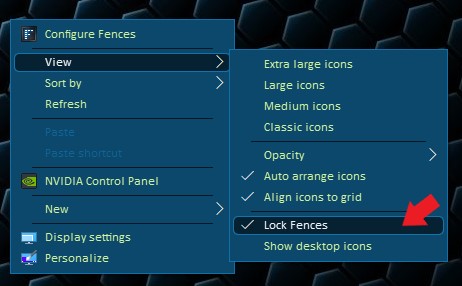
Sorry to hear you are having issues. Please check if you have Fences lock. Just unlock it. Right click anywhere on desktop -> View -> Untick Lock Fences

Basj,
Stardock Community Assistant.

Reply #2 Top

Greetings. I really appreciate your reply. I did as you suggested. The "Lock Fences" option was not ticked. I ticked and un-ticked several times and tried the operation to move in and out of Fences again with no success.  Still locked. Other suggestions appreciated.

Desmond

Reply #3 Top

Please try the purge and reinstall steps : https://forums.stardock.com/486084/fences-support-faq#reinstalling

Just to be sure, re-download the latest version from your account. Reboot after the purge. Reinstall it, reboot again. Retest and report back.

Thanks

Basj,
Stardock Community Assistant.

Reply #4 Top

Thank-you. I will attempt. Do I understand that the purge tool will somehow re-establish all the files and folders that I currently have in various Fences and the end of the operation? Will it automatically restore everything (including their appearance and content) once I move to re-install? Do I need to remove anything (files or folders) from the current Fences to preserve them for later re-loading?

Thank-you, Desmond